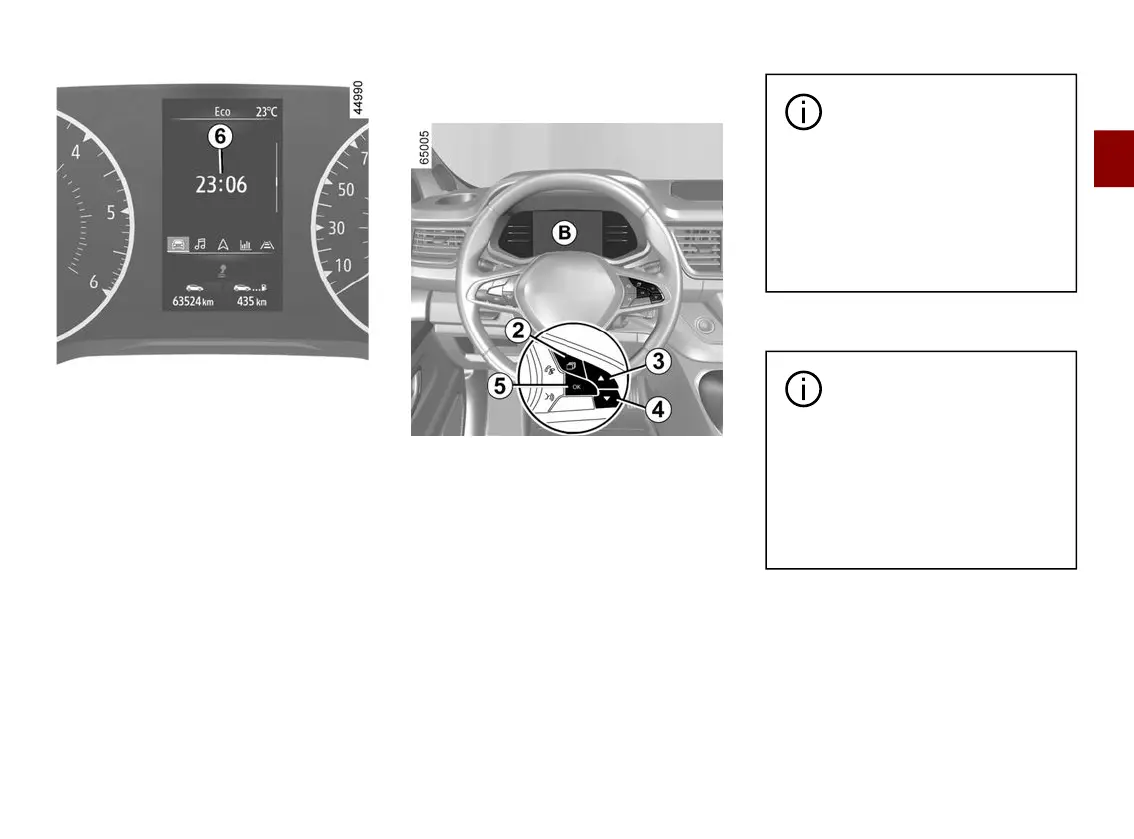
TRIP COMPUTER
2
Getting to know your vehicle - 151
Set the hour using control
3
or
4
, then
press the switch
5
"OK" to confirm.
Set the minutes using control
3
or
4
,
then press the switch
5
"OK"tocon
firm.
Vehiclesnotfittedwithamultime
dia display screen
B
Press the switch
2
as many times as
required to reach the "Settings" world.
Repeatedly press control
3
or
4
to
reach the "Time setting" menu then
press switch
5
"OK".
Press and hold switch
5
"OK" until the
time flashes.
Set the hour using control
3
or
4
,
press switch
5
"OK" to confirm, then
set the minutes using control
3
or
4
and press switch
5
"OK" to confirm.
Depending on the vehicle,
If the electrical supply is cut
(batterydisconnected,bro
ken supply wire, etc.), the clock
will automatically go back to the
right time after a few minutes
oncethesystemiscapableofre
ceiving information GPS.
Exterior temperature indicator
Depending on the vehicle,
If the electrical supply is cut
(batterydisconnected,bro
ken supply wire, etc.), the clock
will automatically go back to the
right time after a few minutes
oncethesystemiscapableofre
ceiving information GPS.











 To Next Page