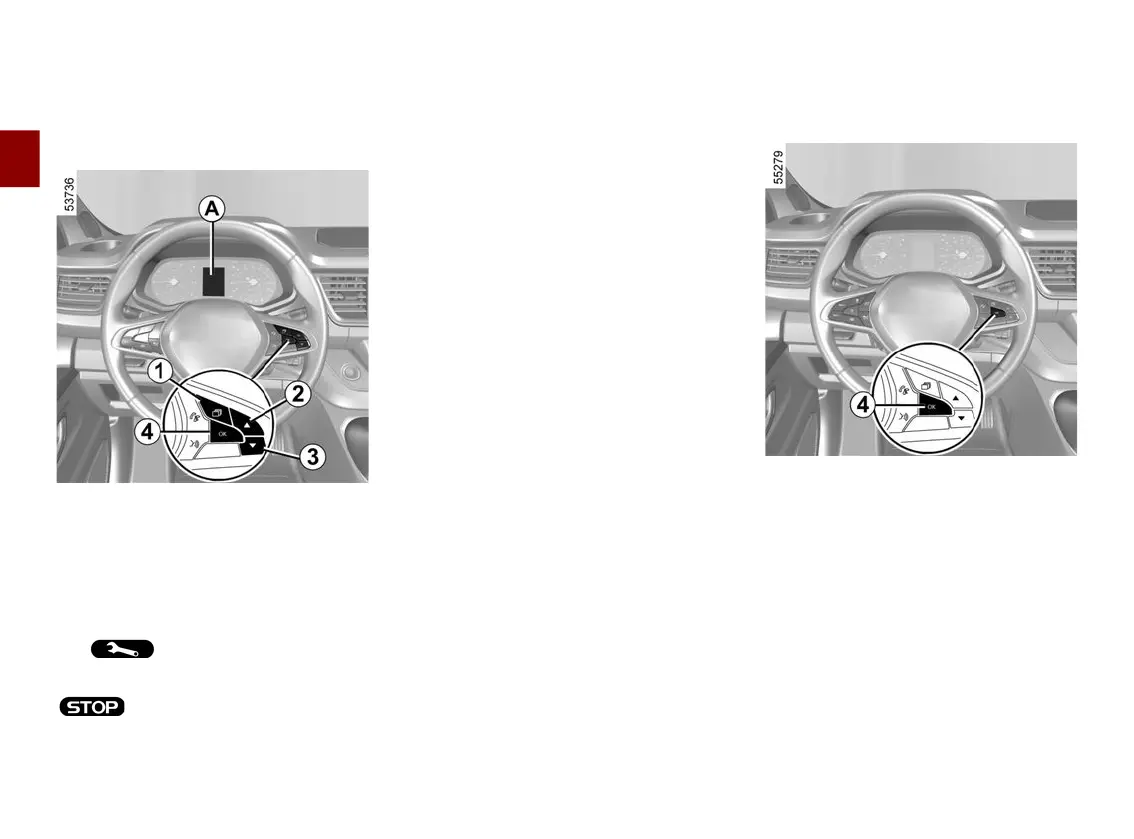
TRIP COMPUTER
2
136 - Getting to know your vehicle
General information
Vehicle fitted with trip computer
A
Dependingonthevehicle,thisin
cludes the following functions:
– mileage;
– trip settings;
– information messages;
– operating fault messages (related to
the warning light);
– warning messages (connected to the
warning light).
Press switch
1
asmanytimesasre
quiredtoreachthe"VEHICLE"tab.
Repeatedly press switch
2
or
3
.
Selections
(the display depends on the vehicle
equipment and country)
a) Triplog,operatingfaultsandinfor
mation message readout;
b) journey settings:
– average energy consumption;
– current energy consumption.
– estimatedrangewithremainingen
ergy;
– distance travelled;
– average speed;
c) trip mileage recorder and average
speed;
d) Reset the tyre pressure
e) set the time;
f) distance before service;
Resetting the trip mileage recorder
andjourneyparameters(resetbut
ton)
With one of the trip settings selected
as the display, press and hold switch
4
"OK " until the display resets to zero.
Automatic resetting of the journey
parameters
Resetting occurs automatically when
themaximumvalueofanyofthepara
meters is exceeded.
Interpreting some of the values
displayed after resetting
Thevaluesshowingaveragefuelcon
sumption, range and average speed
will become more stable and reliable











 To Next Page