ADDITIONAL DRIVING AID FUNCTIONS
3
Driving - 215
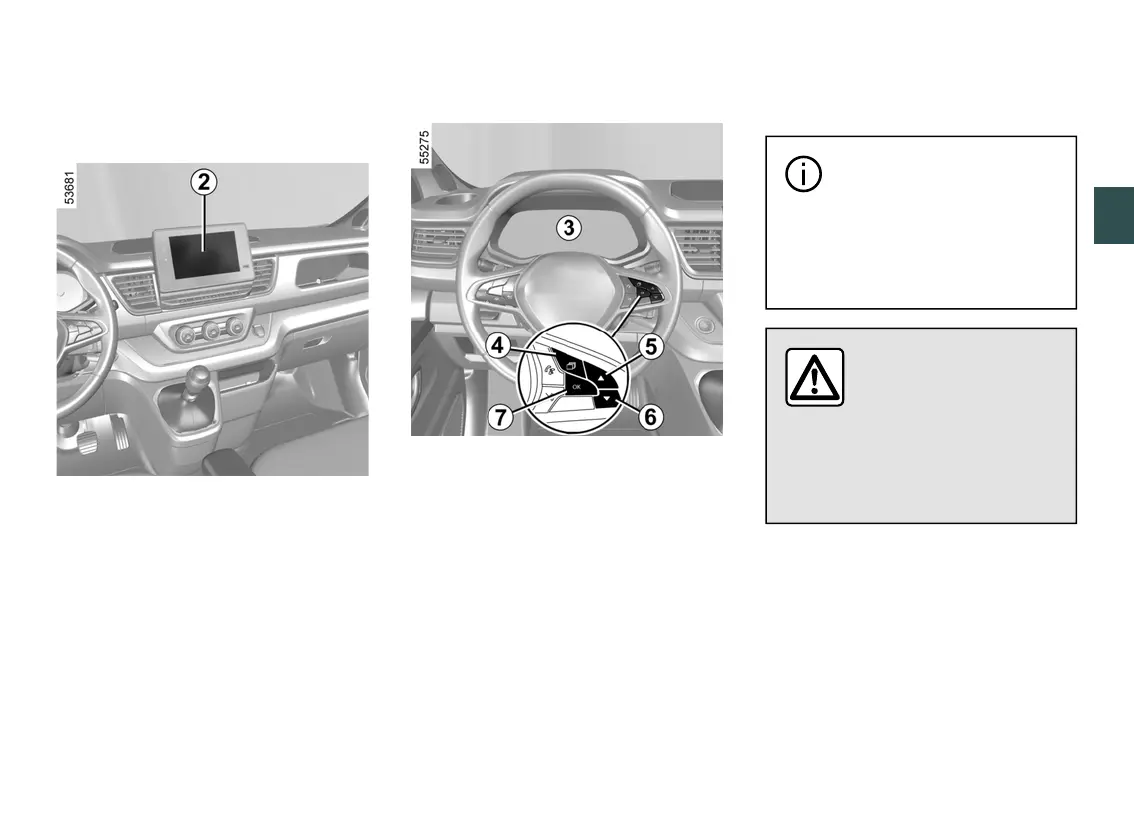
Configuring "My Safety Custom"
Configuration from the multimedia
screen
2
Refer to the multimedia instructions for
information on accessing the settings.
Configuration from the instrument
panel
3
– With the vehicle stationary, press
switch
4
as many times as required to
reach the "Vehicle" tab;
– press the control
5
or
6
repeatedly
to reach the "Settings" menu. Press
switch
7
OK;
– press controls
5
or
6
repeatedly to
reach the "MY SAFETY CUSTOM"
menu. Press switch
7
OK;
– selectthedrivingaidstobedeacti
vated or activated from the "Custom"
mode by repeatedly pressing control
5
or
6
. Press switch
7
OK to deactivate
or activate driving aids.
Vehiclewith"Overspeed"func
tion
Inexceptionalcircum
stances(e.g.steepgradi
ent),theoverspeedfunc
tion speed may be exceeded
slightly as the function does not
affect the braking system.
The function does not
taketheplaceofthedri
ver.Undernocircum
stances should it replace
observation of speed limits nor
vigilance and responsibility on the
part of the driver.











 To Next Page