ADDITIONAL DRIVING AID FUNCTIONS
3
242 - Driving
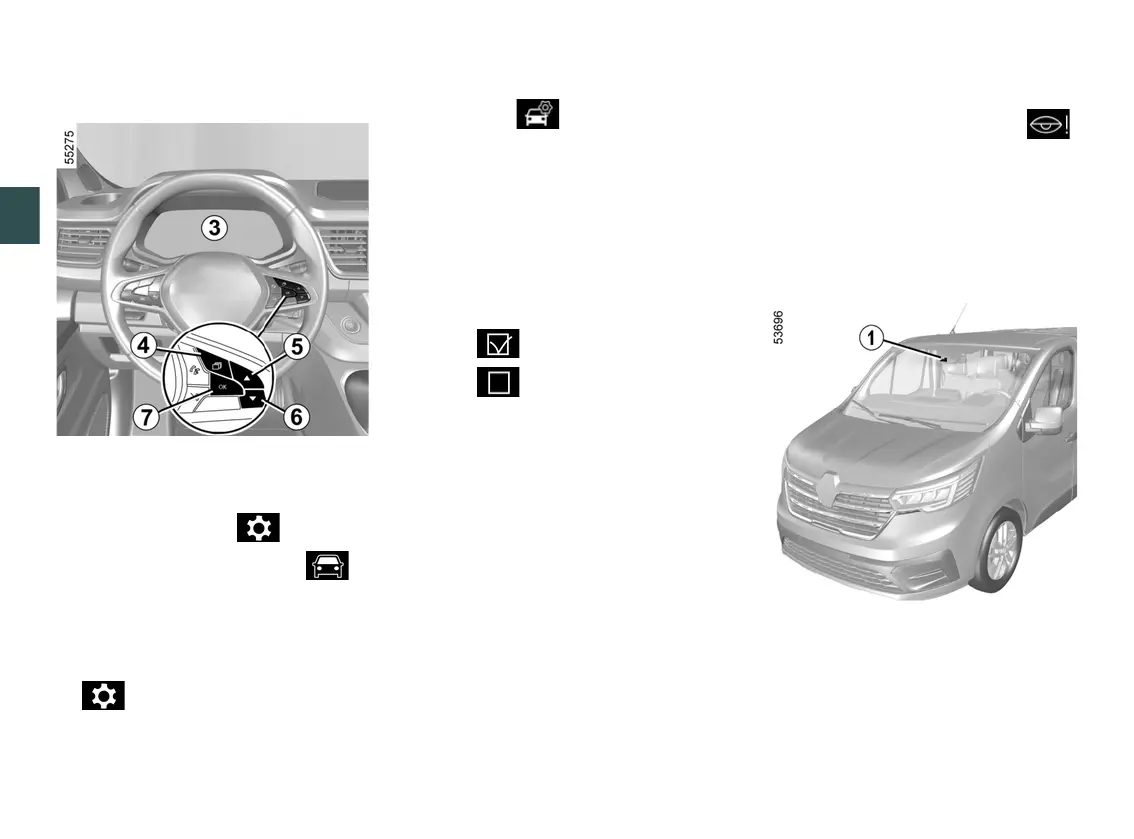
Activating/deactivating the alerts
from the trip computer
3
Withthevehiclestationary,todeacti
vate/activate the alert:
– press the switch
4
as many times as
required to reach the " " tab or,
depending on the vehicle, the " "
tab;
or
Limitations of system operation
Someconditionscandisruptordam
age the operation of the system, for
example:
– certaindrivingstyles(incorrectdri
ving etc.) ;
– driving on a road in poor condition;
– strong side wind;
– theclockiswronglyconfigured(de
pending on vehicle) 🡺150;
– winding roads;
– trailer traction.
Operating faults
If the system detects a fault, the
warning light appears accompanied by
the "Check Fatigue Warning System"
message on the instrument panel
1
.
Havethesystemcheckedbyanautho
rised dealer.
Detection of road signs
The system displays speed limits on
the instrument panel according to road
signs detected on the side of the road.
It mainly uses information taken from
the camera
1
attachedtothewind
screen behind the rear view mirror.
press switch
4
and repeatedly
press control
5
or
6
to reach the
tab;
–
depending on the vehicle, press the
switch
7
OK;
–
repeatedly press control
5
or
6
to
reach the menu, then press
the switch
7
OK;
–
repeatedly press control
5
or
6
to
reach the "DRIVING AIDS" menu,
then press the switch
7
OK;
–
press control
5
or
6
repeatedly to
reach the "Driver vigilance warning"
menu, then press the switch
7
OK;
–
press switch
7
OK again to activate
or deactivate the warning:
–
alert activated;
–
alert deactivated.
–











 To Next Page