ADDITIONAL DRIVING AID FUNCTIONS
3
246 - Driving
Activating/deactivatingtheover
speed sound alert from the trip
computer
3
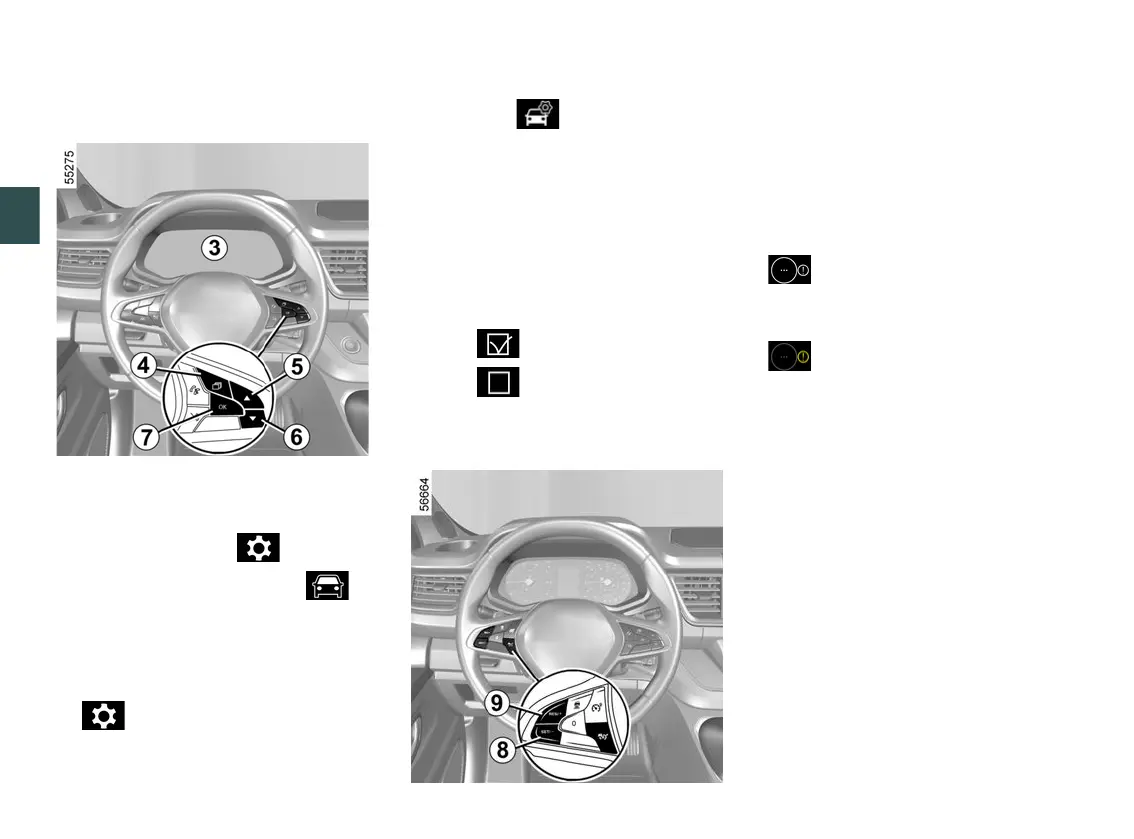
Withthevehiclestationary,todeacti
vate/activate the alert:
– press the switch
4
as many times as
required to reach the " " tab or,
depending on the vehicle, the " "
tab;
or
Variation of the limited speed or
cruising speed
Toadaptthespeedlimiter,cruisecon
trol or adaptive cruise control setpoint
to detected speed limits, press switch
8
(SET/-) or
9
(RES/+).
Temporary unavailability
If the system is unavailable for reasons
related to the camera or map data, the
symbol or, depending on the vehicle,
the
symbol is displayed on the instrument
panel.Ifthereisstillaproblem,con
tact an approved dealer.
The system cannot detect the speed
limit if:
– the windscreen is not clean;
– the camera is blinded by the sun;
– there is insufficient visibility (fog,
etc.);
– the signs are not legible (snow, etc.)
or are hidden (by another vehicle or by
trees);
– the information taken from the map
is not up to date.
Note:whenthefrontcameraisob
scured, the "Front camera no visibility"
messageisdisplayedontheinstru
ment panel. Clean the windscreen
area in front of the camera.
press switch
4
and repeatedly
press control
5
or
6
to reach the
tab;
–
depending on the vehicle, press the
switch
7
OK;
–
repeatedly press control
5
or
6
to
reach the menu, then press
the switch
7
OK;
–
repeatedly press control
5
or
6
to
reach the "DRIVING AIDS" menu,
then press the switch
7
OK;
–
repeatedly press control
5
or
6
to
reach the "Detection of road signs"
menu, then press switch
7
OK;
–
press switch
7
OK again to activate
or deactivate the warning:
–
alert activated;
–
alert deactivated.
–











 To Next Page