CARD
2
Getting to know your vehicle - 25
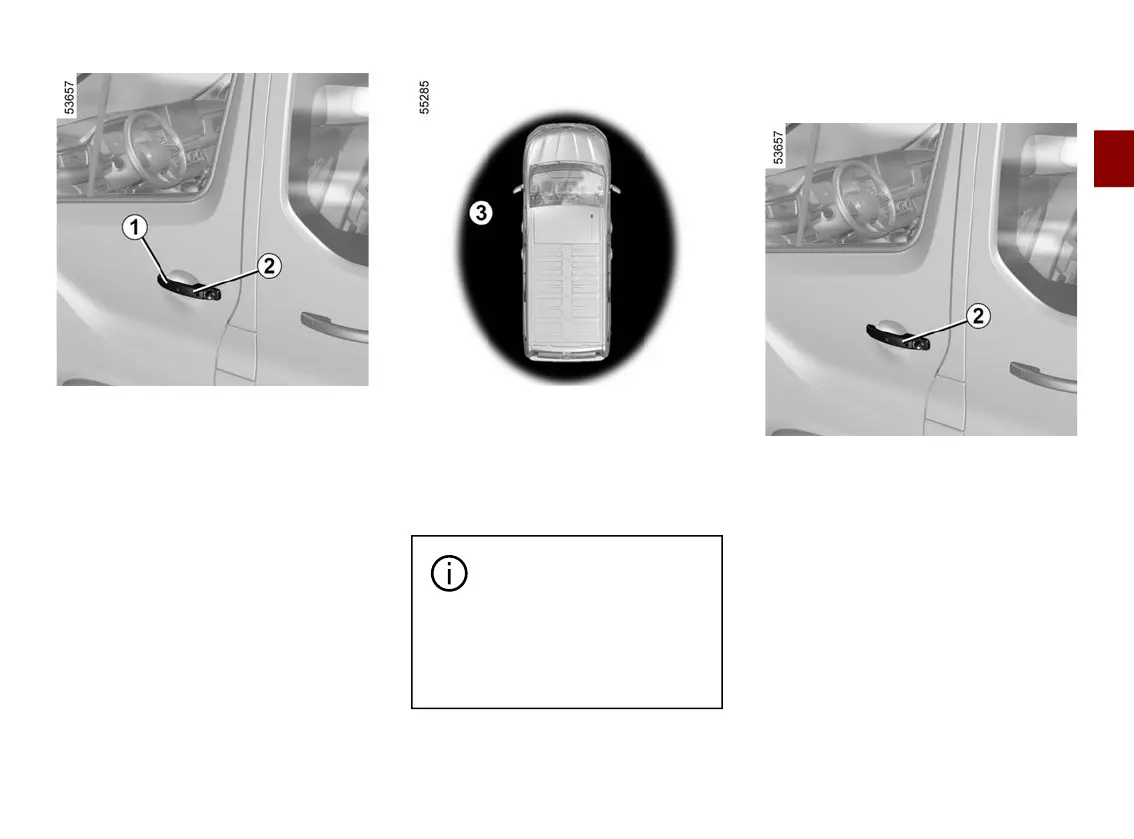
"Handsfree"unlocking/lockingus
ing button
2
(depending on the vehicle)
With the card in zone
3
andthevehi
cle locked, press button
2
onthehan
dle
1
of the driver's door, passenger
door or luggage compartment door to
unlock the vehicle.
Pressingthetailgatebuttononceun
locks the entire vehicle and opens the
tailgate.
The hazard lights and side repeaters
flash once to indicate that the doors
have unlocked and, on some vehicles,
the door mirrors fold out automatically.
Withthevehicleunlocked,pressbut
ton
2
once to lock the vehicle.
The hazard warning lights flash twice
to indicate that the vehicle is locked
and, depending on the vehicle, the
door mirrors automatically fold in.
Donotstorethecardany
where it may come into
contactwithotherelectron
ic equipment (computer, phone,
etc.)asthiscouldhinderitsoper
ation.
Special features of the unlocking
system
Undercertaincircumstances,unlock
ing when approaching the vehicle is
deactivated:
– if the vehicle has not been used for
eight days;
– if the card remains near to zone
3
of
thevehicleforapproximatelyfivemin
utes after the vehicle has been locked;
– after several passes near zone
3
of
thevehiclewithoutthedoorsbeingun
locked.
Use the card as a remote control (refer
to relevant information) or, depending
on the vehicle, press button
2
toun
lock the vehicle and reactivate "hands-
free" mode.











 To Next Page