PARKING AIDS
3
272 - Driving
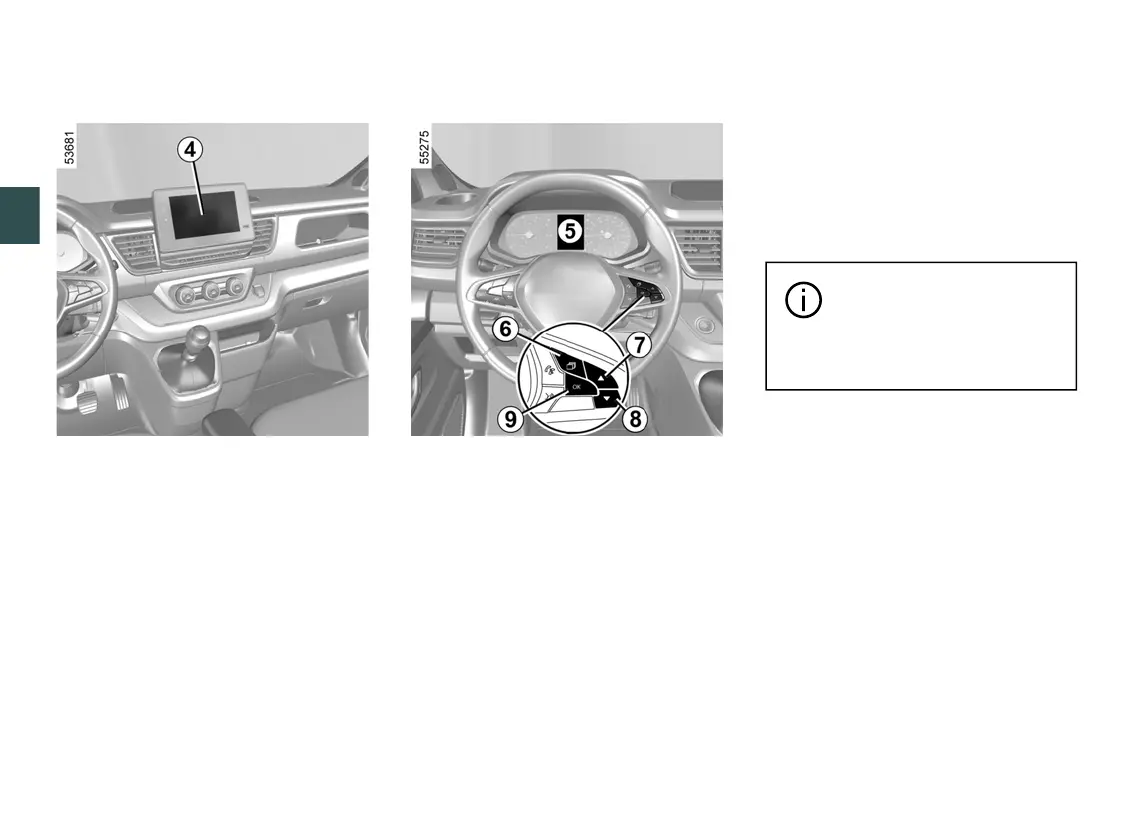
Adjustingsettingsfromthemulti
media screen
4
Vehicle stationary, from the "Vehicle"
world on your multimedia screen
4
,
press the "Parking aids" menu.
Pleaserefertothemultimediainstruc
tions for further information.
Adjusting settings from the trip
computer
5
– With the vehicle stationary, press the
6
switch as many times as required to
reach the "VEHICLE" tab;
– press control
7
or
8
repeatedly to
reach the "DRIVING ASSIST" menu.
Press switch
9
OK;
– press control
7
or
8
repeatedly until
you reach the "Parking" menu. Press
switch
9
OK.
Deactivating the system sound
(depending on the vehicle)
Activateordeactivatetheparkingdis
tance control sound.
Note: if you deactivate the sound, you
will no longer be notified with beeps
when approaching an obstacle.
Parkingdistancecontrolaudiovol
ume
Adjust the Park Assist volume using
the volume bar.
Each time the vehicle is
started,thefunctioncontin
ues the mode saved the
last time the engine was stopped.
Special cases
You can manually deactivate sound
alerts or, depending on the vehicle, the
detection zone concerned:
– iftowing,carryingortrailerequip
mentthatisunrecognisedbythesys
tem is present in front of the ultrasonic
sensors;
– intheeventofdamagetotheultra
sonic sensors.
Note: if the sound is deactivated, the
displayswillcontinuetowarnyouer
ratically.











 To Next Page