PARKING AIDS
3
Driving - 275
Withtheenginerunning,fromthemul
timedia screen
3
youcanaddorre
move the guide lines and adjust the
camera image settings (brightness,
contrast,etc.).Pleaserefertothemul
timediainstructionsforfurtherinforma
tion.
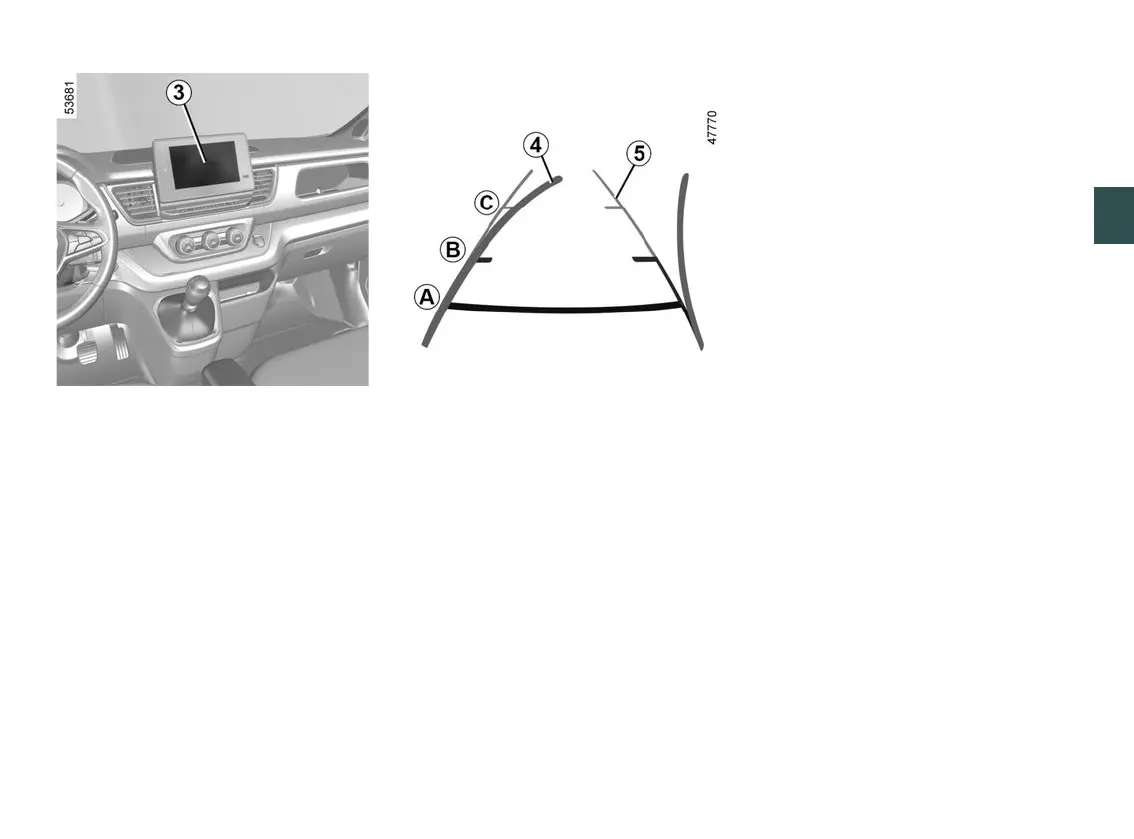
Moving guide line
4
(depending on the vehicle)
Thisisshowninblueonthemultime
dia display
3
. It indicates the vehicle
trajectory according to the position of
the steering wheel.
Fixed guide line
5
The fixed gauge includes coloured
markers
A
,
B
and
C
indicating the
distance behind the vehicle:
–
A
(red)atapproximately30cen
timetres from the vehicle;
–
B
(yellow)atapproximately70cen
timetres from the vehicle;
–
C
(green)atapproximately150cen
timetres from the vehicle.
Thisgaugeremainsfixedandindi
cates the vehicle trajectory if the
wheels are in line with the vehicle.
This system is initially used with the
aidofseveralgauges(mobilefortra
jectory and fixed for distance). When
the red zone is reached, use the
bumper image to stop accurately.
Operating faults
When reverse gear is engaged, if the
system detects an operating fault, a
black screen is displayed temporarily
on the multimedia screen
3
.
This may be caused by a fault affecting
the camera or screen (clearness, fixed
image, delayed communication etc.).
If the temporary display of the black
screenpersists,pleaseconsultanap
proved dealer.











 To Next Page