1-13
BATTERY COVERS AND BATTERY
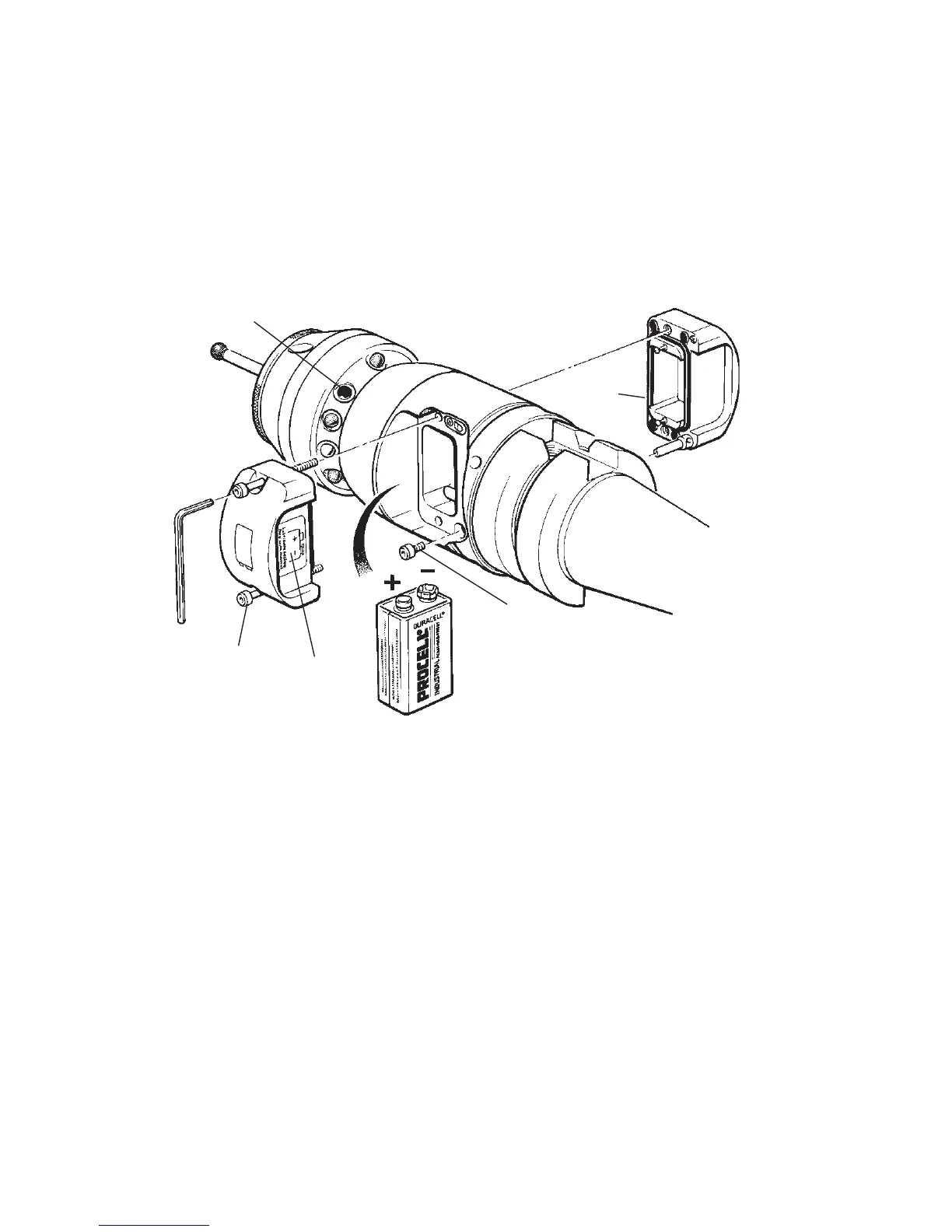
To replace battery covers
4. Check that battery cover seals are seated,
and lubricate seals lightly with a mineral oil
or grease.
5. Replace cover (5) -
with Renishaw logo
.
6. Replace battery with polarity as shown on label,
7. Replace battery cover (1) -
with battery symbol
.
Tighten battery cover screws to 1.1 Nm
(0.8 lbf.ft).
To replace exhausted battery - remove cover
1. Slacken screws (1) and remove battery
cover (2).
2. Remove battery (3).
Do not remove second cover, to change
battery.
Probe/shank mounting and stylus on-centre
adjustment - remove second cover
3. Remove screw (4) and battery cover (5).
- see pages 1-17 and 1-19.
DO NOT leave exhausted battery in probe
Dispose of exhausted batteries in
accordance with local regulations
IMPORTANT
Insert battery as
shown on label
(5)
Battery
cover
Battery
cover
(2)
Label
(4)
Screw
2.5 mm AF
(1)
Screw
Probe status LED.
Constant red indicates
battery dead.
Cover
seal
(3)
Battery


 To Next Page