17
18
Setting up the Alarm System (with the App and SMS)
The alarm system can be set using the G5 Alarm App, as well as by sending text
messages.
Request alarm system status by SMS:
Text ‘00’ to the SIM card telephone number in the Control Panel.
System armed
Entry and exit delay time: 0 sec
Single zone delay time: 30 sec
Siren volume: 2
Siren ringing time: 5 min
Disarm password: 1234
00
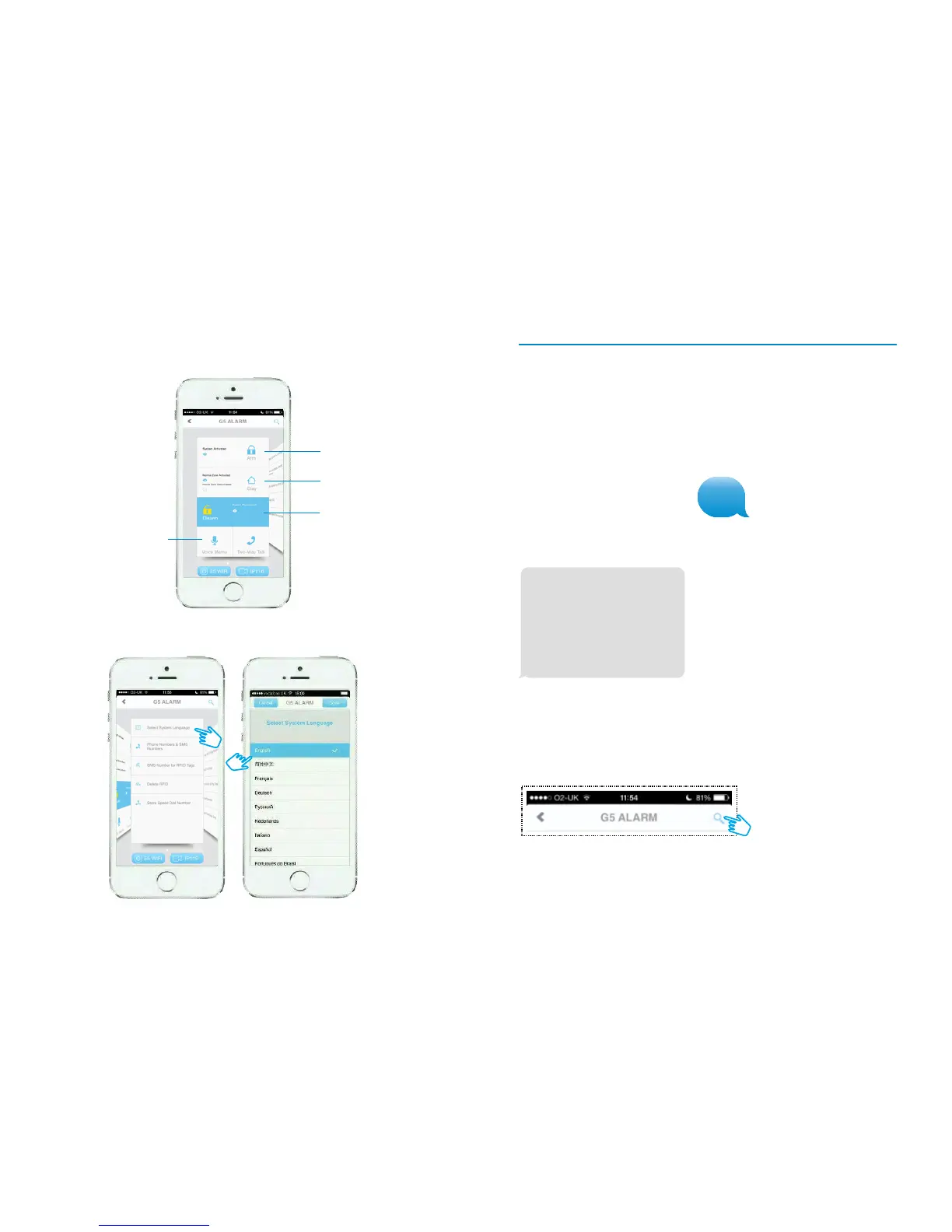
Press the ‘Settings Inquiry’ button (magnifying glass)
G5 Alarm App overview
All Smartphone screenshots are taken from the iOS App and are accurate at the time
of going to print. Android screens may vary.
After sending the message you will receive the following message from the
Control Panel showing the alarm status:
Request alarm system status using the App:
Changing the language
The G5 App can be set to an alternative language via ‘Select System Language’:
Arm
Disarm
Home Arm
Record Voice Memo
(Personal Message)


 To Next Page