21
22
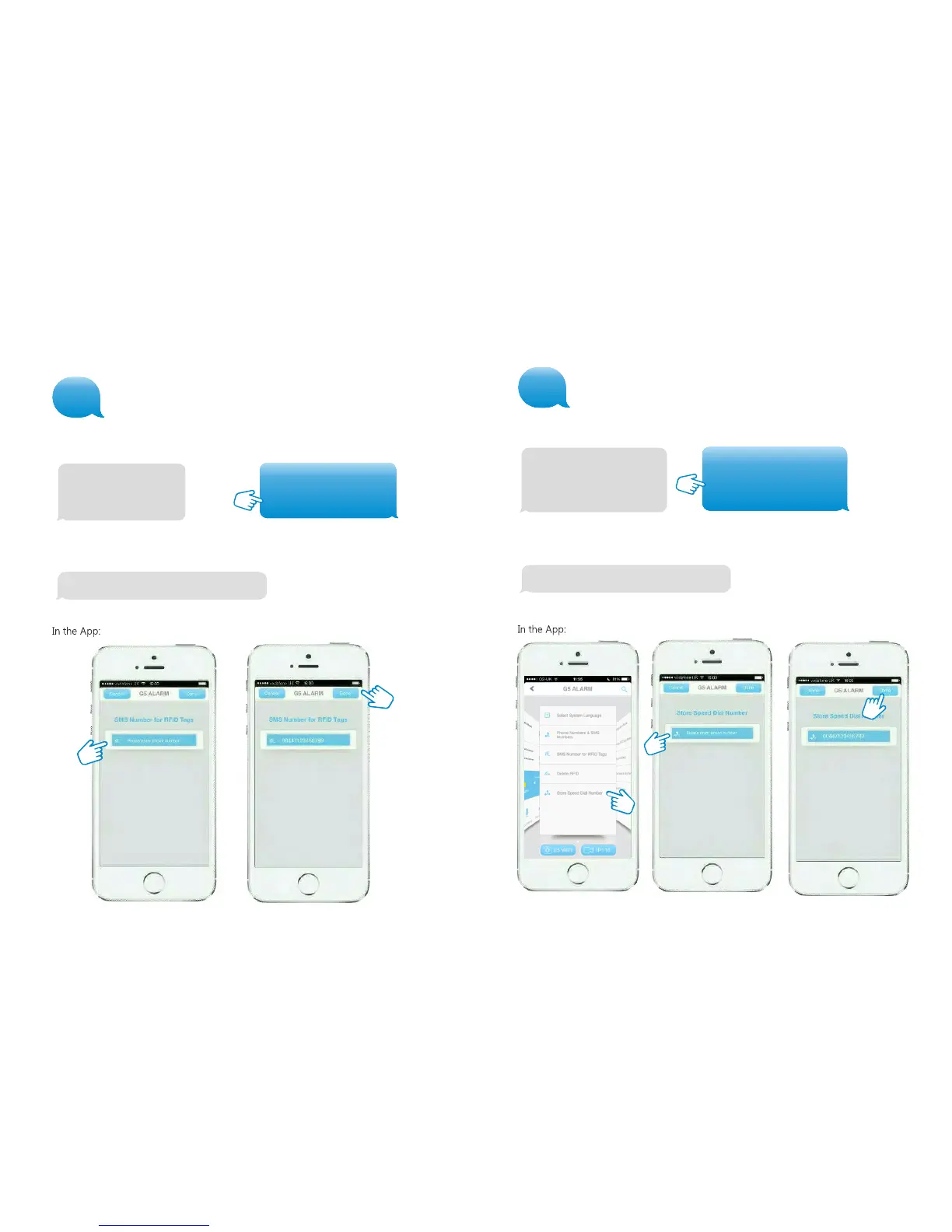
Store speed dial number
In this menu you can assign a phone number that will be stored as speed dial number.
Speed dial phone number
(0-20 digits):
1.
After sending the message you will receive the following message from the Control
Panel to confirm the new settings:
Store SMS number for RFID Tags
The SMS number for an RFID Tag is the number the text message will be sent to when
a RFID Tag is used to arm or disarm the system.
8
After sending the message you will receive the following message from the Control
Panel to confirm the new settings:
7
SMS No. for RFID tags
(0-20 digits):
1.
SMS No. For RFID tags
(0-20 digits):
1. 00447917123456
Copy and edit the received text message and send it back with the new telephone
number.
Store SMS No. For RFID tags successfully.
Speed dial phone number
(0-20 digits):
1. 00447717654321
Copy and edit the received text message and send it back with the new telephone
number.
Store speed dial number successfully


 To Next Page