33
34
PIR Sensor overview
1. Detection windows
2. LED indicator
3. Wall mount
LED Indicator
Blink continuously
Blink once
Blink twice
: Motion Sensor performs a self-testing
: Motion detected
: 3 minutes testing is finished, enters power saving mode.
: Low battery indication, please change the batteries
immediately
Note: When the PIR battery level is low the Sensor will send an SMS message
to the administrator for notification.
2
1
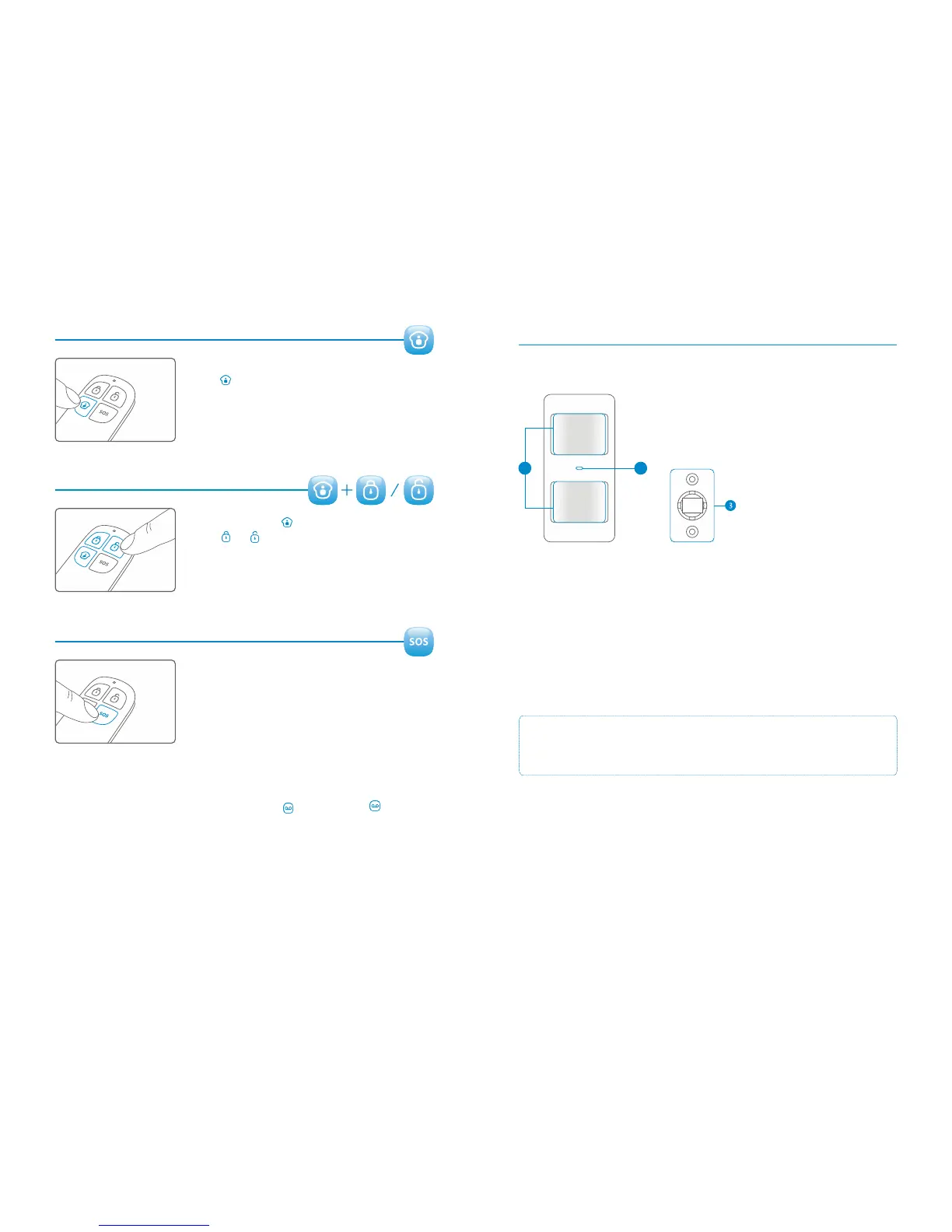
Home Mode (Part-arm)
Press . All sensors in the normal group will be armed.
All sensors in the home group will be inactive. This
means you can part arm the house.
Mute Mode
Press and hold the button for 1 second, and then
press or within 3 seconds. The alarm system will
be armed or disarmed without the external siren making
any noise. The alarm system can be controlled without
disturbing neighbours.
Emergency Call
Pressing the SOS button on the Remote Control will
activate the alarm immediately (whether the system is
armed or disarmed). The Siren will sound at the Control
Panel and external Siren (if fitted).
Connect a new Remote Control
Enter the password on the Control Panel and press the button. The button will
light up.
Press a button on the Remote Control to connect with the Control Panel.
The Control Panel will beep once when paired successfully. It will beep twice if it has
already been paired.
Pet Friendly PIR Sensor


 To Next Page