7
8
Getting Started
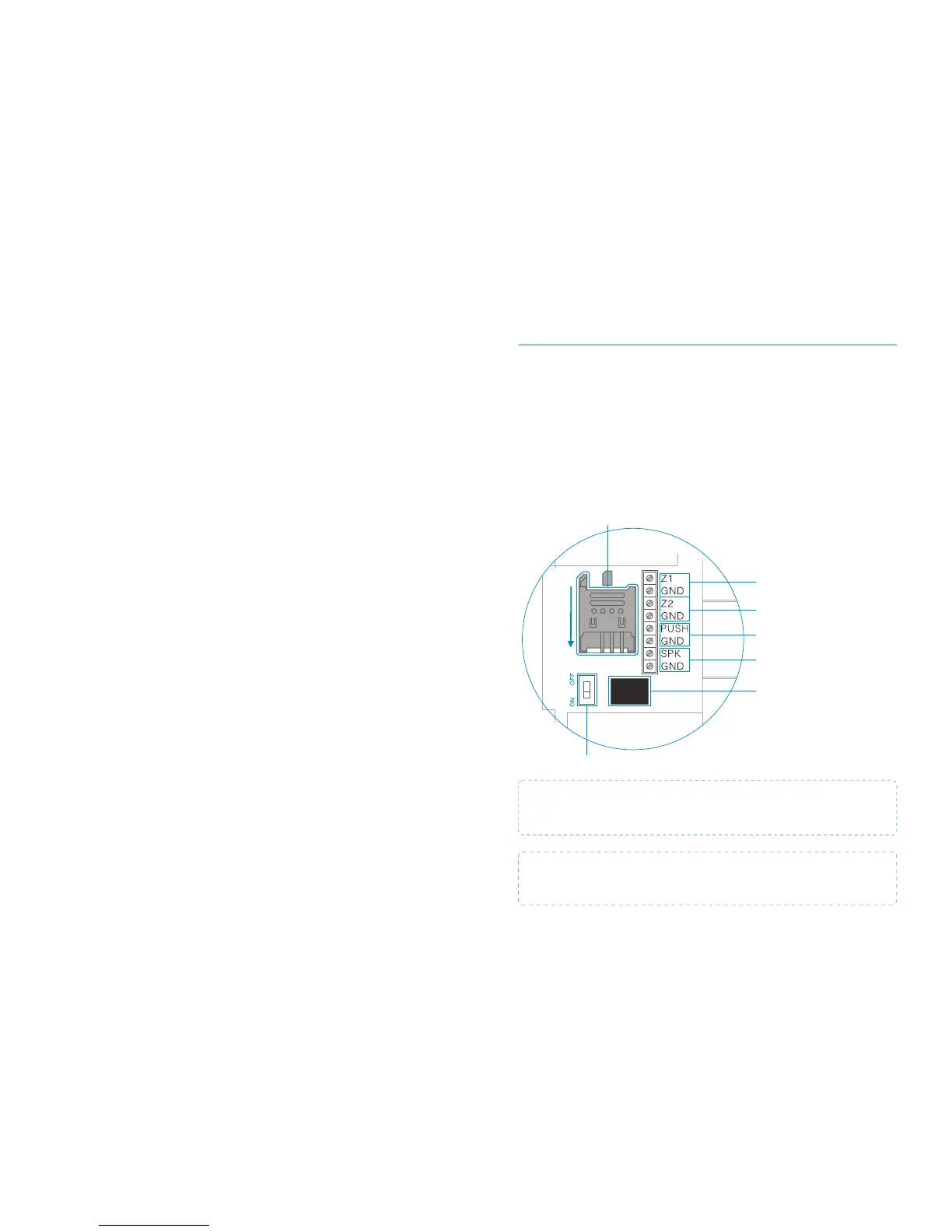
Inserting a SIM card *
Before inserting a SIM card, please perform the following steps:
1.
Make sure the alarm system is powered off
2.
Disable the Unlock Code on the SIM Card
3.
Turn off the Voicemail function if it is enabled
4.
Insert the SIM card into the SIM card holder in the Control Panel
as shown below
GSM SIM Card Holder
IMPORTANT: The use and set up of the alarm systems requires the sending of
text messages. Depending on your network service provider and your plan,
you may incur some charges.
IMPORTANT: The Android and/or Apple App both make use of SMS Text
messages (not the internet) in order to send the commands to and from the
Control Panel.
Single Delay Mode: One or more Sensors can be set in Single Delay Mode and will alarm
at the specified time after being triggered. This Mode is usually used for Door/Window
Sensors. For example, if the user does not want to carry the Remote Control, they can set
the Door/Window Sensor to Single Delay Mode with the delay time set to 30 seconds.
When the user opens the door or window the Control Panel will alarm after a 30 second
delay, giving the user time to disarm the system prior to it being triggered.
24-hour Mode: 24 hour Mode is recommended as the default setting for Sensors that
detect smoke or gas for instance. When set to this Mode the Sensor is always active and
will always send a signal (without a delay) to the Control Panel when triggered, regardless
of whether the system is armed or disarmed.
Sensor Zone Names
The supplied Sensors are by default paired with the alarm system for ease of installation.
Each Sensor is assigned its own zone number. The supplied Door/Window Sensor is by
default assigned to zone 1. The supplied PIR Sensor is by default assigned to zone 2.
Sensors added to the system will be sequential, for example the 3rd Sensor added will be
on ‘zone 3’, a 4th Sensor will be on ‘zone 4’ and so on. The first 9 zones can be re-named.
Refer to Page 23 for Sensor re-naming instructions.
.
Power On/Off
Input for wired sensors
24-hour group
Output for Electric Lock
Power Adapter Socket
Wired connection
Siren 12V≤ 500mA
Input for wired sensors
(Normal group)
Slide down
to unlock
fig.a
* SIM Card must work with 2G networks such as:
Vodafone, O2, Orange, T-Mobile


 To Next Page