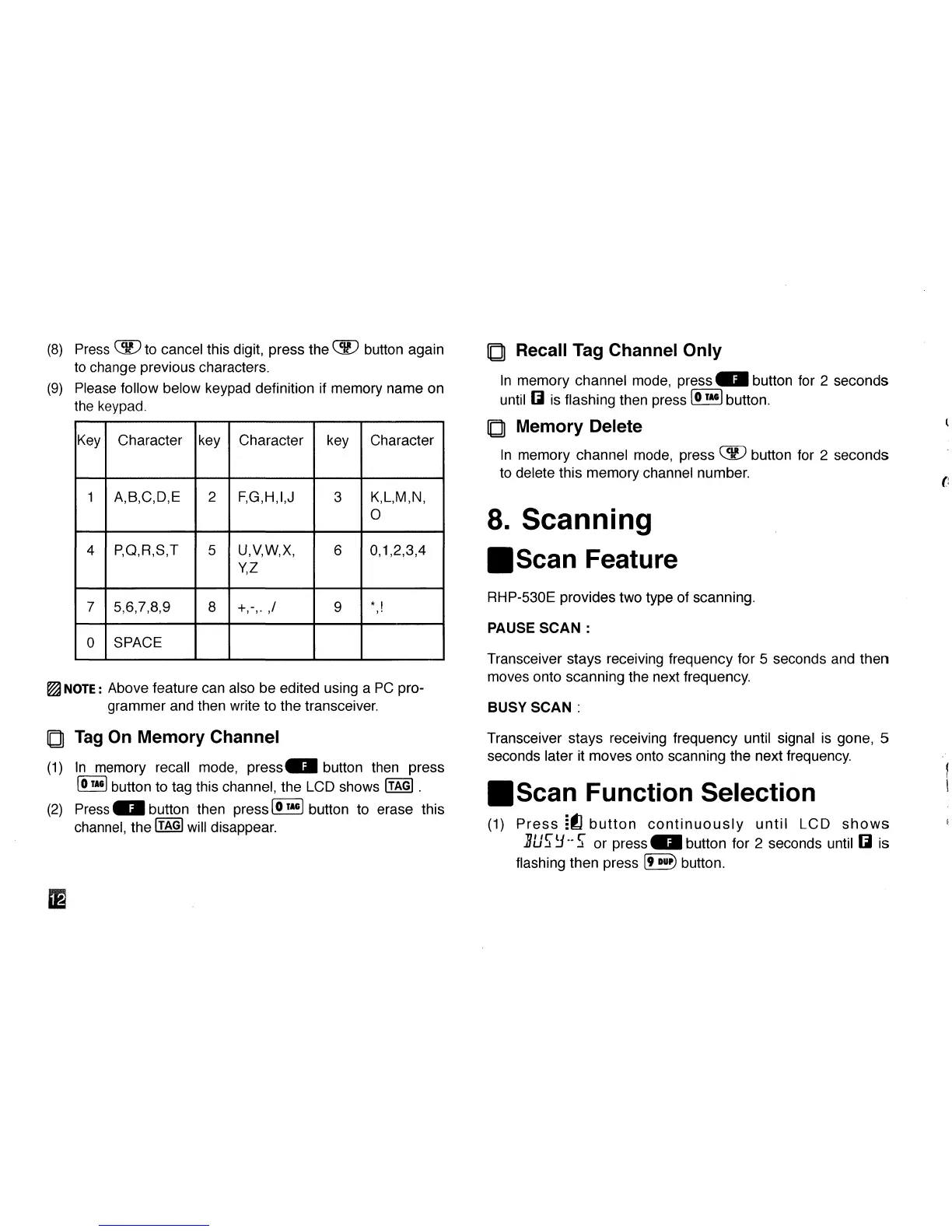
(8) Press QH9 to cancel this digit, press the 059 button again
to change previous characters.
(9) Please follow below keypad definition if memory name on
the keypad.
Key
1
4
7
0
Character
A,B,C,D,E
P.Q.R.S.T
5,6,7,8,9
SPACE
key
2
5
8
Character
F,G,H,I,J
u,v,w,x,
YZ
+,-,. ,/
key
3
6
9
Character
K,L,M,N,
0
0,1,2,3,4
*,!
^NOTE:
Above feature can also be edited using a PC pro-
grammer and then write to the transceiver.
Q Tag On Memory Channel
(1) In memory recall mode, press€DI button then press
(5™*) button to tag this channel, the LCD shows
[TAG)
.
(2) Press GM button then press S™3 button to erase this
channel,
the
ITAGI
will disappear.
El
Q Recall Tag Channel Only
In memory channel mode, press id button for 2 seconds
until Q is flashing then press
@L™*)
button.
Q Memory Delete
In memory channel mode, press CS9 button for 2 seconds
to delete this memory channel number.
8. Scanning
•Scan Feature
RHP-530E provides two type of scanning.
PAUSE SCAN :
Transceiver stays receiving frequency for 5 seconds and then
moves onto scanning the next frequency.
BUSY SCAN :
Transceiver stays receiving frequency until signal is gone, 5
seconds later it moves onto scanning the next frequency.
•Scan Function Selection
(1) Press -fl button continuously until LCD shows
5u?y**S or press0 button for 2 seconds until Q is
flashing then press [9
•>"*)
button.



 To Next Page