4. Symbols Description
OOOO0OOOO
Q 5^0 Cc gyp] (Agg Ew) [HI On .A
'166
f&MMMMMm
inn° DVOR CDI TO ra^srai _^-
+
VOR CDI TO H33E1 J^T"
<<<<<
•!•••]••
I
t(t(4-
© © © ©
©
-©
tef tef te/ w w
fe^S™-^
iKuEuKuKuEuKtlo
•
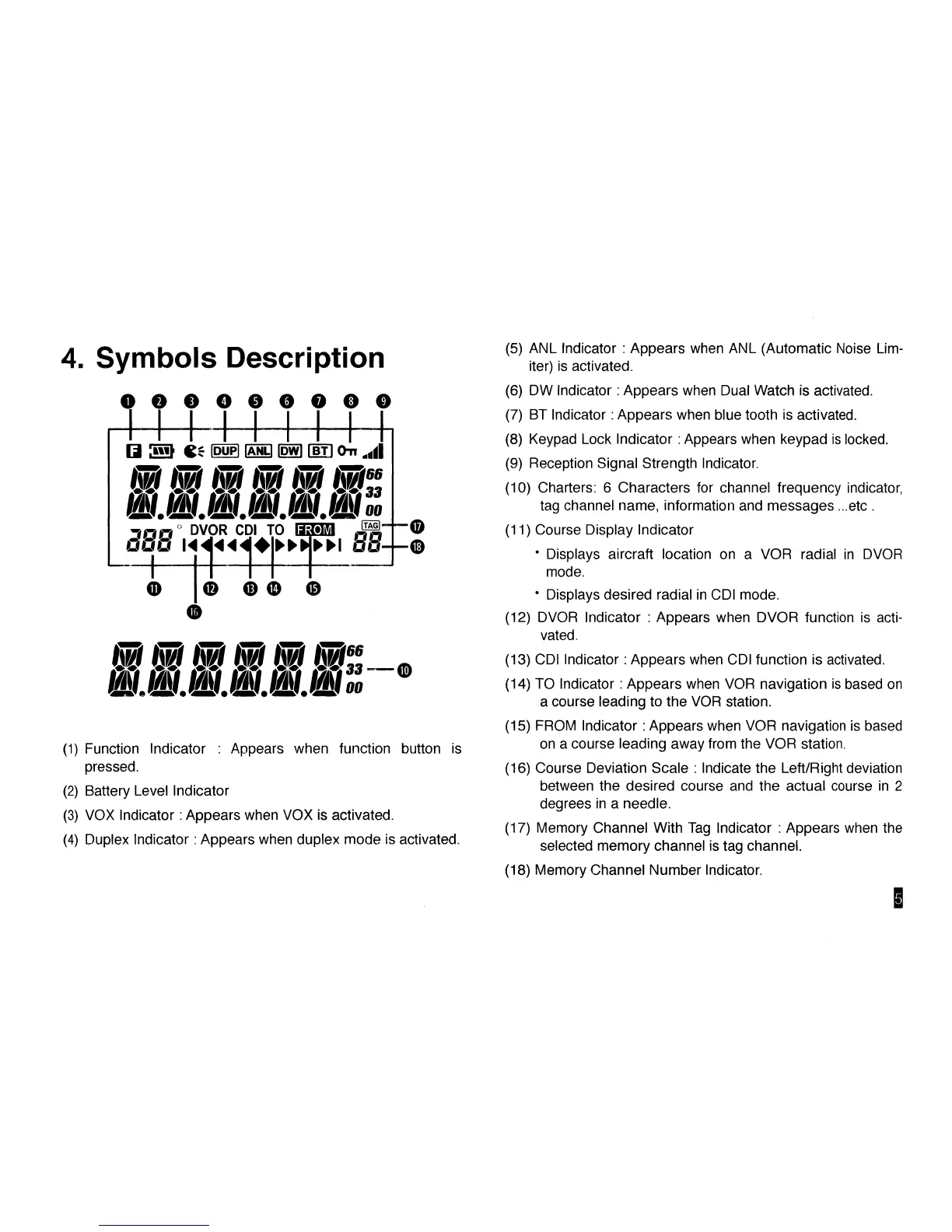
(1) Function Indicator : Appears when function button is
pressed.
(2) Battery Level Indicator
(3) VOX Indicator: Appears when VOX is activated.
(4) Duplex Indicator: Appears when duplex mode is activated.
(5) ANL Indicator : Appears when ANL (Automatic Noise Lim-
iter) is activated.
(6) DW Indicator: Appears when Dual Watch is activated.
(7) BT Indicator: Appears when blue tooth is activated.
(8) Keypad Lock Indicator
:
Appears when keypad is locked.
(9) Reception Signal Strength Indicator.
(10) Charters: 6 Characters for channel frequency indicator,
tag channel name, information and messages ...etc .
(11) Course Display Indicator
• Displays aircraft location on a VOR radial in DVOR
mode.
• Displays desired radial in CDI mode.
(12) DVOR Indicator : Appears when DVOR function is
acti-
vated.
(13) CDI Indicator: Appears when CDI function is activated.
(14) TO Indicator
:
Appears when VOR navigation is based on
a course leading to the VOR station.
(15) FROM Indicator: Appears when VOR navigation is based
on a course leading away from the VOR station.
(16) Course Deviation Scale : Indicate the Left/Right deviation
between the desired course and the actual course in 2
degrees in a needle.
(17) Memory Channel With Tag Indicator : Appears when the
selected memory channel is tag channel.
(18) Memory Channel Number Indicator.



 To Next Page