Catalog Explorer User Manual
______________________________________________________________________________
________________________________________________________________________________
Page 21 of 36
Visit our knowledgebase at: http://www.ricoh-usa.com/support/knowledgebase.asp
Copyright 2008 Ricoh Americas Corporation
8.2.5 Other
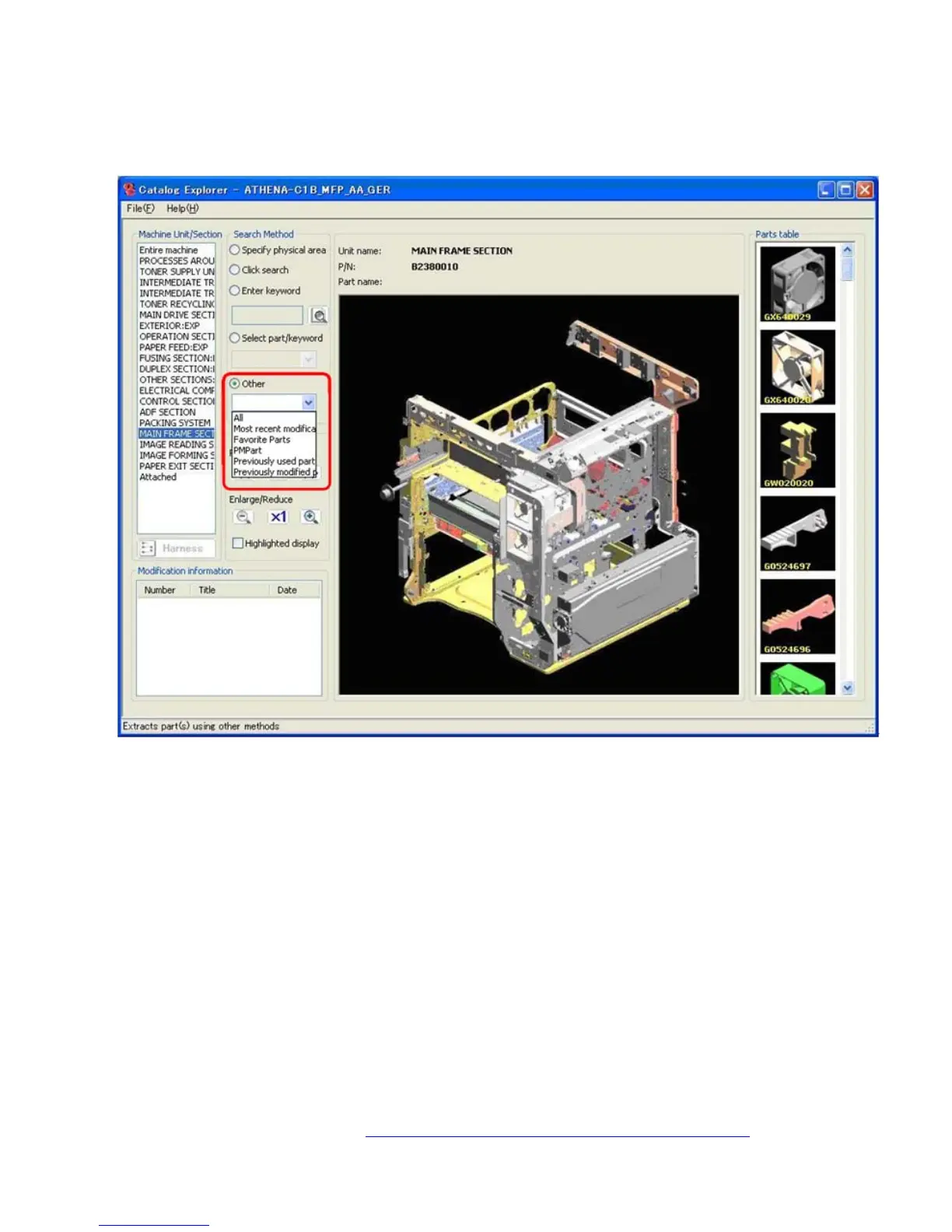
Search for the part by selecting other criteria to narrow down the search results.
Select the Other radio button.
Select one of the following:
• All: Displays all parts used in the unit/section selected.
• Most recent modification history: Displays all parts in the selected unit/section that
have either been modified or newly added since the previous catalog version.
• Favorite Parts: Displays all parts in the selected unit/section that have been saved to
Favorite Parts.
• PM part: Displays all PM parts used in the selected unit/section selected.
• Previously used parts: Displays parts that have been changed or deleted as a result
of modifications applied since the previous catalog version only (thumbnails for these
parts appear in the Parts Table).
• Previously modified parts: Displays all parts that have been changed or deleted since
the first release of the catalog file.



 To Next Page