Catalog Explorer User Manual
______________________________________________________________________________
________________________________________________________________________________
Page 6 of 36
Visit our knowledgebase at: http://www.ricoh-usa.com/support/knowledgebase.asp
Copyright 2008 Ricoh Americas Corporation
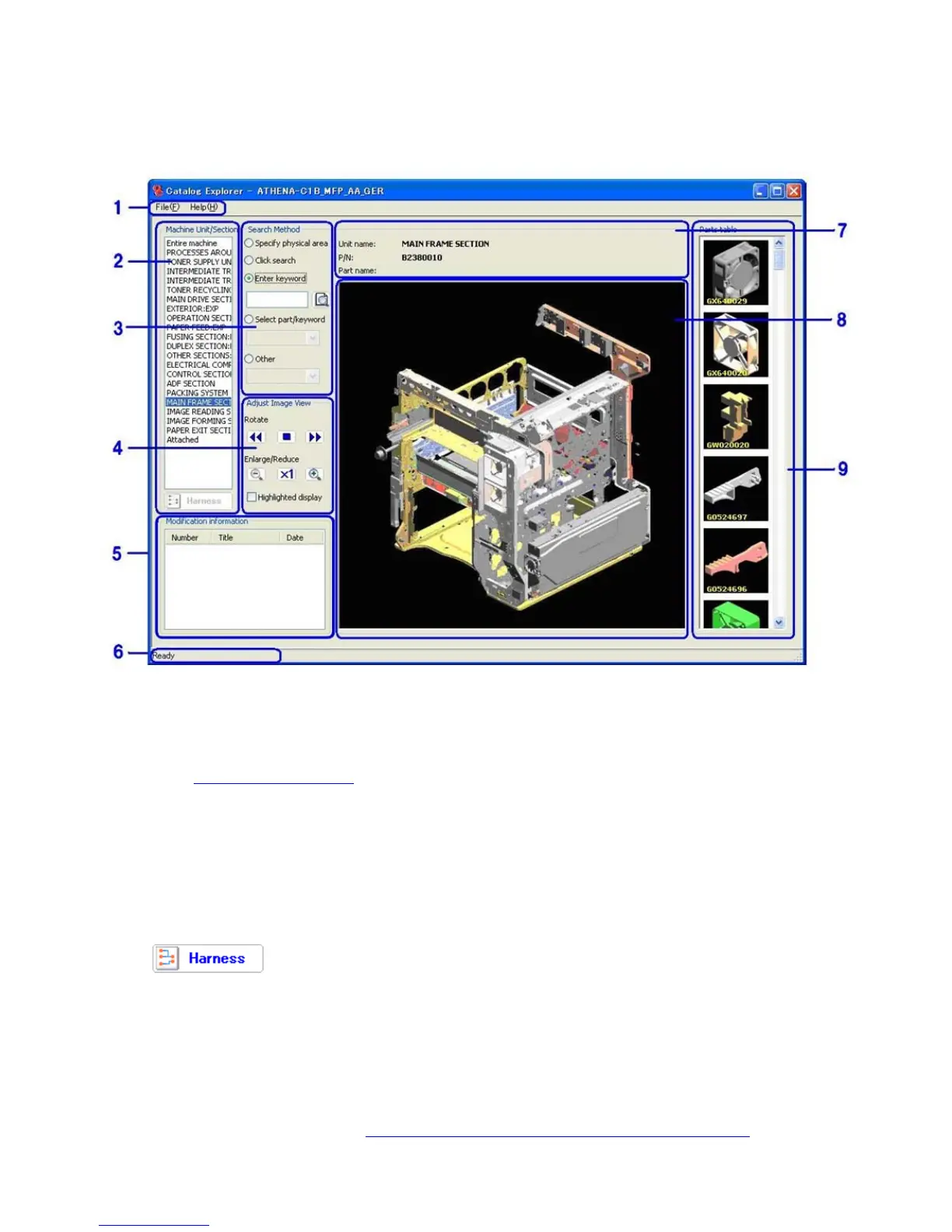
2. Visual Overview of the GUI
1) Menu Bar
File menu Load P/C data, display the Favorite Parts list, other.
Help menu Display version information, view User’s Manual for this tool
Note: See 3.1 Pull-down Menus
below for descriptions of each menu.
2) List of Target Machine Unit/Section
This list displays the major machine unit/section (paper feed, fusing, external cover, etc.)
Choosing an item in this list is the first step to performing a parts search.
When a machine unit/section is selected, a graphical representation of the mainframe is
displayed in the center of the screen, with only that specific unit/section installed.
If “Mainframe” is selected, a graphical representation of the mainframe is shown with all
unit/section installed.
The
button appears below the list, which if pressed, displays the machine’s
harness diagram.



 To Next Page