Catalog Explorer User Manual
______________________________________________________________________________
________________________________________________________________________________
Page 30 of 36
Visit our knowledgebase at: http://www.ricoh-usa.com/support/knowledgebase.asp
Copyright 2008 Ricoh Americas Corporation
Viewing old parts information
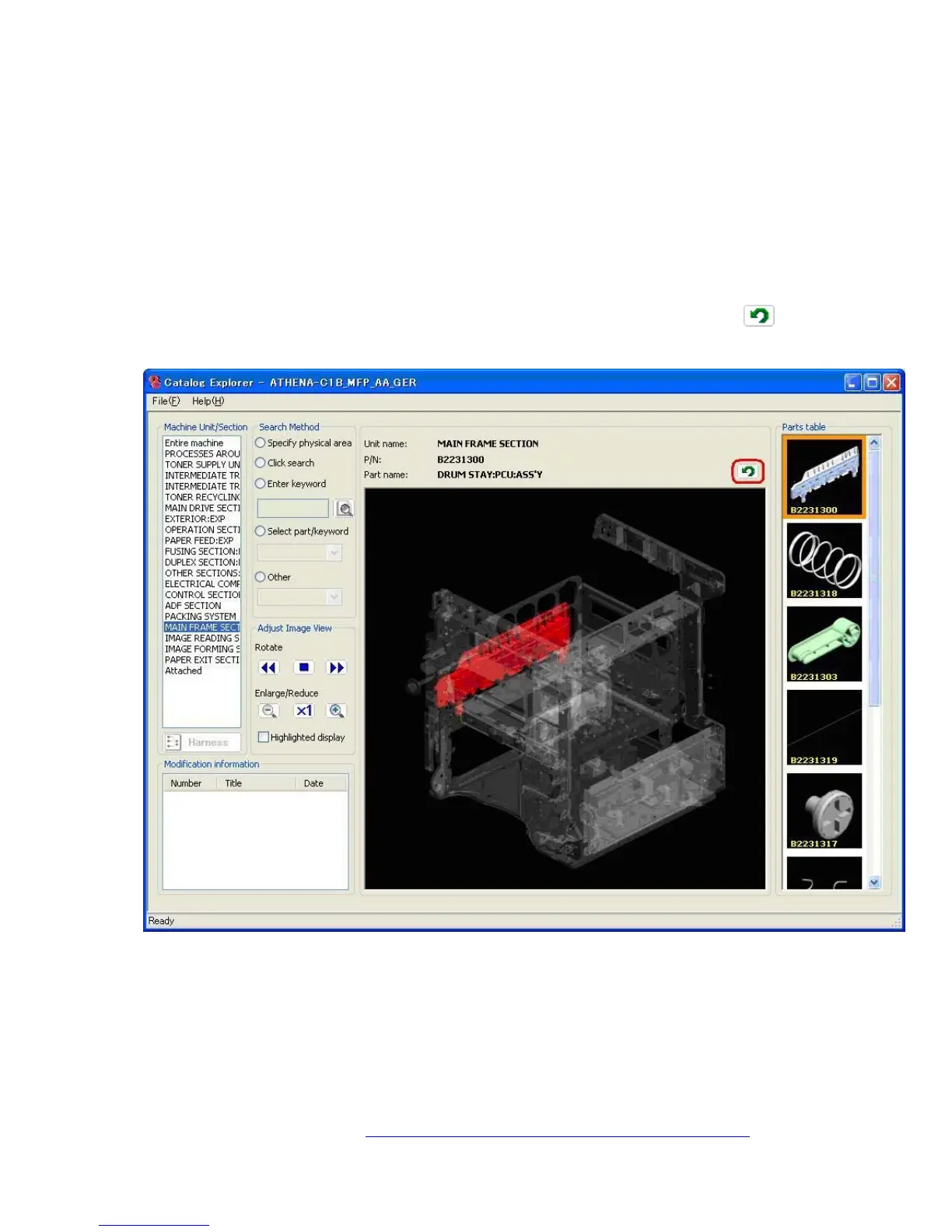
Double click on the part whose information you wish to view.
Note: The thumbnail for the old part is then displayed in the parts table, and the main
image area shows the location of the old part.
Viewing new parts information
If the catalog file being viewed contains new parts modification information, the
information for the desired part can be viewed by double-clicking on that part (listed under
“New parts”). The thumbnails for these part(s) are then displayed in the Parts Table, and
can be viewed in the Main Image Area by double-clicking on them.
To return the main image area and parts table to the previous view, click the
icon
located near the top right-hand corner of the main image area.
Viewing the contents of the PDF file
When available, more details on the modification are included in the form of a PDF file,
listed in the “File Attachment” area on the bottom right-hand corner of the “Modification
details” screen. Double click on the filename to view the contents of the file.



 To Next Page