EasyManua.ls Logo

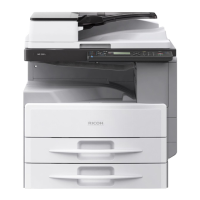
Ricoh PE-P1 - User Manual

Ricoh PE-P1
225 pages
Print Icon
To Next Page IconTo Next Page
Loading...
Model PE-P1/MF1
Machine Code:
G165/G166/G167 Printers
and
G181/G183/G184 Copiers
SERVICE MANUAL
Nov. 2007
Subject to change

Table of Contents

Questions and Answers

  • E
    Elizabeth MartinJul 31, 2025
    What to do if Ricoh PE-P1 shows Waste Toner Bottle Set Error?
    • C
      Caitlin PeckJul 31, 2025
      If your Ricoh Copier displays a Waste Toner Bottle Set Error, it could be due to several reasons: the waste toner bottle might not be properly installed, the harness of the waste toner bottle set sensor could be disconnected or defective, or the waste toner bottle set sensor itself might be defective. To resolve this, first install the waste toner bottle correctly. If the problem persists, check or replace the harness of the waste toner bottle set sensor.
  • P
    preyesAug 16, 2025
    How to fix 'Cover Open' error on Ricoh PE-P1 Copier?
    • M
      Matthew DuncanAug 16, 2025
      To fix a 'Cover Open' error on your Ricoh copier: 1. Close the front or top cover. 2. If the problem persists, it might be necessary to replace the interlock switches or actuator mechanism.

Summary

Safety Notices

Prevention of Physical Injury

Guidelines to prevent physical harm during printer operation and maintenance.

Health Safety Conditions

Precautions regarding toner exposure and first aid for accidental contact.

Electrical Safety Standards

Requirements for servicing the printer by qualified personnel.

Disposal Safety and Ecology

Notes on safe disposal of toner and parts, and fire prevention.

Laser Safety Information

Lithium Battery Caution

Warning about potential explosion hazard from incorrect battery replacement.

Laser Radiation Hazards

Information on hazardous radiation exposure from improper laser unit operation.

1. Installation Guide

Installation Requirements

Specifies environmental, leveling, and space requirements for machine installation.

Power Requirements

Information on input voltage levels and permitted voltage fluctuation.

2. Preventive Maintenance Guide

3. Replacement and Adjustment Procedures

Before You Start

Essential preparatory steps before performing replacement or adjustment procedures.

Laser Optics Unit Service

Details on laser safety, caution decals, and housing unit replacement.

4. Troubleshooting and Error Codes

Service Call Conditions

Explanation of SC codes and conditions requiring service calls.

7. Machine Specifications

Ricoh PE-P1 Specifications

General IconGeneral
BrandRicoh
ModelPE-P1
CategoryCopier
LanguageEnglish

Related product manuals