EasyManua.ls Logo

Rigol MSO5000-E Series - Front Panel Overview

Rigol MSO5000-E Series
366 pages
Print Icon
To Next Page IconTo Next Page
To Previous Page IconTo Previous Page
Loading...
RIGOL Chapter 1 Quick Start
1-10 MSO5000-E User Guide
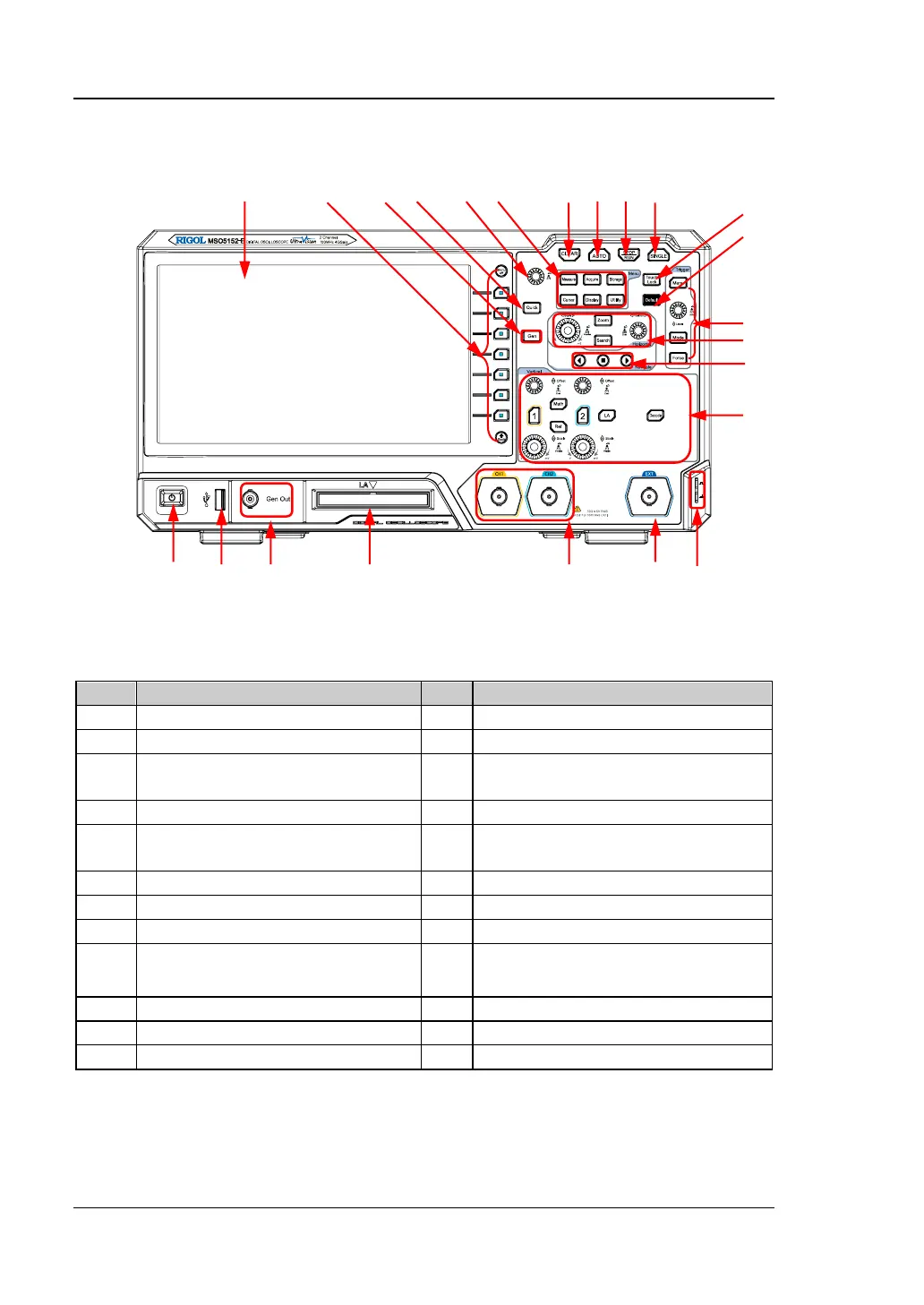
Front Panel Overview
Figure 1-11 Front Panel
Table 1-1 Front Panel Description
No.
Description
No.
Description
1
Capacitive Touch Screen
13
Trigger Control System
2
Function Menu Operation Keys
14
Horizontal Control System
3
Function/Arbitrary Waveform
Generator Setting Key
[1]
15
Navigation Control key
4
Quick Key (Shortcut Key)
16
Vertical Control System
5
Multifunction Knob
17
Probe Compensation Signal
Output Terminal/Ground Terminal
6
Common Operation Keys
18
External Trigger Input
7
CLEAR Key
19
Analog Channel Input
8
Auto Waveform Display Key
20
Digital Channel Input
[2]
9
RUN/STOP Key
21
Function/Arbitrary Waveform
Generator Output Terminal
[1]
10
Single Trigger Control Key
22
USB HOST Interface
11
Touch Lock Key
23
Power Key
12
Default Setting Key
--
--
Note
[1]
: This function is only available for the model installed with the MSO5000-E-AWG option.
Note
[2]
: PLA2216 active logic probe option is required to be ordered.
1 2 3 4 5 6 7 8 9 10
23 22 21 20 19 18 17
15 14
11
12
13
14
15
16

Table of Contents

Other manuals for Rigol MSO5000-E Series

Related product manuals