12
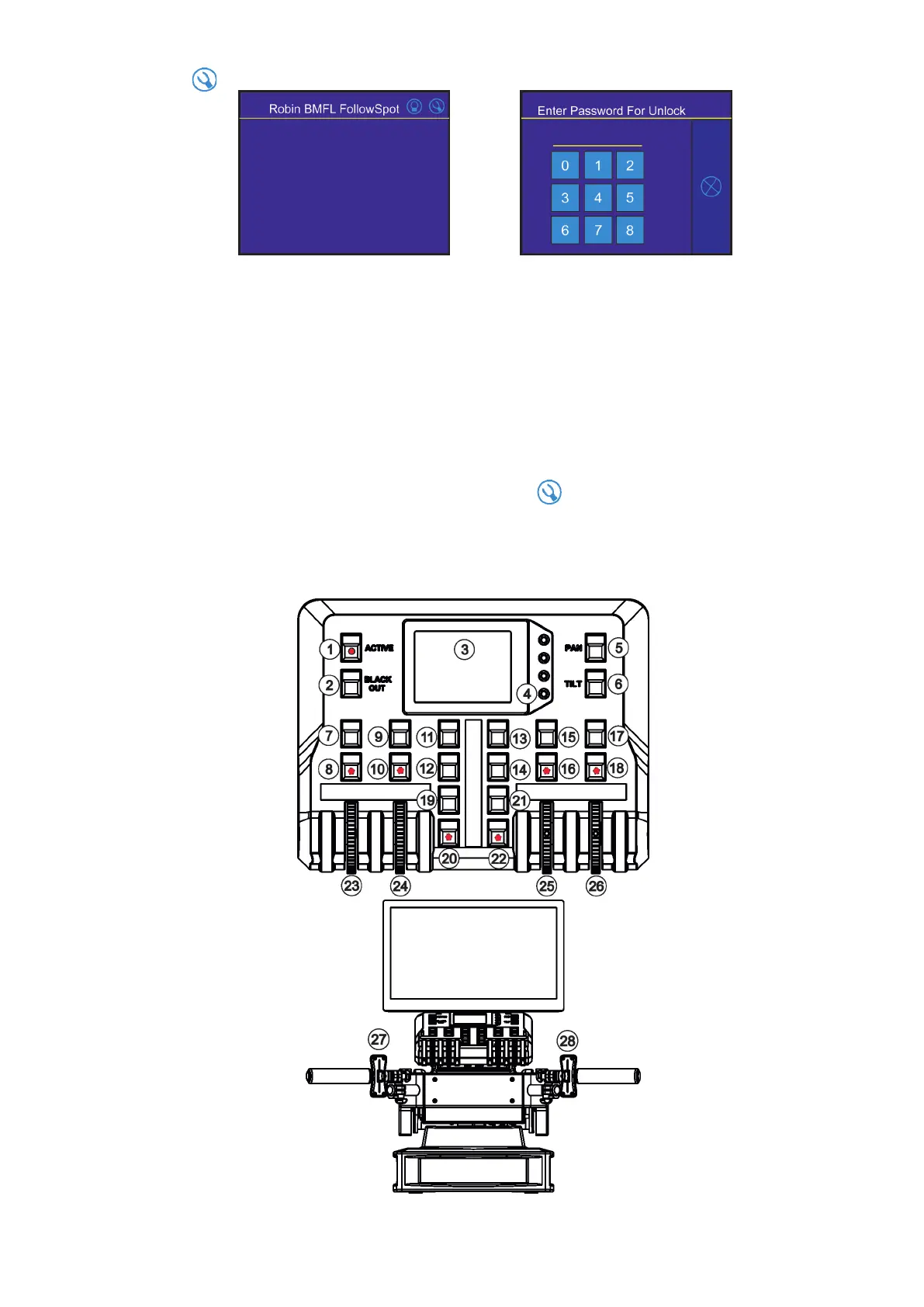
Touch the icon on the FollowSpot Controller to display the password entering screen:
Enter the password (default password is 5242 and also goes for the 15.6" touch screen ) to enter the main
menu of the FollowSpot Controller. The password prevents unauthorized person from changing setting of the
FollowSpot Controller.
Enter the menu "Functions Mapping". The list of available eects will appear:
If the message" Please Activate FollowSpot Controller!" will appear, press the ACTIVE button (1) on the Follow
Spot Controller.
Note. If no xture is connected to the RoboSpot (or DMX cable is disconnected from the RoboSpot),
the following message will appear:
" Waiting for devices"
"Long touch here to access setting"
In this case touch the display for cca 4 sec. until the screen with icon will appear and you will be able to
enter the main menu of the controller.
To assign eects to the jog-wheels and faders
1.Touch desired eect. Buttons (8/10/16/18) which activate Jog-wheels (23/24/25/26) and buttons (20/22), which
matches faders (27/28) will start to ash.
2.Press desired button and selected eect will be assigned to its jog-wheel (fader).
Assigned eect is displayed in a yellow colour, free eects stay in a white colour.
3.Repeat steps 1 and 2 for needed eects.















 To Next Page