43
Setting the dimmer curve
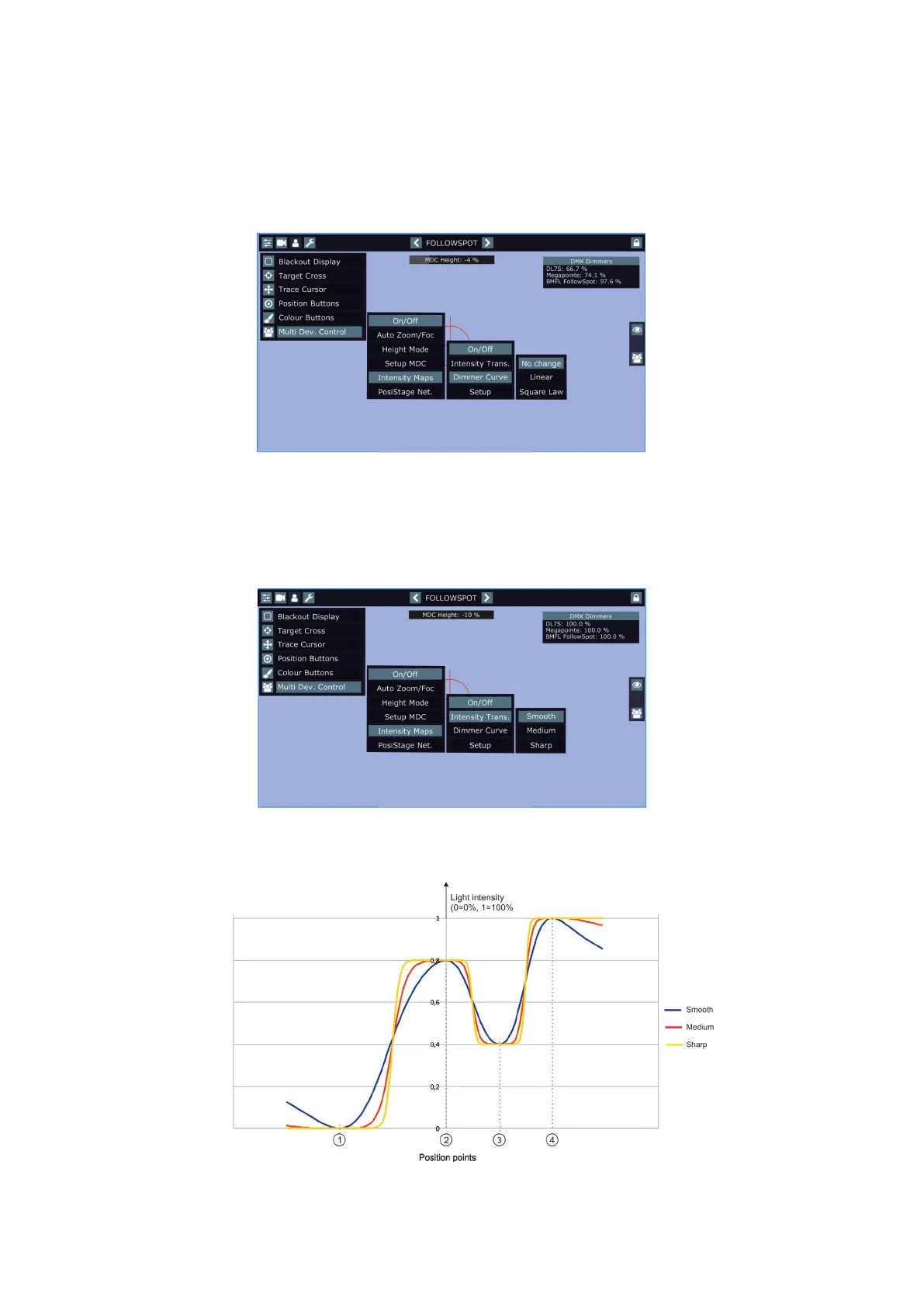
The menu Intensity Maps allows you to select a linear or square law dimmer curve. Selected dimmer curve
applies to all xtures used in MDC setup.
When you switching between dimmer curves, the message " Setting dimmer curve for MDC lights to linear" or
" Setting dimmer curve for MDC lights to square law" will appear for a while informing you, the command for
activation of selected dimmer curve is sending to xtures.
Note. The message stated above also will appear when you activate the Intensity Maps (item On/O)
Dimmer curves in individual xtures are temporarily overwritten (by means of the command on the channel
Power/Special Functions).
Note: if you select a dimmer curve and than you switch some xture o and on, the xture will use a dimmer
curve set in the menu of this xture (not curve set in the Dim. Curve menu).
Intensity transition
The menu Intensity Transition oers you three modes (Smooth, Medium, Sharp) of a "light transition" from one
position point to another.
There is a picture illustrating dierences among the three modes.
The light intensity in the Smooth mode decreases faster around position point during movement from one po-
sition point to another than in the Medium or Sharp mode.















 To Next Page