Robotiq Hand-E C10 Gripper Instruction Manual
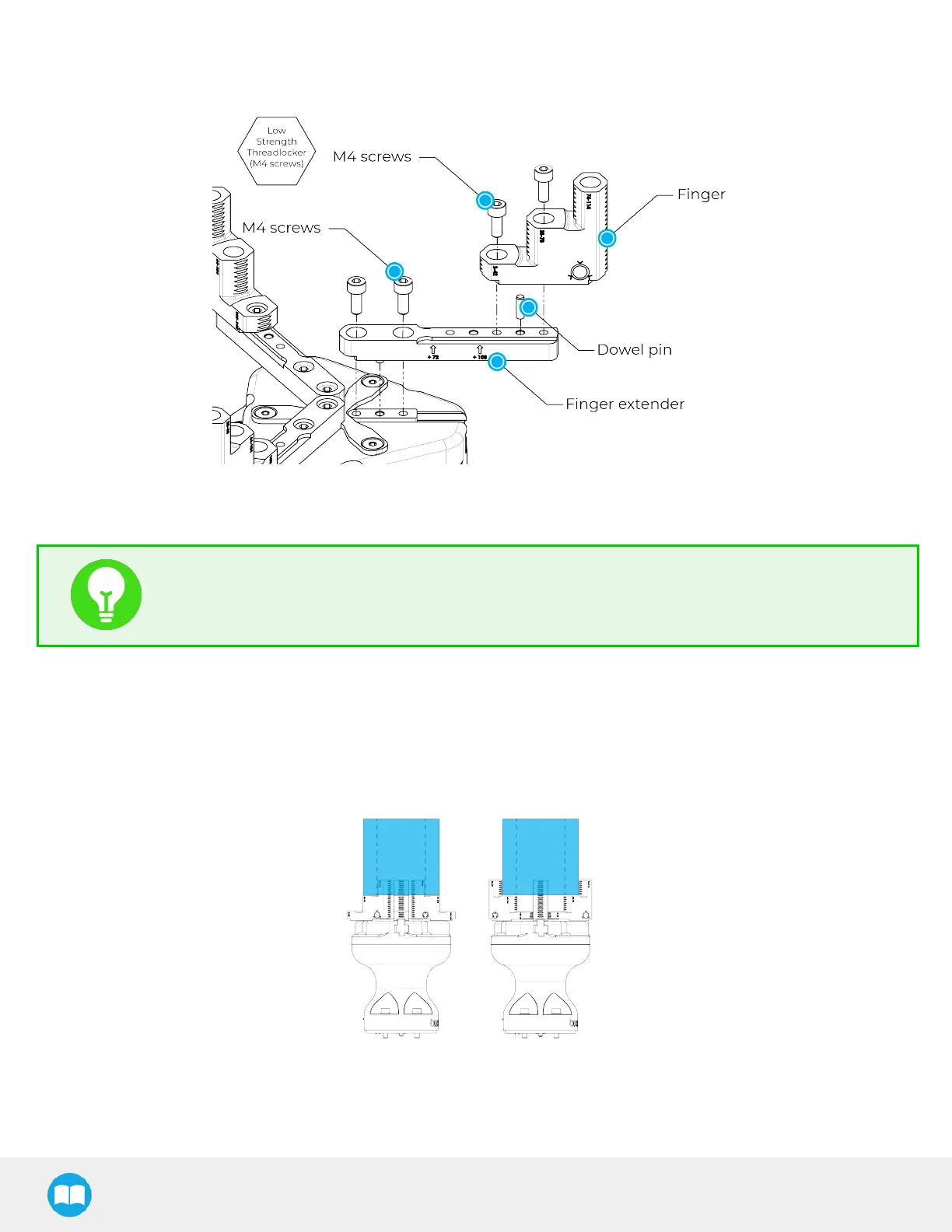
The user can install fingers directly on the racks, or fasten fingertips to fingertip extenders, which are in turn installed on the racks.
Refer to the Installing the Gripper on the Robot section for more information on how to integrate custom fingers and fingertips to
Hand-E.
Fig. 1-2: Mounting a Finger on a Rack
Depending on the fingers configuration used, the user can install the stop plate directly be on top of the gripper or on spacers.
TIP
Fingers and fingertips are customizable (for example, mount fingers on racks and fingertips on fingertip
holders).
1.1. Object picking
The Hand-E C10 Gripper has a single actuator for opening and closing the fingers. It also allows internal and external gripping.
The fingers can pick hollow parts from the inside by applying pressure with the outer surface of the fingers. The fingers can be
flipped in order to accommodate internal or external gripping.
Refer to the Picking Features section for details on avaible position commands.
Fig. 1-3: Hand-E C10 Gripper Internal and External Gripping
9



 To Next Page