Robotiq Hand-E C10 Gripper Instruction Manual
5. The user can now assume it is holding the payload, and proceed to the next step.
Example of contact lost with an object:
1. From the previous example, after an object is picked
a. gOBJ == 0x02
2. If the gOBJ status displays 0x03 after it was 0x02, user can assume contact with the object has been lost.
4.5.4. Brake engagement
Hand-E C10 is equipped with a brake that engages at the end of every gripper move, and disengages between moves. For
instance, when fully closing on an object, the gripper touches the object, activates the brake, and sends the object detection
signal to the robot.
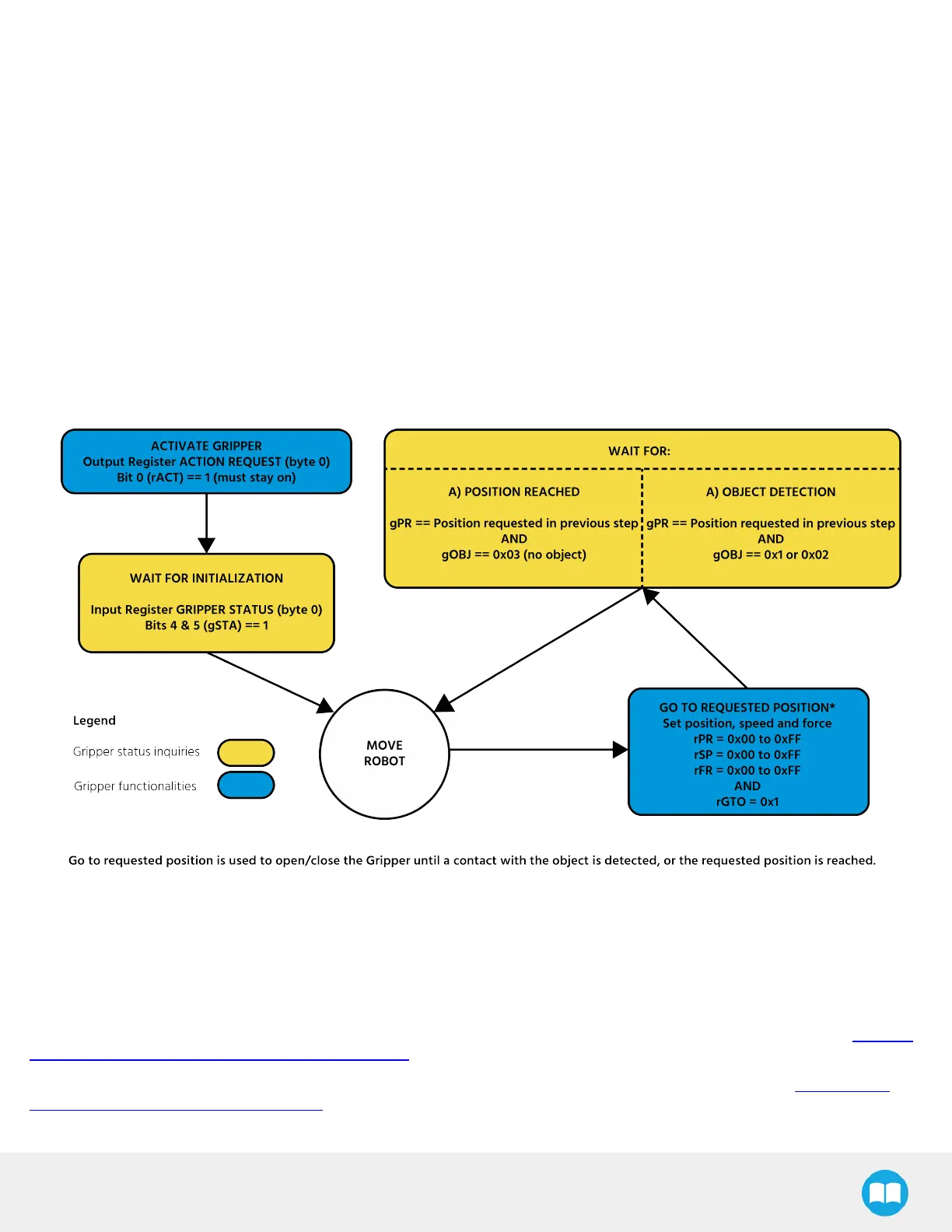
4.6. Control Logic Example
Fig. 4-2: Example of Gripper Control Logic with Corresponding Registers
4.7. Modbus RTUCommunication
The gripper can be controlled by Modbus RTU directly with RS485 or over USB using the ACC-ADT-USB-RS485. This section is
intended to provide guidelines for setting up a Modbus master that will adequately communicate with the gripper.
For a general introduction to Modbus RTU and for details regarding the CRC algorithm, the reader is invited to read the Modbus
over serial line specification and implementation guide.
For debugging purposes, the reader is also invited to download one of many free Modbus scanners such as the CAS Modbus
Scanner from Chipkin Automation Systems.
52



 To Next Page