Robotiq Hand-E Gripper Instruction Manual
Multiple Grippers Installation
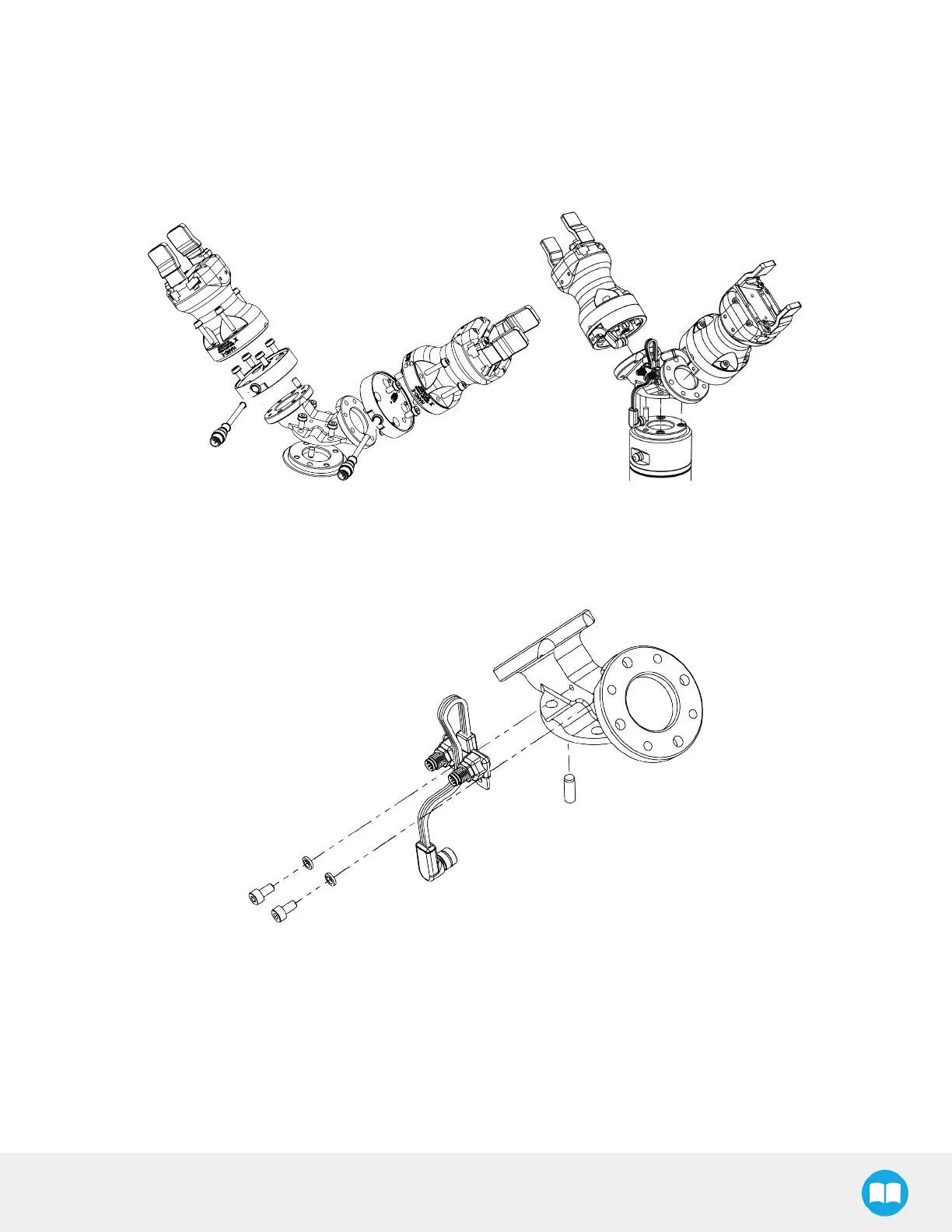
When installing multiple grippers on one robot, every gripper must have its own coupling.
1. Install the mounting plate on the robot arm (AGC-APL-159-02).
2. Mount the grippers' couplings on the mounting plate using the provided M6 X 12mm screws and tooth lock washers.
3. Mount the grippers onto the coupling using the provided M5 X 25 mm screws and tooth lock washers.
Fig. 3-5: Dual Hand-E Gripper Configuration (CB-Series and e-Series)
For e-Series:
1. Fasten the M8 splitter (ACC-SPLIT-M8-2:1) to the dual gripper adapter plate (AGC-APL-159-002)
a. Make sure the splitter is fastened on the side of the adapter plate that receives the dowel pin
Fig. 3-6: Fastening the splitter to the dual gripper adapter plate
25



 To Next Page