Robotiq Hand-E Gripper Instruction Manual
3.4.2. Installing Fingers on the Gripper
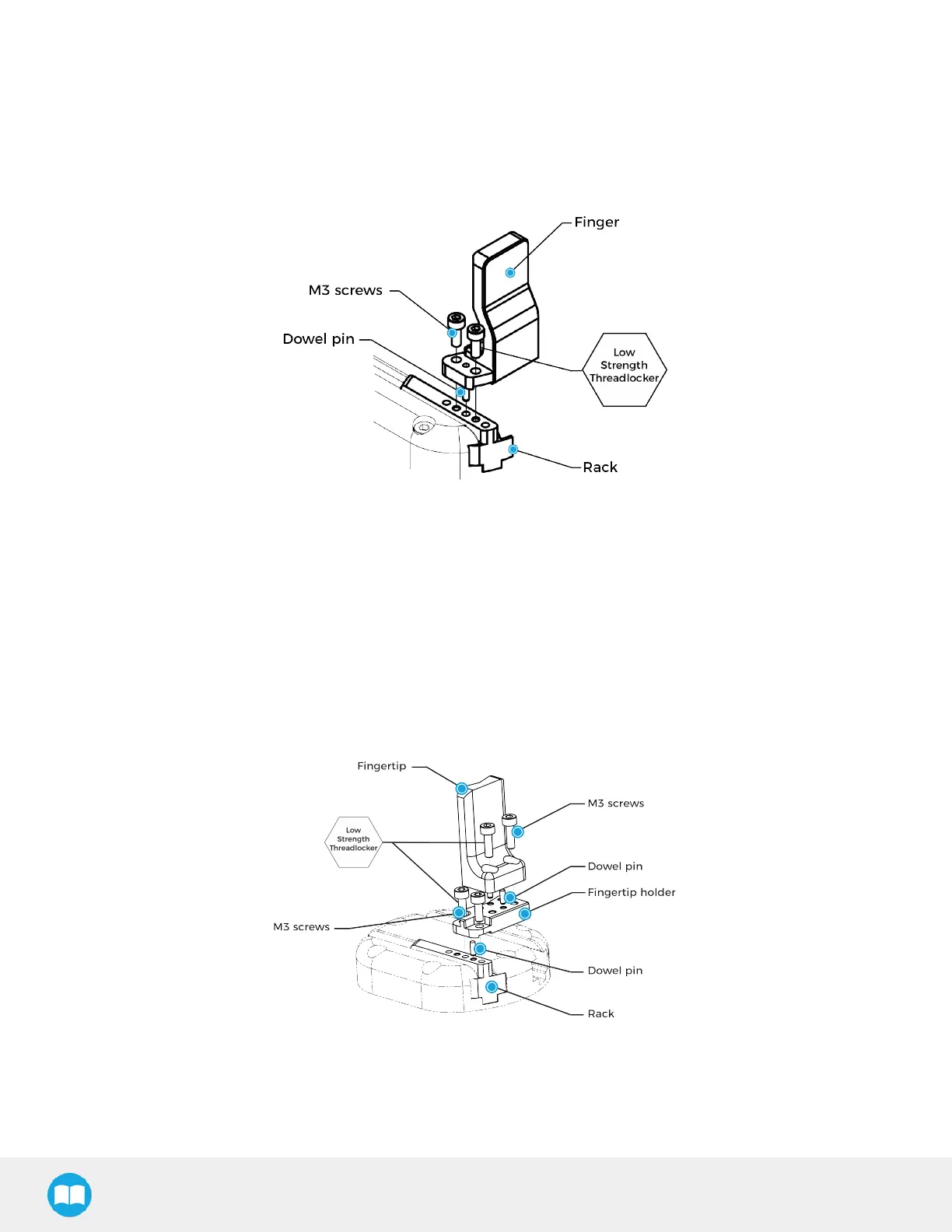
If you need to change the fingers, follow the instructions below.
1. Align the finger dowel pin with the finger dowel hole.
2. Apply low strength threadlocker on the provided screws and secure the finger to the rack.
3. Repeat for the second finger, if necessary.
Fig. 3-7: Mounting fingers on racks.
3.4.3. Installing Fingertips and Holders on the Gripper
If you need to change the fingertips and holders, follows the instructions below.
1. Align the fingertip holder dowel pin with the rack dowel hole.
2. Apply low strength threadlocker on the provided screws and secure the fingertip holder to the rack.
3. Align the fingertip dowel pin with the fingertip holder dowel hole.
4. Apply low strength threadlocker on the provided screws and secure the fingertip to the fingertip holder.
5. Repeat for the second fingertip, if necessary.
Fig. 3-8: Mounting fingertips on holders, and holders on racks.
26



 To Next Page