17
How to Operate the Receiver (in Robot)
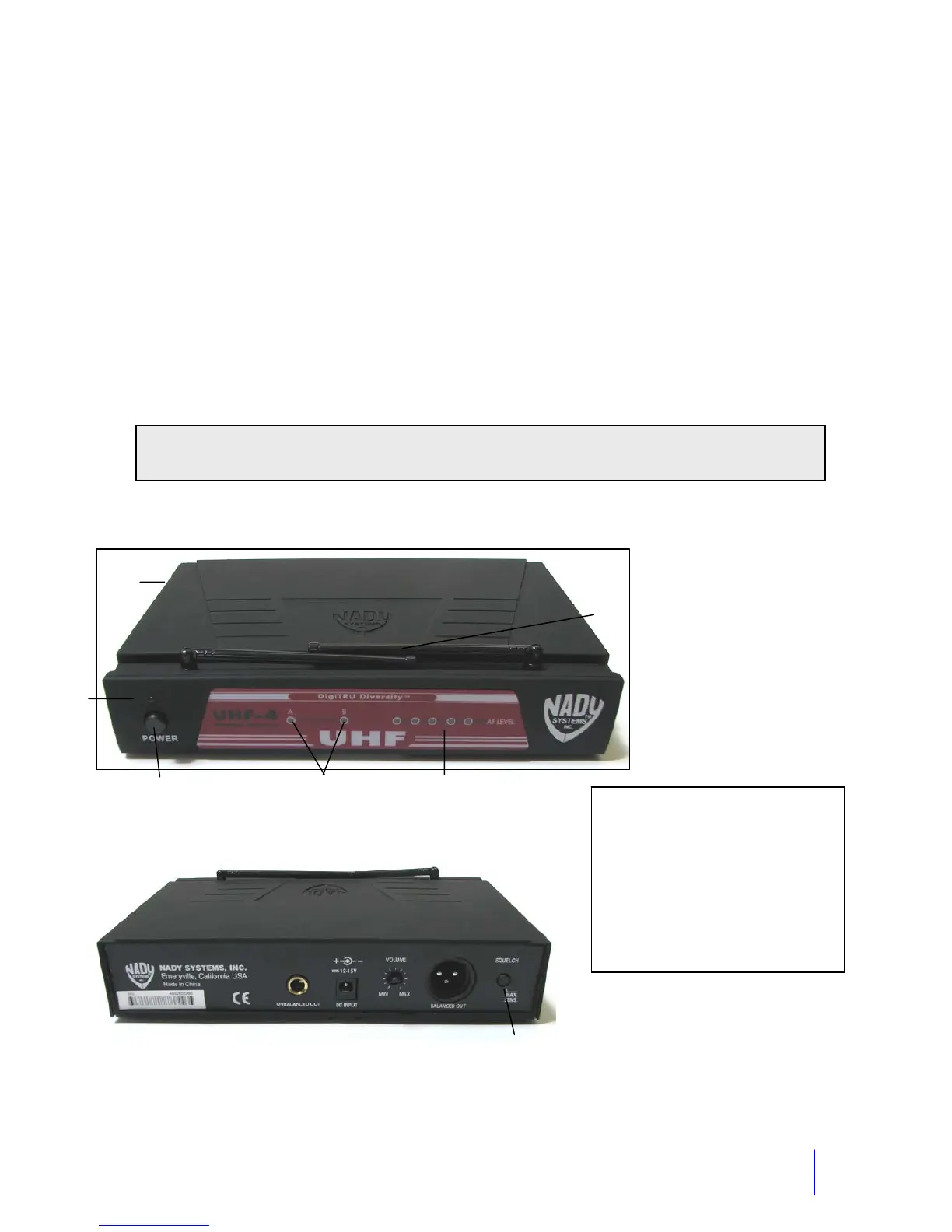
There are two adjustments on the receiver. The volume is on the back of the receiver, which
you may set to the desired volume. The other adjustment is the sensitivity. This is factory
preset to maximum sensitivity. This effects how sensitive the receiver is to the transmitter
signal. Typically you would never need to adjust this. The only exception would be if you get
squelch when the transmitter is off. You can deal with this by simply turning on the belt
transmitter whenever the robot is turned on. You could turn the sensitivity down slightly but turn
the adjustment as little as possible, because adjusting it will affect the range.
Frequency label- Located on the side of the receiver.
Function of the LEDs
TX LED- This indicates that you are receiving a signal from the transmitter. On some units it is
a single TX light. On other units it may have an A or B that it will alternate between.
AF LED- This light indicates that audio is going through the receiver. It will flash as you speak
into your headset mic.
Tip: For best range extend the receiver antenna(s) as much as possible, not allowing it
to touch metal.
1. Power On LED Indicator
2. Diversity LED Indicators
3. AF Peak LED Indicator
4. Antennas
5. Power Switch (Leave On)
6. Frequency Label
7. Audio Output
8. DC Input Jack 12V
9. Aux. Volume Control
10. Balanced Mic Audio Output XLR
1
2 3
4
5
8
6
11
9
7
10



 To Next Page