37
Optional Accessory: Voice Modifier (Pitch Shifter)
The pitch shifter (voice modifier) can change the operator’s voice to disguise it and create a
robot character type voice. The operator’s voice signal is received like normal by the voice
receiver in the robot. The signal is then sent from the audio out of the receiver to the Input
Jack of the pitch shifter. It is modified and sent from the shifter Output A to the voice 'audio in'
on the main circuit board.
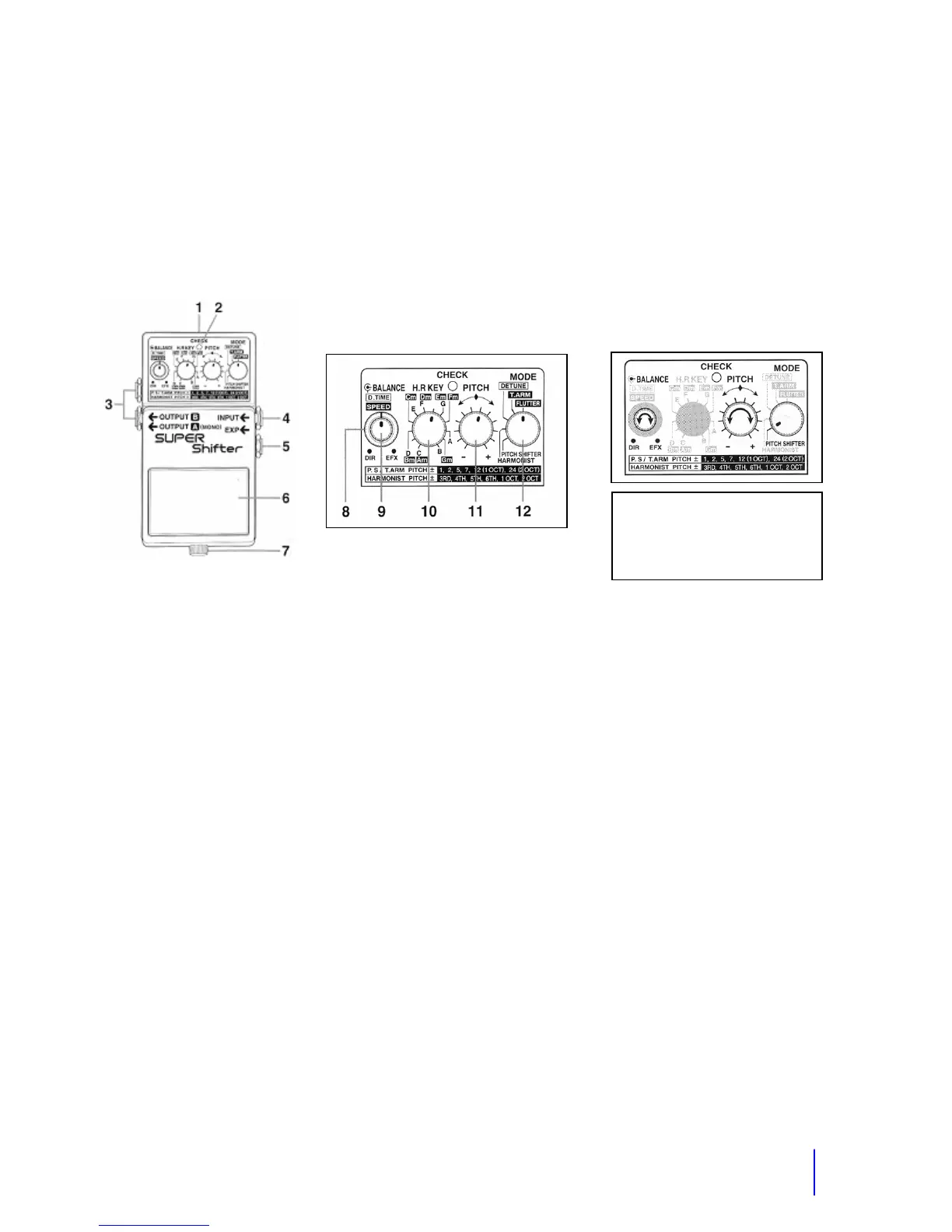
1. Power Jack – 9 Volts center negative
2. Check indicator – Power indicator and show whether an effect is on or off.
3. Output Jacks. Output A is what we use.
4. Input Jack. Audio input wire from the wireless receiver plugs in here.
5. EXP Jack. Not used.
6. Pedal Switch. Turns it on or off.
7. Thumbscrew. To release pedal.
8. D.Time Speed Knob – Delay time. Not used in pitch shifter or harmonist mode.
9. Balance knob – This adjust the output balance between the direct sound and the effect
sound. Typically set this on EFX for the full effect.
10. H.R. Key switch. Not used.
11. Pitch Switch. Adjusts the amount of pitch shift.
12. Mode Switch. Selects the mode. Typically use the pitch shifter mode.
The pedal on the pitch shifter is used to turn it on and off. When the pitch shifter is on, the
power light labeled 'check' will be lit. The shifter will take a few seconds to power up. To turn it
off, push the pedal again. If the pitch shifter is not turned on, your unmodified voice will come
through.
The pitch shifter has two basic effects; a digital pitch shifter and a delay. There are many
variations of these two effects. When used as a pitch shifter, you can vary the shift within +/- 2
octaves. Set the mode knob to Pitch shifter and then vary the pitch knob until you get the sound
of voice that you want. You can get a similar effect with the harmonist position but the pitch
shifter gives you the best sound. These are the most common modes used because these
Common Setting
Balance= Full Clockwise
Pitch=2:00
Mode=Pitch Shifter



 To Next Page