24
DGM001519.01 UM Sirius CE/ROTW
Mains connection
Once all the checks have been made and after placing the laser device in its final position in the working area,
you can connect the device to the mains. Use the cable provided. Such cable can suffer
wear over time. The operator or anyone involved in the ordinary maintenance of the
device after the installation must take care of monitoring the maintenance status of the
power cable.
The device must be connected to the mains in compliance with electrical safety
regulations.
Caution: Before starting to use the device, be sure that the cable lock is fixed and
the cable cannot be removed.
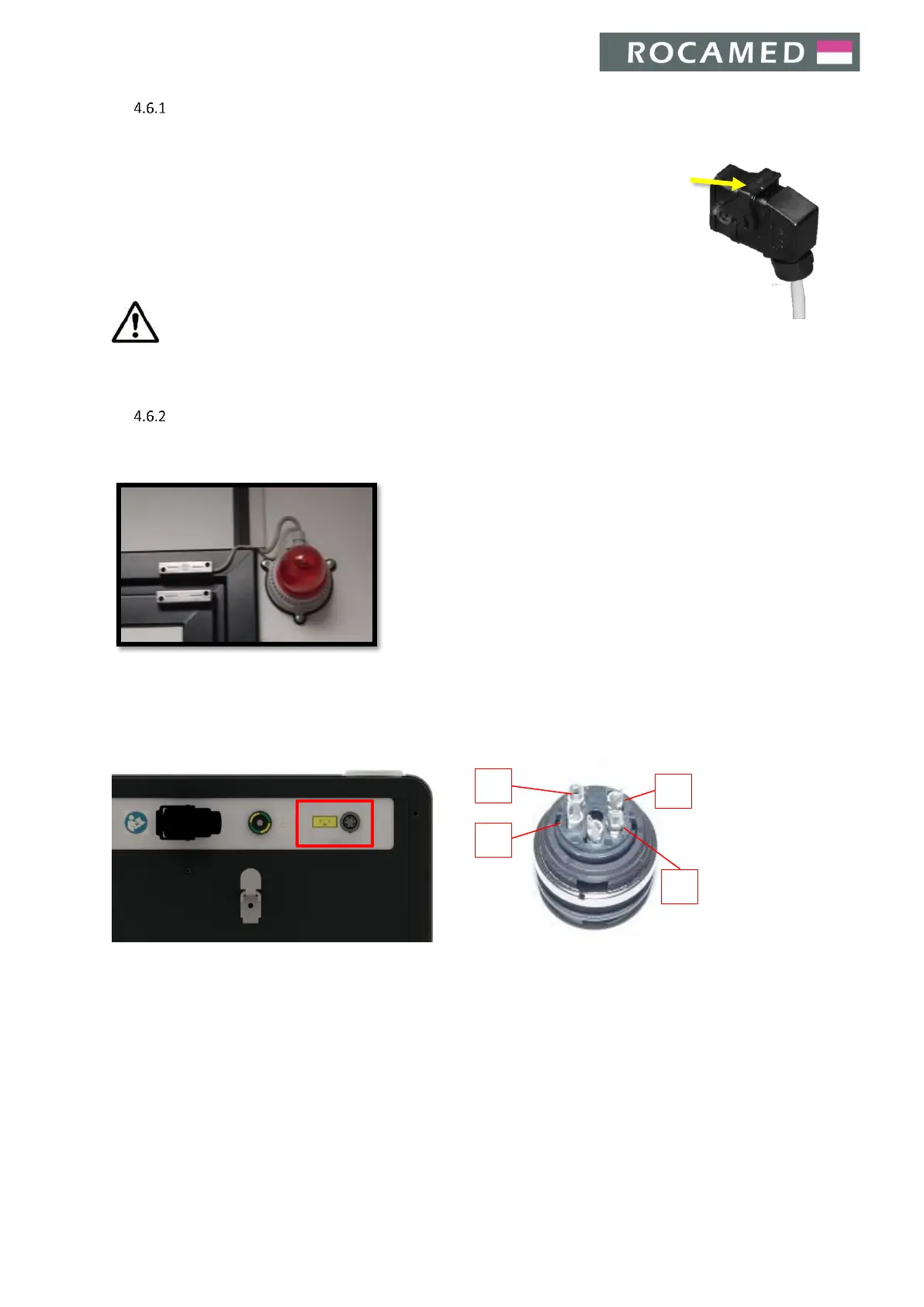
Remote interlock connection
According to IEC 60825-1 all laser devices must be equipped with a remote block connector, connected to the
room access door, which prevents laser emission when the door is opened.
A suitable switch shall be prepared by the client on the room
access door where the device will be installed. In case of multiple
access doors, each door should have its own switch, whose
contacts have to be connected in series.
The remote interlock cable must be connected to a lamp mounted
at the entrance of the working area (as shown in the picture).
When the door is closed, the switch will enable laser emission with
a dedicated electrical signal.
The connection, or the sequence of connections, has to be wired with a suitable cable to the interlock connector
during the device installation.
The interlock connector is wired on the laser side in the following way:


 To Next Page