31
DGM001519.01 UM Sirius CE/ROTW
Aiming beam
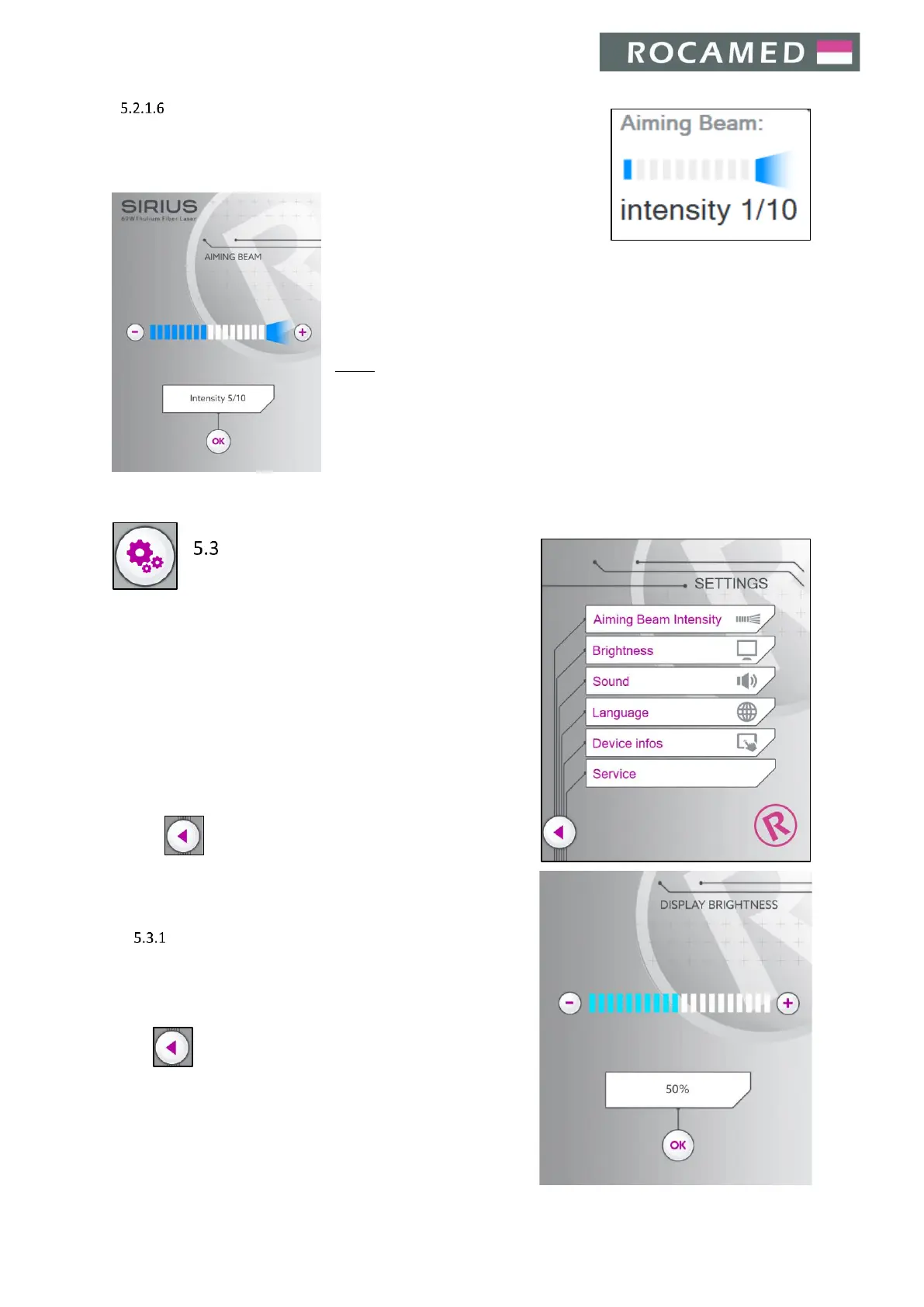
The aiming beam is adjustable by software, by tapping on the related icon in
the main interface. The current level of the aiming beam intensity is shown.
Touch the - / + buttons on the Aiming Beam settings screen (below) to
decrease / increase the aiming beam intensity. Once the desired aiming
beam intensity has been reached, press OK to confirm and return to the main
screen.
NOTE: Pressing the Aiming beam Button on the Main Screen when the laser
system is in Standby status, the green pilot laser will be activated,
maintaining the laser system in Standby mode. This function gives the
possibility to check connected fibers in a safe condition, evaluating the shape
of the laser beam immediately out of the fiber tip.
Settings
When pressing the Settings button, the sub-menu
panel will appear.
The available functions are the following:
x Aiming beam intensity (see section 5.2.1.6 Aiming beam)
x Brightness
x Sound
x Language
x Device infos
x Service
Press to return to the Main Screen.
Brightness
It is possible to tune the screen brightness.
Increase or decrease the sound volume using + / - buttons.
Press OK to give confirmation and return to the main interface.
Press to return to the Main Screen.
Note: the percentage of the brightness, related to the max
available, is shown on the screen.


 To Next Page