32
DGM001519.01 UM Sirius CE/ROTW
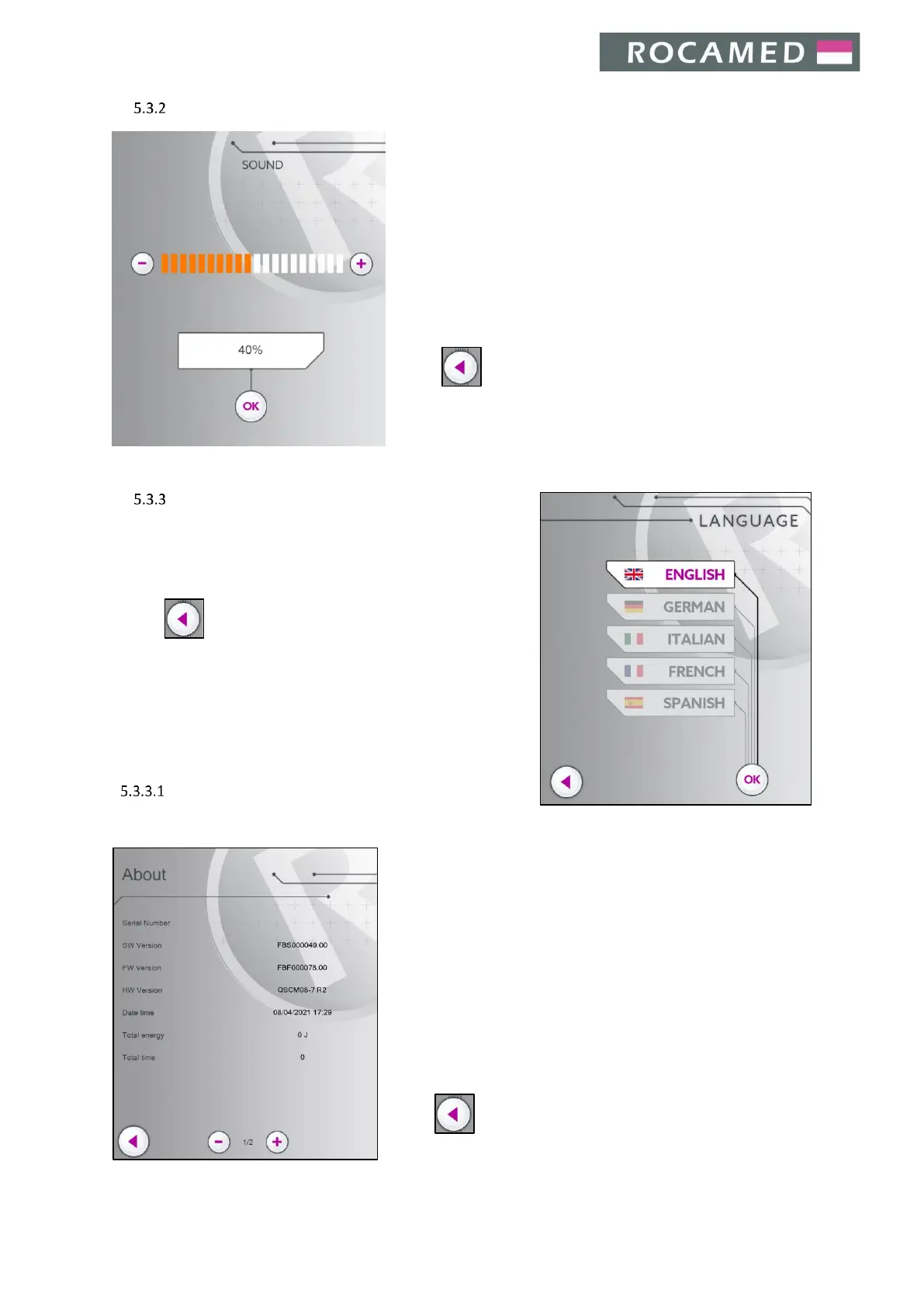
Sound
The device emits an acoustic signal with a fixed duration when the
device runs in READY mode and the footswitch is pressed. During
the operation of the system, the emitted signal varies according
to the frequency of laser pulses (almost synchronously for low
frequencies).
By entering the Sounds Menu, it is possible to tune the sound level
of the laser emission associated with the pressure of footswitch.
Increase or decrease the sound volume using + / - buttons.
Press OK to give confirmation and return to the main interface.
Press to return to the Main Screen.
Note: the percentage of the sound volume, related to the max
available, is shown on the screen
Language
Select the desired language.
Press OK to confirm and return to the main interface.
Press to return to the Main Screen.
Device info
The Device Infos Panel displays the following information:
x Serial number
x Software Version (SW)
x Firmware Version (FW)
x Hardware Version (HW)
x Date time
x Total emission energy
x Total emission time
x Total emission pulses
Move through the pages using + / - buttons.
Press to return to the Main Screen.


 To Next Page