30
DGM001519.01 UM Sirius CE/ROTW
Fiber INFO
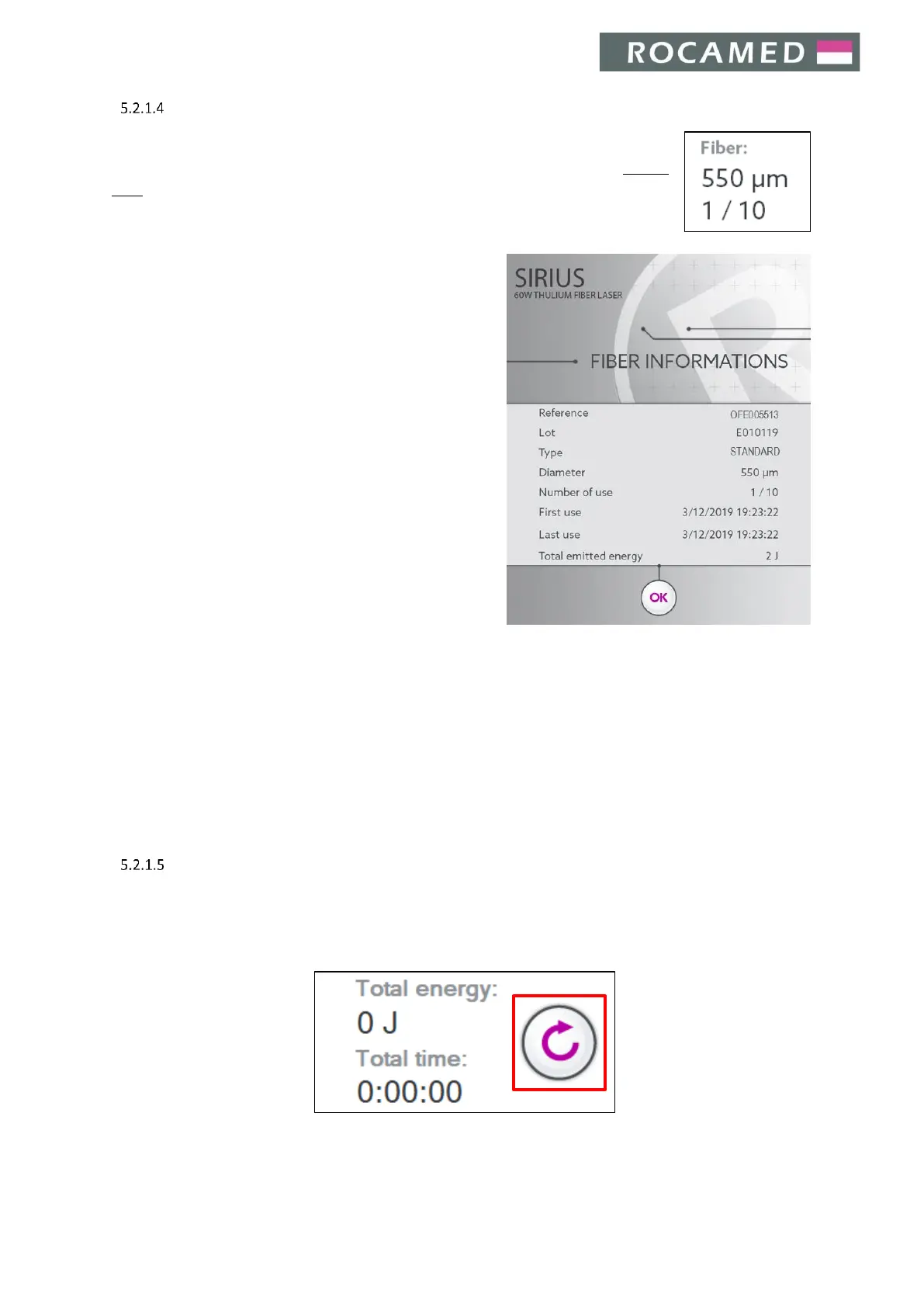
When a RFID Fiber is connected and the RFID system is active, the system automatically
recognizes the type of the fiber and the number of the previous uses (see also Section
5.4.1), further showing the Fiber Info Panel on the display. The Fiber Info Panel appears
also by pressing on the Fiber Info area.
Here you can find the following information:
x Fiber Code
x Fiber LOT
x Fiber Type
x Diameter
x Number of use
x Time of the first and the last use
x Total emitted energy
Press OK to return to the main Screen.
If an unauthorized fiber is connected to the RFID system, the fiber will not be recognized and an error message
will appear.
If an expired optical fiber (disposable/reusable) is connected to the laser system, an error message will appear.
By touching the Fiber Info area with no fiber inserted, the user can approach the RFID connector to the laser
port with the fiber still contained in its sterilization packaging. When doing so, the User can identify the fiber
without opening the fiber sterile envelope. Follow the description detailed on the screen in order to perform
this procedure.
Counters
The emitted energy (Joules) and Lasing time counters are shown in the main screen and increase during radiation
emission.
Press the highlighted button to reset the counters.


 To Next Page