58
DGM001519.01 UM Sirius CE/ROTW
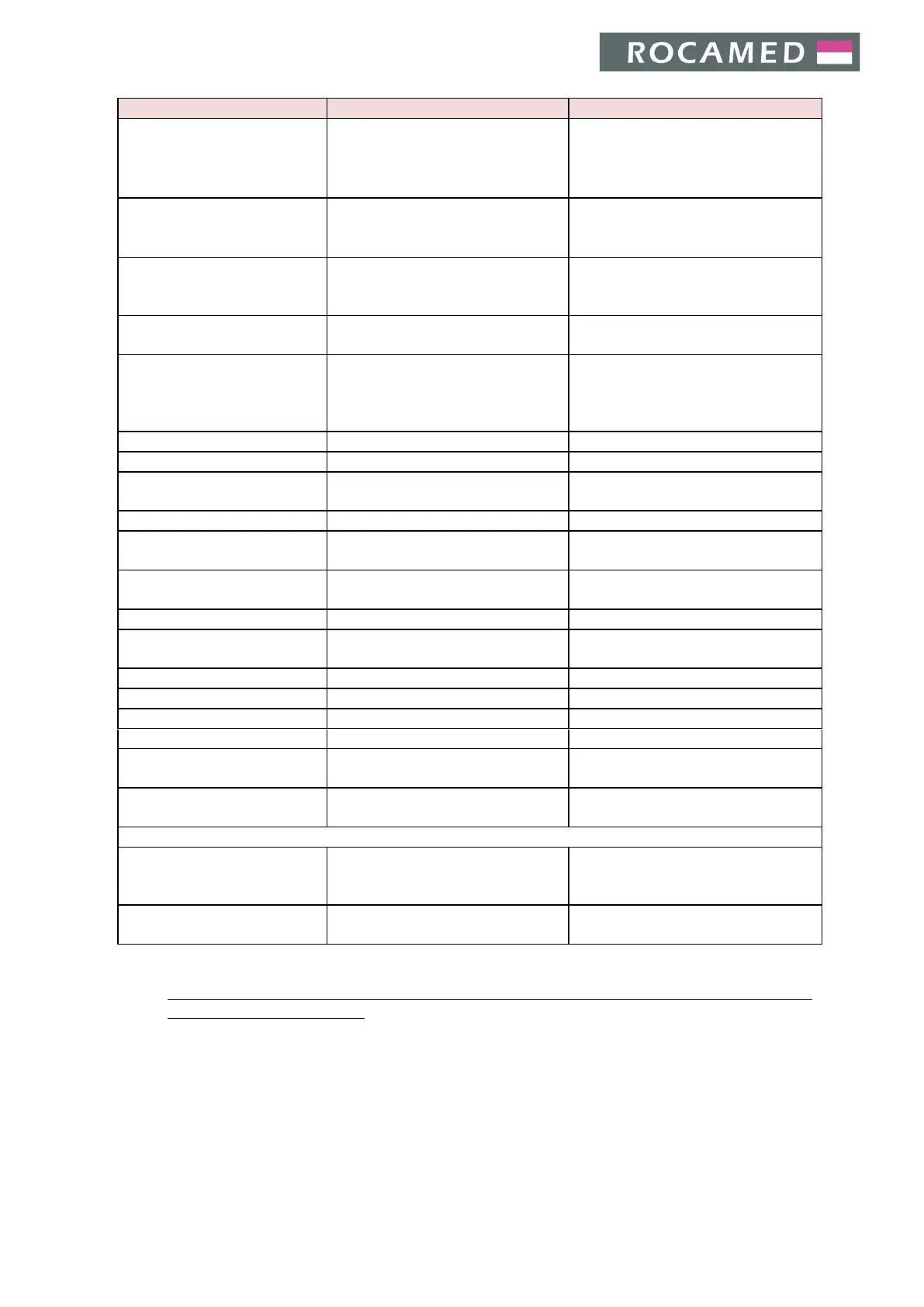
Turning the device key is not
producing any detectable
effect
x Plug not connected
x Main switch not turned on
x Emergency LASER STOP
activated
x Check for main input
x Deactivate Emergency LASER STOP
switch
x Fluctuation of energy parameter
during laser radiation
x Wait a few seconds for
stabilization.
x Call the service
Serial port communication
fault
ͻdŚŝƐǁĂƌŶŝŶŐĂƉƉĞĂƌƐǁŚĞŶƚŚĞ
serial communication from PC to
microprocessor fails
x Restart the system
x Call service
ͻWŽǁĞƌƐƵƉƉůLJĞƌƌŽƌŽƌďƌŽŬĞŶ
ͻŚĂƌŐĞƌĞƌƌŽƌŽƌďƌŽŬĞŶ
No correspondence between
displayed energy and
treatment effects and/or
decrease of laser efficacy
ͻ&ŝďĞƌĚamaged
ͻůĂƐƚƐŚŝĞůĚŵŝƌƌŽƌďƌŽŬĞŶ
ͻŚĂŶŐĞĨŝďĞƌůĂƐƚƐŚŝĞůĚ
ͻĂůůƐĞƌǀŝĐĞ
ͻ/ŶĐŽƌƌĞĐƚƐŚƵƚƚĞƌƉŽƐŝƚŝŽŶ
ͻ/ŶĐŽƌƌĞĐƚƐŚƵƚƚĞƌƉŽƐŝƚŝŽŶ
The remote interlock contacts
are open
ͻdŚĞext. Interlock is not connected
or is poorly connected
ͻŽŶƚƌŽůĞdžƚ/ŶƚĞƌůŽĐŬĐŽŶŶĞĐƚŝŽŶ
ͻtƌŽŶŐƉĞĚĂůĐŽŶŶĞĐƚŝŽŶƐ
ͻWĞĚĂů;ƐͿƐŚŽƵůĚďĞƉƌĞƐƐĞĚ
at the right moment
ͻŶƚĞƌŝŶZĞĂĚLJmode and press the
footswitch
Blast shield wrong installation
ͻtƌŽŶŐďůĂƐƚƐŚŝĞůĚŝŶƐƚĂůůĂƚŝŽŶ
ͻŚĞĐŬůĂƐƚƐŚŝĞůĚ
ͻĂůůƐĞƌǀŝĐĞ
Fiber not present/connected
ͻtƌŽŶŐĨŝďĞƌŝŶƐƚĂůůĂƚŝŽŶ
ͻŚĞĐŬƚŚĞĨŝďĞƌĐŽŶŶĞĐƚŝŽŶ
Fiber not identified by RFID
ͻtƌŽŶŐfiber installation
ͻtƌŽŶŐĨŝďĞƌƚLJƉĞ
ͻŚĞĐŬƚŚĞĨŝďĞƌĐŽŶŶĞĐƚŝŽŶ
ͻŚĂŶŐĞĨŝďĞƌ
ͻdŚĞĞŵŝƐƐŝŽŶŝƐƚŽŽŚŝŐŚŽƌůŽǁ
ͻZĞƐƚĂƌƚƚŚĞƐLJƐƚĞŵ
ͻĂůůƐĞƌǀŝĐĞ
Laser Internal Interlock Error
ͻ>ĂƐĞƌƐŽƵƌĐĞŝŶƚĞƌŶĂůŝŶƚĞƌůŽĐŬ
fault
ͻZĞƐƚĂƌƚƚŚĞƐLJƐƚĞŵ
ͻĂůůƐĞƌǀŝĐĞ
Critical Errors and Warnings appearing during start-up procedure
ͻDĞƐƐĂŐĞĂĨƚĞƌŶĞǁ&tƌĞůĞĂƐĞ
installation
ͻ&tŝƐƐƵĞƐ
ͻ^ŚƵƚĚŽǁŶĂŶĚƌĞƐƚĂƌƚ
ͻĂůůƐĞƌǀŝĐĞ
ͻ^ŚƵƚĚŽǁŶĂŶĚƌĞƐƚĂƌƚ
ͻĂůůƐĞƌǀŝĐĞ
In case the device must be sent back to the company, fill the RMA request enclosed in Appendix A and
send it to your local distributor.


 To Next Page