• SETTING THE EXPRESSION RANGE:
~
1.
Press and hold the SET piston.
2.
Turn the Select Knob counter clockwise (left) to "
MINIMUM
EXPRESSION",
and place the cursor over the division name.
3.
Rotate the Alpha Dial to select the desired division.
4.
Turn the Select Knob clockwise (right). The cursor moves to the bottom
line.
S.
Rotate the Alpha Dial to select the desired expression range.
If
the expression shoe
is
closed and notes
are
played on voices
in
the division being adjusted, the change
is
heard immediately. All expression range settings are saved when the organ
is
turned
off
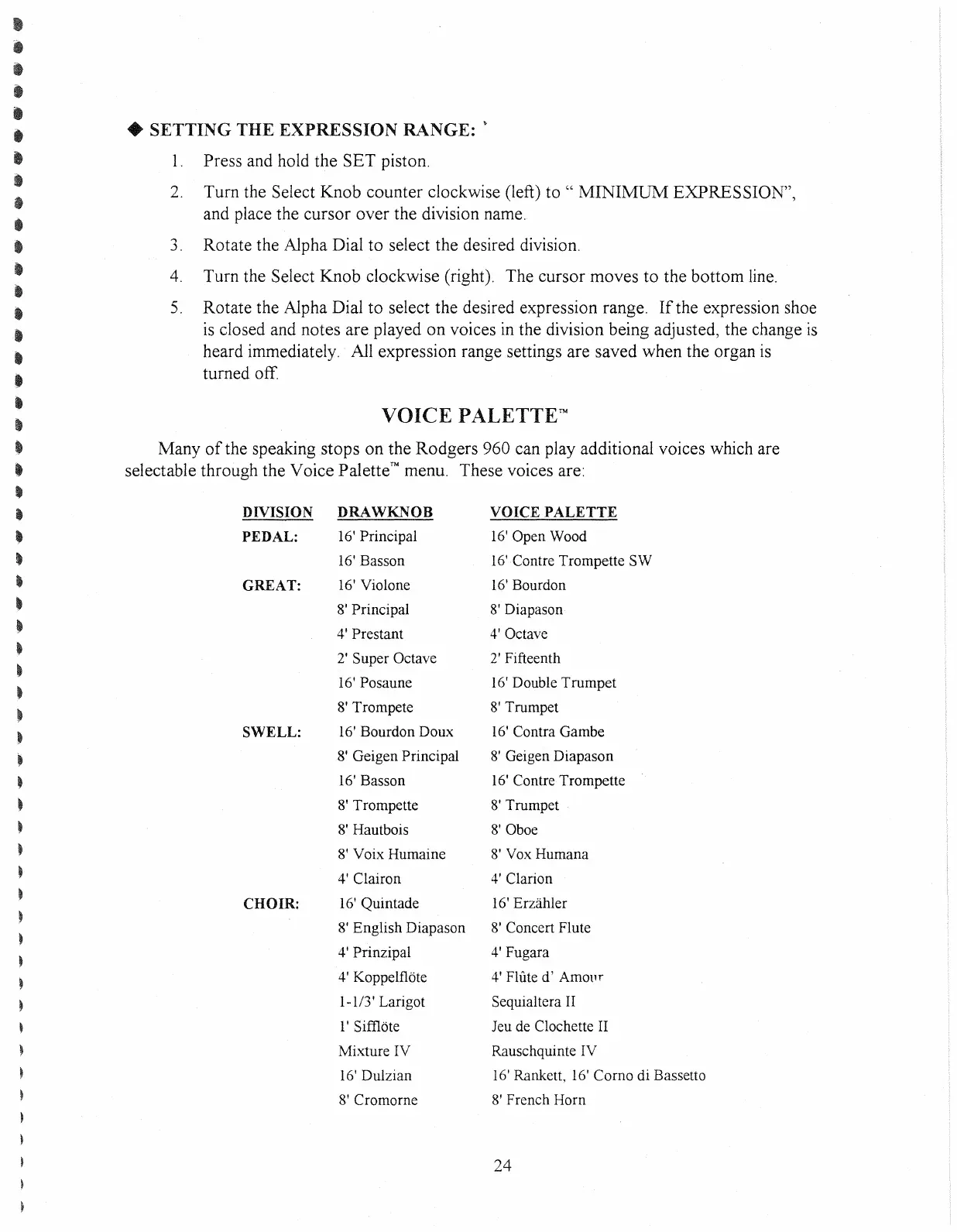
VOICE
PALETTETM
Many
of
the speaking stops on the Rodgers 960 can play additional voices which are
selectable through the Voice Palette™ menu. These voices are:
DIVISION DRAWKNOB VOICE
PALETTE
PEDAL:
16' Principal
16'
Open Wood
16'
Basson
16'Contre Trompette SW
GREAT:
16'
Violone
16'
Bourdon
8' Principal
8'
Diapason
4' Prestant
4'
Octave
2'
Super Octave
2'
Fifteenth
16'
Posaune
16'
Double Trumpet
8'
Trompete
8'
Trumpet
SWELL:
16'
Bourdon Doux
16'
Contra Gambe
8'
Geigen Principal
8'
Geigen Diapason
16'
Basson
16'
Contre Trompette
8'
Trompette
8'
Trumpet
8'
Hautbois
8'
Oboe
8' Voix Humaine
8'
Vox
Humana
4'
Clairon
4'
Clarion
CHOIR:
16'
Quintade
16'
Erzahler
8'
English Diapason
8'
Concert Flute
4' Prinzipal
4'
Fugara
4' Koppelflote
4'
Flute d'
AmOllr
1-113'
Larigot Sequialtera
II
l'
Sifi10te Jeu
de
Clochette
II
Mixture IV Rauschquinte IV
16'
Dulzian
16'
Rankett 16' Como di Bassetto
8'
Cromome
8'
French Horn
24



 To Next Page