3-10
MODEL 54 C SECTION 3
PROGRAMING THE ANALYZER
5.
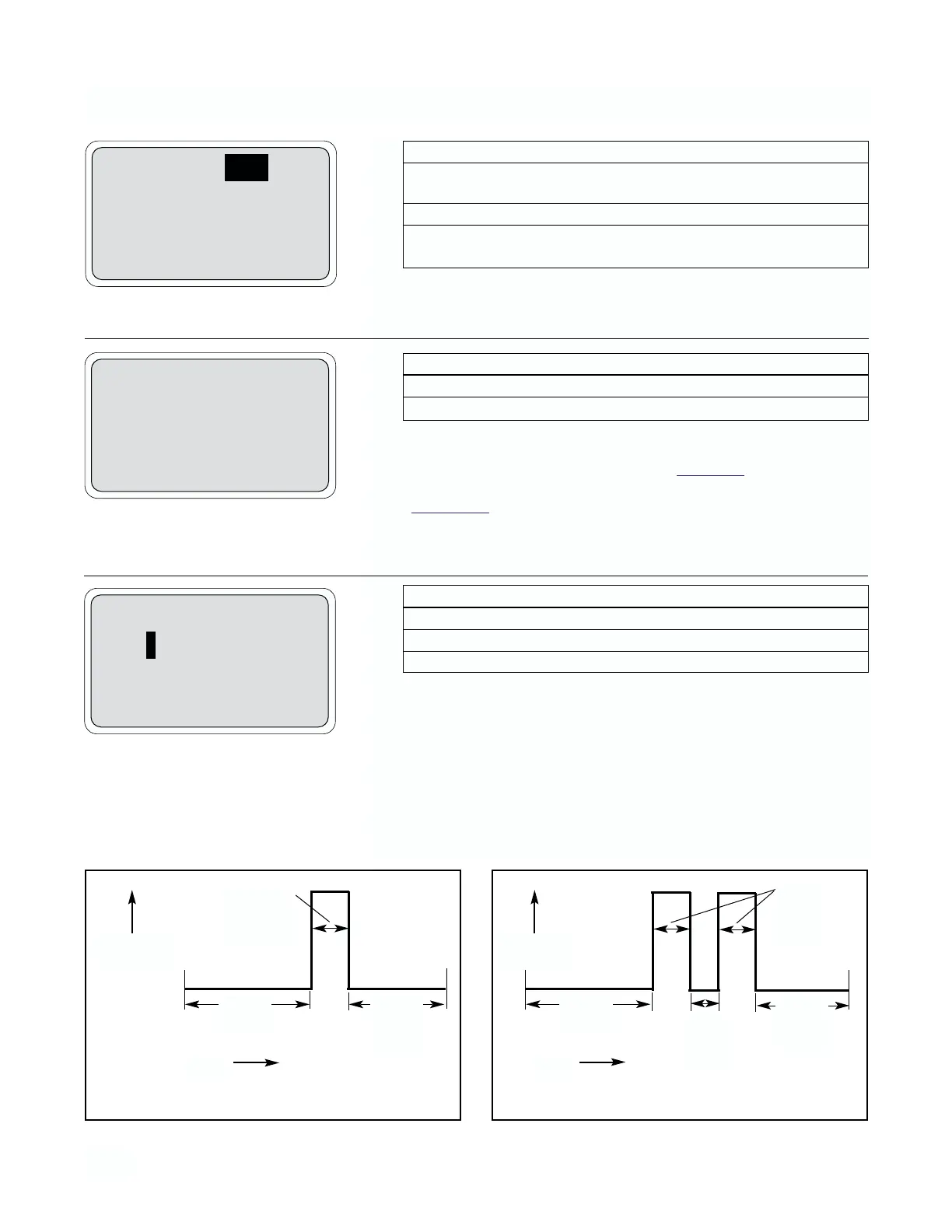
Pressing More (F3) allows the configuration of timer setting.
*Delays relay deactivation after reading is no longer in the alarm 3 condition
6.
NOTE
The timer can be used for periodic chemical or mechanical
cleaning of a coated sensor. See the examples
of the timer
cycle below. The timer must be activated separately (see
Section 3.1
).
Pressing More (F3) allows configuration of more timer parameters.
7.
Pressing Exit (F1) returns screen to previous functions.
TIMER EXAMPLES
A3: High
A3 Hys: 000 %
A3 Delay: 0 Sec
Exit More Enter
Timer setting:
Interval: 000.0 hr
Repeats: 01
Exit More Enter
More timer settings
On: 120 Off: 1 sec
Recovery: 600 sec
Exit More Enter
Menu Item Options
A3 alarm 3: Configuration Low alarm/High alarm/
Off (not used)
A3 alarm 3: Hysteresis (deadband)* 0-25 %
A3 alarm 3: Delay time before relay activation
and deactivation (can prevent chatter) 0-99 sec
Menu Item Options
Interval between cycles 0-999.9 hr.
No. of activation cycles for relay (repeats) 1-60
Menu Item Options
Relay “on” (time per activation) 0-999 sec
Relay “off” (time between activations) 0-999 sec
Recovery time after last activation 0-999 sec
RELAY
ACTIVATION
TIME
Interval
(hr)
Recovery
(sec)
“On”
Time
(sec)
One activation cycle
RELAY
ACTIVATION
TIME
Interval
(hr)
Recovery
(sec)
“On”
Time
(sec)
“Off”
Time
(sec)
Two activation cycles (repeats)


 To Next Page