17
MODEL SOLU COMP II SECTION 5.0
PROGRAMMING THE ANALYZER
5.3 CONFIGURING AND RANGING THE OUTPUTS.
5.3.1 Purpose
The Solu Comp II accepts inputs from two pH or ORP sensors and has two current outputs. This section describes
how to configure and range the outputs. CONFIGURE THE OUTPUTS FIRST.
1. Configuring an output means
a. Selecting either a 4-20 mA or 0-20 mA output,
b. Assigning a sensor and a measurement (pH, ORP, or redox potential) to output 1 and output 2,
c. Turning on or turning off output current dampening.
d. Choosing a linear or logarithmic output.
2. Ranging the outputs means assigning values to the low (0 or 4 mA) and high (20 mA) outputs.
5.3.2 Definitions
1. CURRENT OUTPUTS.The analyzer provides either a continuous 4-20 mA or 0-20 mA output current directly
proportional to pH, ORP, redox potential, or temperature. The low and high current outputs can be set to any
value in the table.
Measurement Range Recommended Range
pH 0 to 14 NA
ORP/Redox -2000 to 2000 mV NA
Temperature -99 to 999°C or °F -5 to 200°C
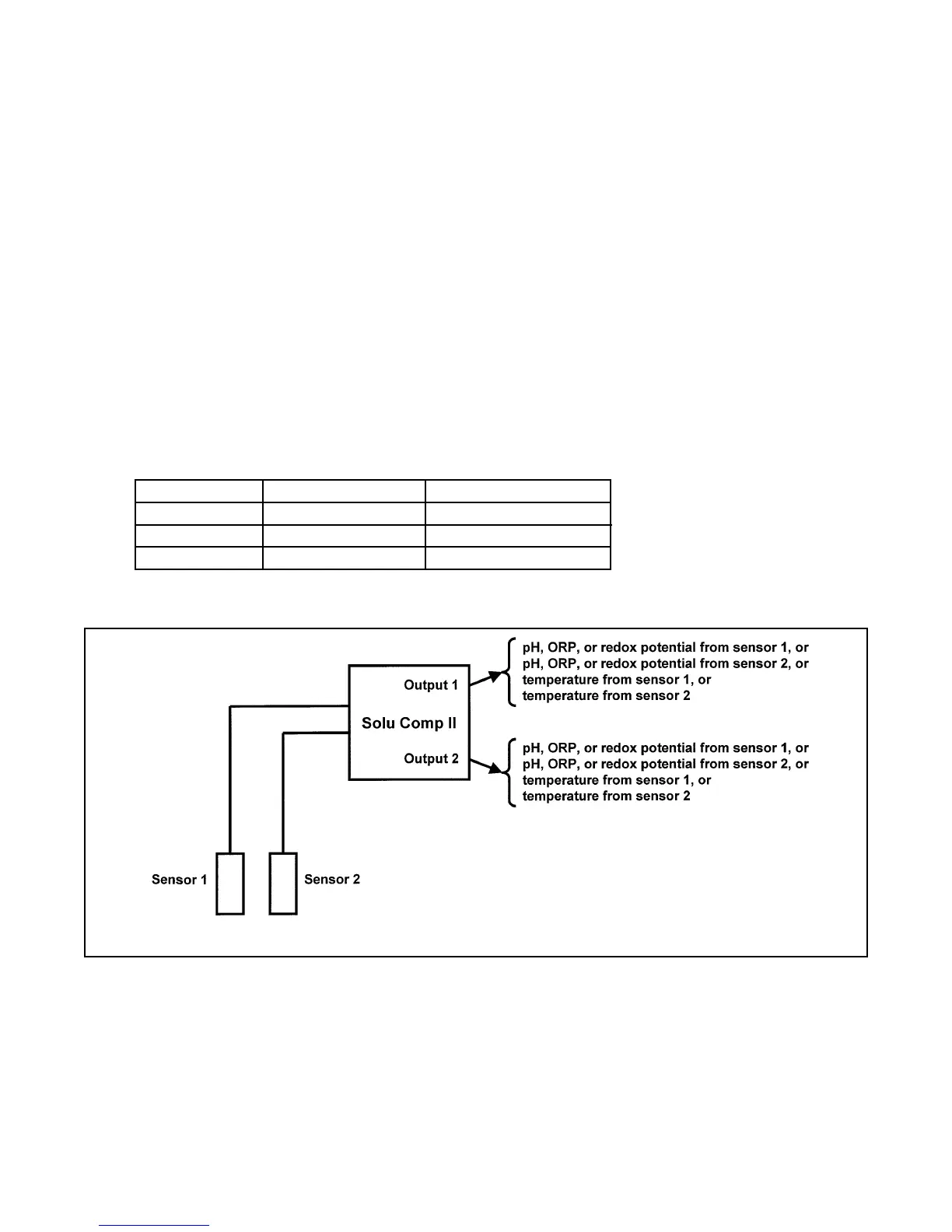
2. ASSIGNING OUTPUTS. Figure 5-1 shows the ways in which the outputs can be assigned.
3. DAMPEN. Output dampening smooths out noisy readings. It also increases the response time of the output.
With output dampening the time to reach 63% of final reading following a step change is 5 sec. Output damp-
ening does not affect the response time of the display.
4. MODE. The current output can be made directly proportional to the displayed value (linear mode) or directly
proportional to the common logarithm of the displayed value (log mode).
FIGURE 5-1. Assigning Outputs 1 and 2


 To Next Page