50/74
11.4. Network Delay measurement
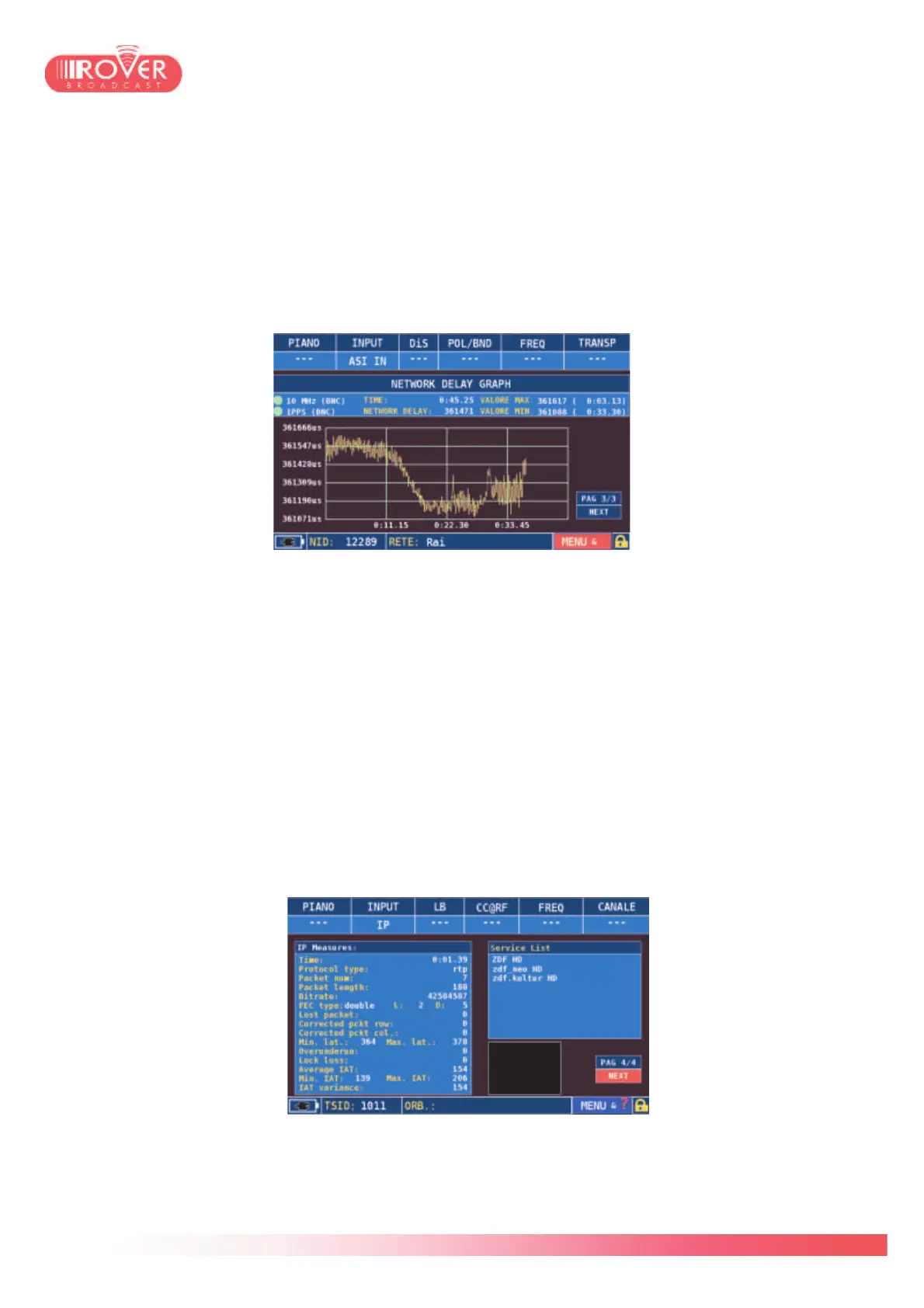
The third page of the embedded transport stream analyzer displays the Network Delay
measurement. This is a fundamental measurement when operating in SFN environments
because il lets the operator qualify the transport stream network delay and verify that its value
doesn’t exceed the maximum value configured in the TS MIP Packets (typically 900ms).
This measurement is possible only when an external 10MHz-1PPS reference is provided either
via the BNC connectors or through the GPS receiver (option).
Above the graph, the status of the external reference and the measurement statistics are
shown. Actual, maximum and minimum Network Delay values are shown and updated each 5,
10 or 30 seconds, depending on the chosen refresh interval (via the contextual menu). The
Graph has an auto-scale function which let enlarge or compress the view depending on the
MAX/MIN values.
As for all the other meter’s screens it is possible to take a snapshot of this graph using the
S.M.A.R.T. software* to use it in measurement reports or save it for future reference.
11.5. IP Layer analysis
The fourth page of the embedded analyzer is accessible only if the selected input is “IP”. It
presents the IP layer measurements, like inter arrival time , standard deviation, loss packets
count, etc:
* see the bundled CD-ROM for the S.M.A.R.T. installer.



 To Next Page