65/74
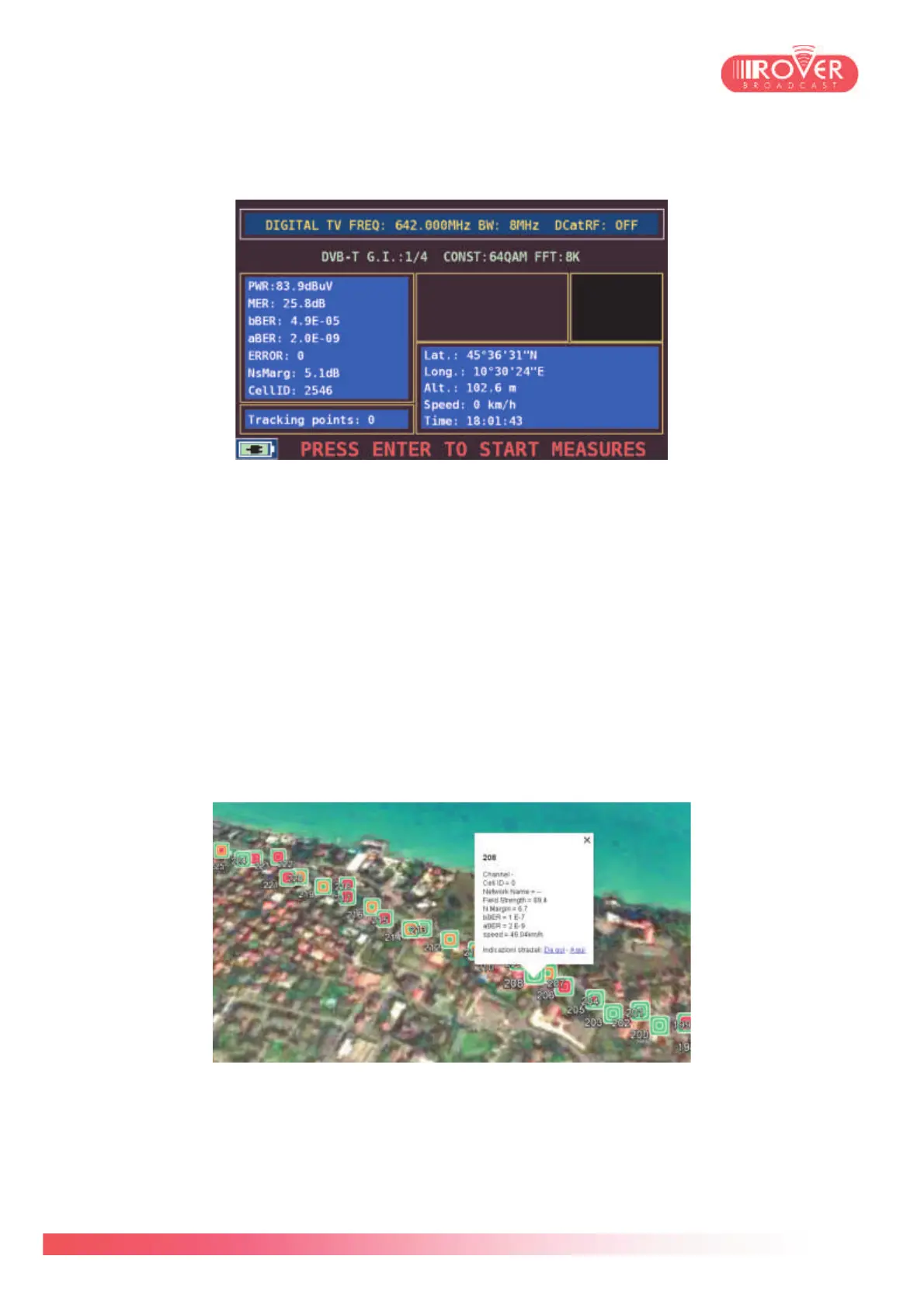
Once finished to set the desired parameters, pressing START MEASURE will toggle the meter into
the Test Drive mode:
Before actually starting to collect measurements, it is necessary to wait that the meter has
correctly locked and demodulated the configured signal (up to 10 seconds) and the GPS provide
valid data (LAT, LOT, ALT, SPEED and UTC time will be displayed on screen).
Pressing ENTER will start the measurements: it is possible to see the progress of the campaign
looking at the number of samplings done and indicated by Tracking points.
Pressing again ENTER will stop the measurements and automatically toggle the meter to the
HOME screen. Now the file containing the tracked points has been saved on the USB dongle.
Unplug it from the meter and plug into your PC to retrieve the file and browse the recordings.
Using the ROVER Test Drive application it will be then possible to convert the recordings to a kml
file and import it into Google Earth to see the geo-referenced measurements on the map*.
(*Test Drive software is provided in bundle with the Test Drive APP for the meter. Contact us for
upgrade information and upgrade support).



 To Next Page