7
Introducing the ZoneFlex Access Point
Getting to Know the Access Point Features
ZoneFlex 7962 Access Point
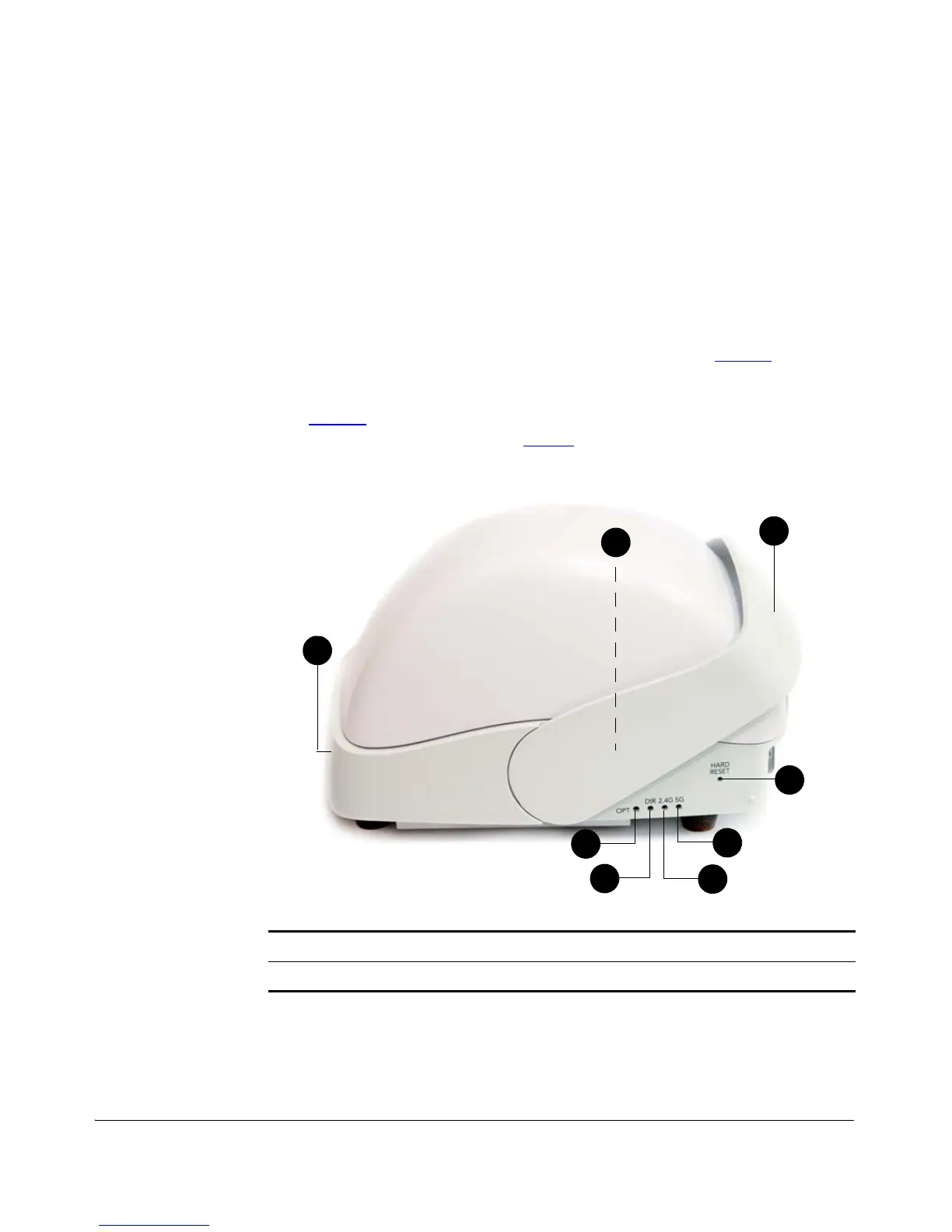
The side panel of ZoneFlex 7962 features four LED indicators that can be used to
assess both device and network status. The rear view displays the connector panel,
which includes the LAN ports and power adapter connector. Refer to the following
illustrations and tables to learn more.
Side Panel Features
The ZoneFlex 7962 chassis includes a Kensington lock (on the side of the unit opposite
the OPT and DIR LEDs) and a lockable “sliding door” (shown in Figure 3
) that hides
and protects the rear connector I/O panel and status LEDs. As your AP may be placed
in a public location, the lock and door mechanisms can help prevent tampering or
theft. Figure 3
illustrates the side panel features of the ZoneFlex 7962. For a descrip-
tion of each side panel part, refer to Table 6
.
Figure 3. ZoneFlex 7962 side panel
Table 6. ZoneFlex 7962 side panel elements
Number LED/Button Name Description
1 OPT LED Not used in this model












 To Next Page