EasyManua.ls Logo

RUKO F11PRO 2 - Page 23

RUKO F11PRO 2
72 pages
Print Icon
To Next Page IconTo Next Page
To Previous Page IconTo Previous Page
Loading...
F11PRO
2
User
Manual
3.5.3
Powering
On/Off
*
Long
press
the
power
button
to
power
on
or
off.
3.5.4
Checking
Battery
Level
*
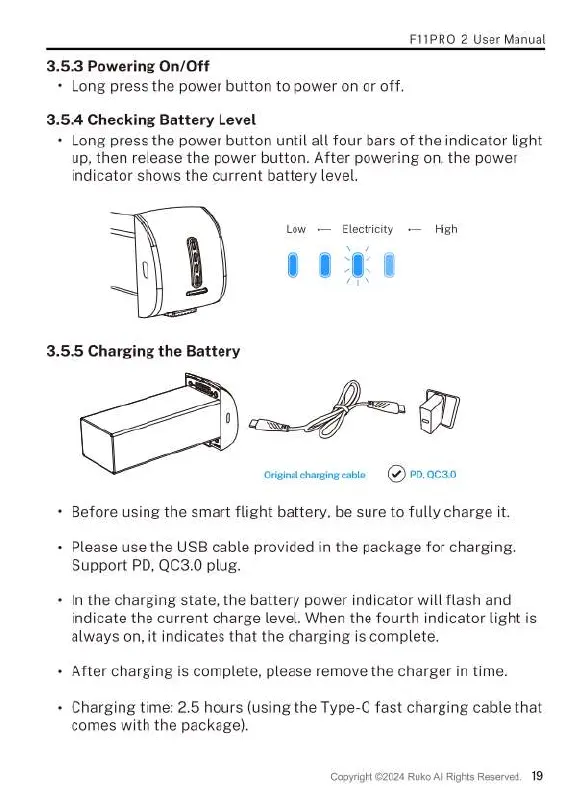
Long
press
the
power
button
until
all
four bars
of
the
indicator
light
up,
then
release
the
power
button.
After
powering
on,
the
power
indicator
shows
the
current
battery
level.
Low
Electricity
~—
High
Orgnachagngcable
()
P0,ac30
Before
using
the
smart
flight
battery,
be
sure
to
fully
charge
it.
Please
use
the
USB
cable
provided
in
the
package
for
charging.
Support
PD,
QC3.0
plug.
In
the
charging
state,
the
battery
power
indicator
will
flash
and
indicate
the
current
charge
level.
When
the
fourth
indicator
light
is
always
on,
it
indicates
that
the
charging
is
complete.
After
charging
is
complete,
please
remove
the
charger
in
time.
Charging
time:
2.5
hours
(using
the
Type-C
fast
charging
cable
that
comes
with
the
package).
Copyright
©2024
Ruko
All
Rights
Reserved.
19

Related product manuals