EasyManua.ls Logo

RUKO F11PRO 2 - Page 27

RUKO F11PRO 2
72 pages
Print Icon
To Next Page IconTo Next Page
To Previous Page IconTo Previous Page
Loading...
F11PRO
2
User
Manual
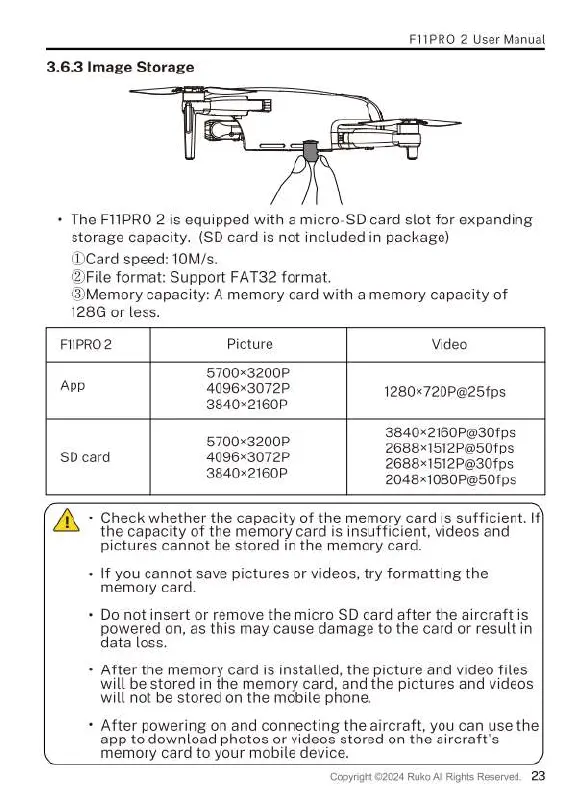
3.6.3
Image
Storage
The
F11PRO
2
is
equipped
with
a
micro-SD
card
slot
for
expanding
storage
capacity.
(SD
card
is
not
included
in
package)
(Card
speed:
10M/s.
ile
format:
Support
FAT32
format
(3Memory
capacity:
A
memory
card with
a
memory
capacity
of
128G
or
less.
F1IPRO2
Picture
Video
5700x3200P
App
4096x3072P
1280x720P@25fps
3840<2160P
3840x2160P@30fps
5700x32000
2688x1512P@501ps
SD
card
4096x3072P
36881512P30fps
3840<2160P
2048x1080P@50fps
N
Check whether
the
capacity
of
the
memory
card
is
sufficient.
If}
the
capacity
of
the
memory
card
is
insufficient,
videos
and
pictures
cannot
be
stored
in
the
memory
card.
If
you
cannot
save
pictures
or
videos,
try
formatting
the
memory
card.
Do
not
insert
or
remove
the
micro
SD
card
after
the
aircraft
is
30We{ed
on, as
this
may
cause
damage
to
the
card
or
result
in
ata
loss.
After
the
memory
card
is
installed,
the
picture
and
video
files
will
be
stored
in
the
memory
card,
and
the
pictures
and
videos
will
not
be
stored
on
the
mobile phone.
After
powering
on
and
connecting
the
aircraft,
you can use
the
app
to
download
photos
or
videos
stored
on
the
aircraft's
memory
card
to
your
mobile
device.
024
Ruko
Al
Rights
Reserved.
23
pyrght

Related product manuals