EasyManua.ls Logo

RUKO F11PRO 2 - Page 59

RUKO F11PRO 2
72 pages
Print Icon
To Next Page IconTo Next Page
To Previous Page IconTo Previous Page
Loading...
F11PRO
2
User
Manual
6.10.3
Fly
Around
*+
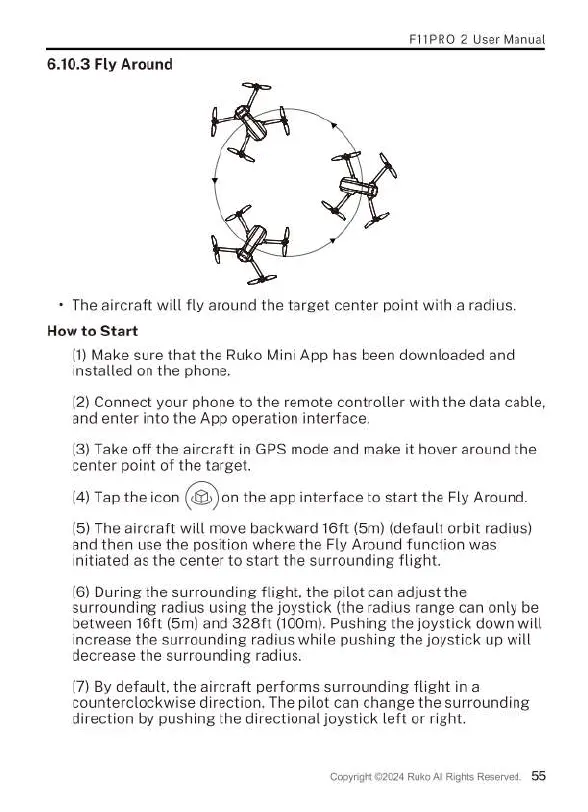
The
aircraft
will
fly
around
the
target
center
point
with
a
radius.
How
to
Start
(1)
Make
sure
that
the
Ruko
Mini
App
has
been
downloaded
and
installed
on
the
phone.
(2)
Connect
your
phone
to
the
remote
controller
with
the
data
cable,
and
enter
into
the
App
operation
interface.
(3)
Take
off
the
aircraft
in
GPS
mode
and
make
it
hover
around
the
center
point
of
the
target.
(4)
Tap
the
icon
(&)
on
the
app interface
to
start
the
Fly
Around.
(5)
The
aircraft
will
move
backward
16t
(5m)
(default
orbit
radius)
and
then
use
the
position
where
the
Fly
Around
function
was
initiated
as
the
center
to
start
the
surrounding
flight.
(6)
During
the
surrounding
flight,
the
pilot
can
adjust
the
surrounding
radius
using
the
joystick
(the
radius
range
can
only
be
between
167t
(5m)
and
328ft
(100m).
Pushing
the
joystick
down
will
increase
the
surrounding
radius
while
pushing
the
joystick
up
will
decrease
the
surrounding
radius.
(7)
By
default,
the
aircraft
performs
surrounding
flight
in
a
counterclockwise
direction.
The
pilot
can
change
the
surrounding
direction
by
pushing
the
directional joystick
left
or
right.
024
Ruko
Al
Rights
Reserved.
55

Related product manuals