10
4) Open the Ryze Connect App.
If you already have a Ryze Connect account, log in
to your account. If you do not have a Ryze Connect
account, tap the Login button and follow the
prompts to register a new account. Follow on-screen
instructions to grant permissions when prompted.
5) Pair and connect with the smartwatch.
Go to the Device menu in the App and tap the + sign.
The App will then automatically search for devices
to connect. Tap and select the Ryze smartwatch
to connect. If a pairing request is displayed on the
smartwatch screen, tap
to complete pairing.
6) Complete the setup for the smartwatch by following
the on-screen instructions in the App. Once the
setup is completed, read through the user manual
to learn more about the smartwatch and how to
manage its functions and features with the App.
NOTE
If your Ryze Trek smartwatch is currently connected to a
smartphone and you would like to pair it to a new smartphone,
first turn o the Bluetooth of your connected smartphone.
For iPhones, you will need to delete the smartwatch from the
Bluetooth device list after your smartwatch is unpaired from
the App. To do this, touch the
icon next to the smartwatch
name and tap Forget this Device.
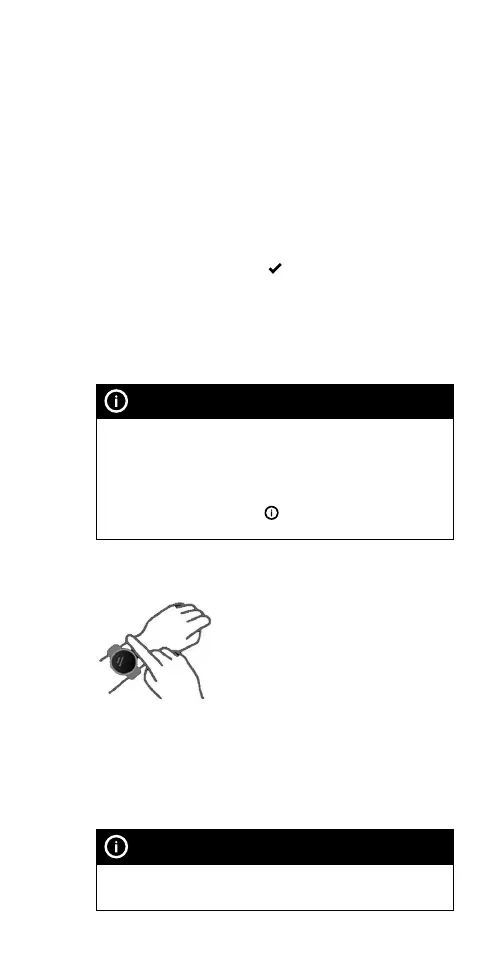
1.6 WEAR AND CARE
The smartwatch should rest a
finger’s width below your wrist bone.
The bottom of the smartwatch
should be slightly in contact with
your skin. Keep the smartwatch
secure on your wrist during workout.
Do not overtighten the smartwatch on your wrist to avoid
discomfort. Take o your smartwatch from time to time.
The smartwatch has a IP68 dust-tight and waterproof
rating. It can be worn in cold-water showers, shallow
waters, indoor pools and when swimming near the
shoreline.
NOTE
Do not use the smartwatch in spas, hot springs, deep dives or
any high-temperature and high-humidity environment.



 To Next Page