12
2.0 RYZE WATCH FEATURES
2.1 DATE AND TIME SYNC
The date and time settings are automatically updated
when the smartwatch is connected to the Ryze Connect
App.
2.2 SHORTCUT TILES
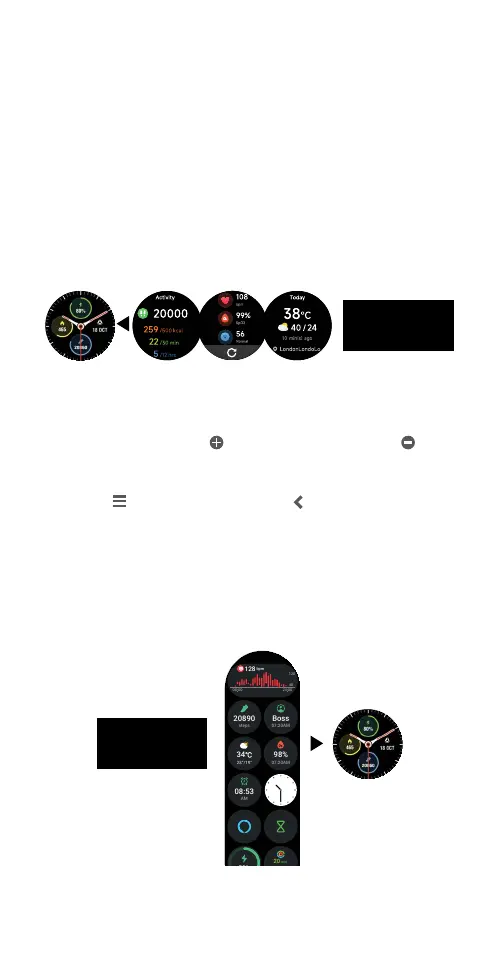
Tiles are a collection of shortcuts to applications that
are located at the right side of the smartwatch home
screen. The listing and order of tiles can be customised
via the Ryze Connect App.
Managing tiles in the Ryze Connect app
1) Open the Ryze Connect App and go to the Device
tab. Tap More Settings. In the following page, tap
Shortcuts. Tap
to add an application. Tap
to
remove an application.
2) To rearrange the order of the tiles, hold and drag the
icon next to a name. Tap
to save the changes.
2.3 WIDGETS
Widgets are collection of applications that are located
at the left of the smartwatch home screen. The listing
and order of the widgets can be customised via the
Ryze Connect App.
Swipe left to view
shortcut tiles
00 00 24 00
40
120
128
bpm
20890
steps
34
Boss
07:20AM
98%
07:20AM
08:53
AM
50%
20
min
9999
kcal
20
hrs
Workout
Event reminder
Shenzhen
Mon Tue Wed Thu Fri
2020202020
6 25
h m
22 33 06 30
00 00 24 00
40
120
78
Medium
20
min
423
kcal
8
hrs
Swipe right to
view windgets



 To Next Page