Sacher Lasertechnik
Group
User Manual Laser Diode Controller PilotPC 15
Front Panel
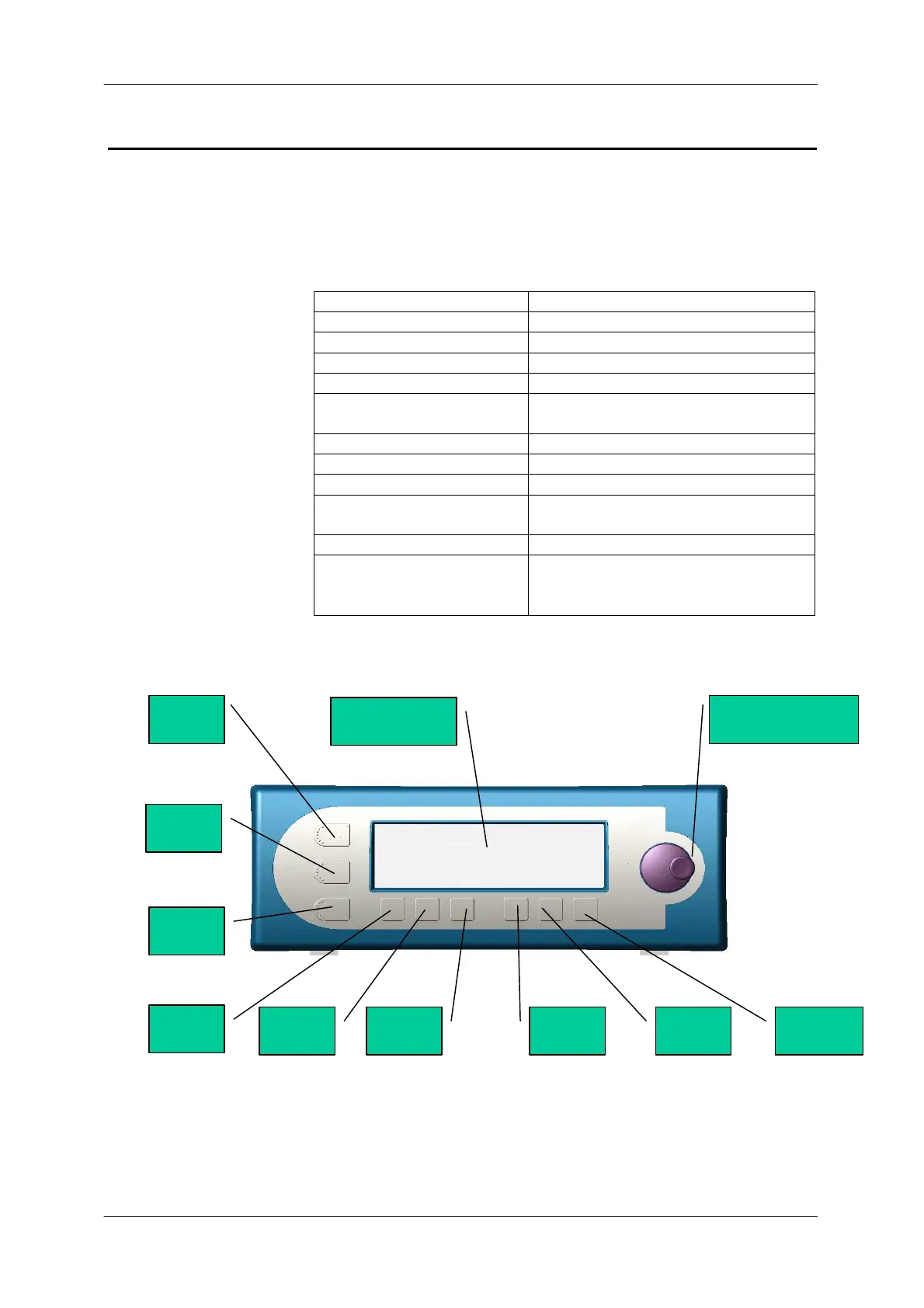
This section shows the front-panel elements.
The front panel consists of a blue graphic display and a foil keypad-
List of Front panel Elements
Element Description
Line Button To switch the driver ON/OFF
Graphic Display
Incremental jog
Menu Button
Laser ON/OFF Button
with Laser Warning Indicator
To switch the laser ON/OFF
I-Mode Button Constant current mode
P-Mode Button Constant power mode
SCAN Button Sets Scan Options
I-Tec Button To switch the TEC (Thermo Electric
Coolser ON OFF)
T-Set Button Sets the laser diode temperature
T-Watch Button Switch the T-Watch Mode ON /OFF
(Laser is only working when
Temperature is within a given limit)
Inkremental Jog
LINE
Laser
I
P
SCAN
I
T
T
GRAPHIC
MENU


 To Next Page