English
8
38
8.2.4 MILK PROGRAMMING
“MILK PROGRAMMING” is a direct control allowing to program and
store the milk quantity for the beverage chosen.
Select “MILK
PROGRAMMING”
The display shows the
programming icon (1)
Press and hold the button
corresponding to the
beverage to be
programmed
The machine starts dispensing
milk only
Release the button
corresponding to the beverage
chosen as soon as the desired
amount of milk is reached
The machine will stop
dispensing milk.
Programming is complete
The next time you dispense the
selected beverage
the programmed quantity of milk
will be dispensed.
(1) During milk programming the icon shown in the figure is
displayed.
8.2.5 LOADING LOGO
The loading logo procedure is possible
only from the GUI 2.0 version and
successive and from the CPU 4.01.19 and
successive. For GUI software update,
please refer to the Software Update KIT.
The procedure to follow for the loading of the personalised logo by
means of proprietary software is shown below.
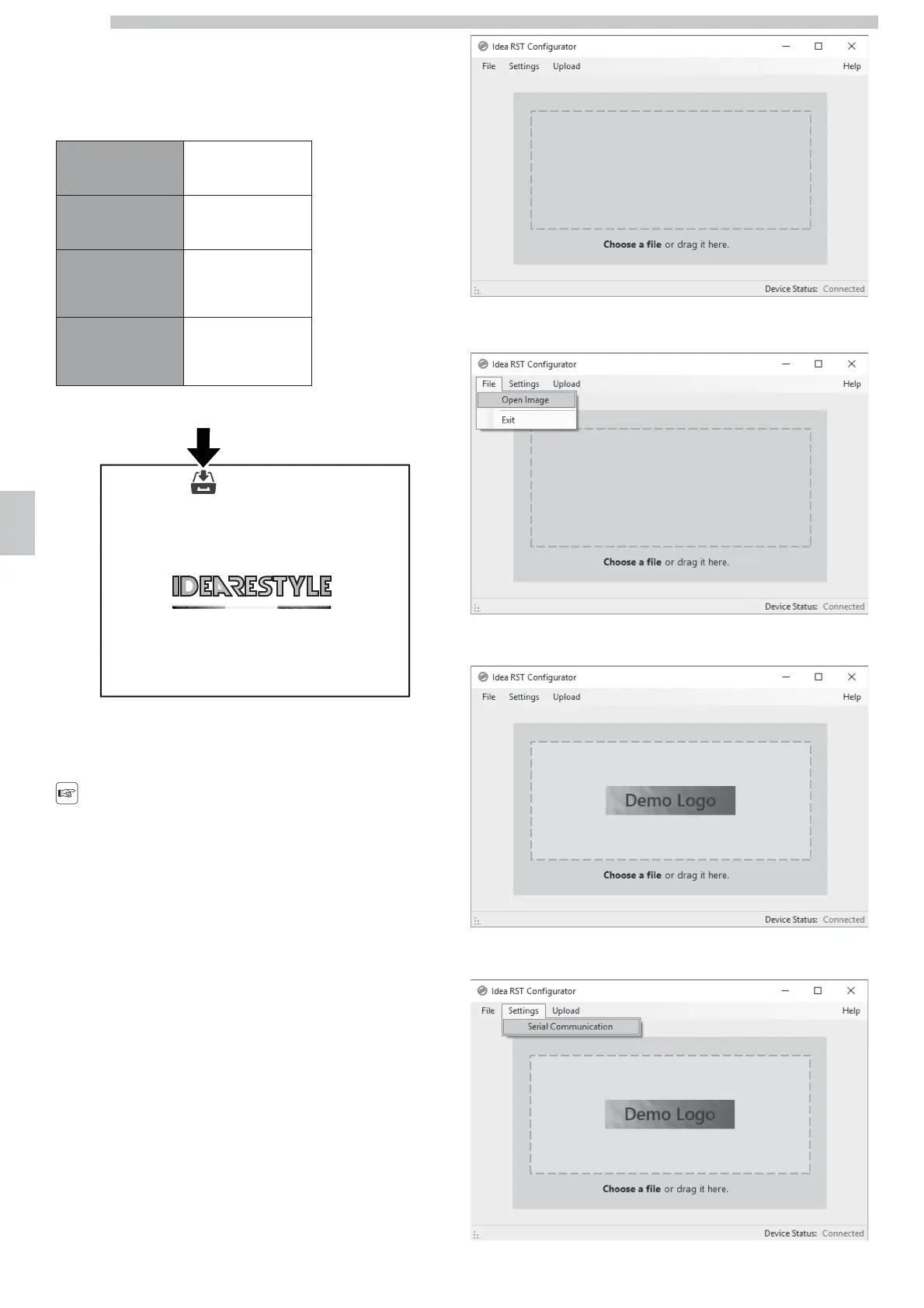
Home screen
From "File" menu, select "Open Image" and choose the image of the
logo to upload.
The image of the logo will appear in the screen.
From "Settings" menu, select "Serial Communication"




 To Next Page