INTEGRA-X User Manual WEB GUI
SAF Tehnika JSC 40
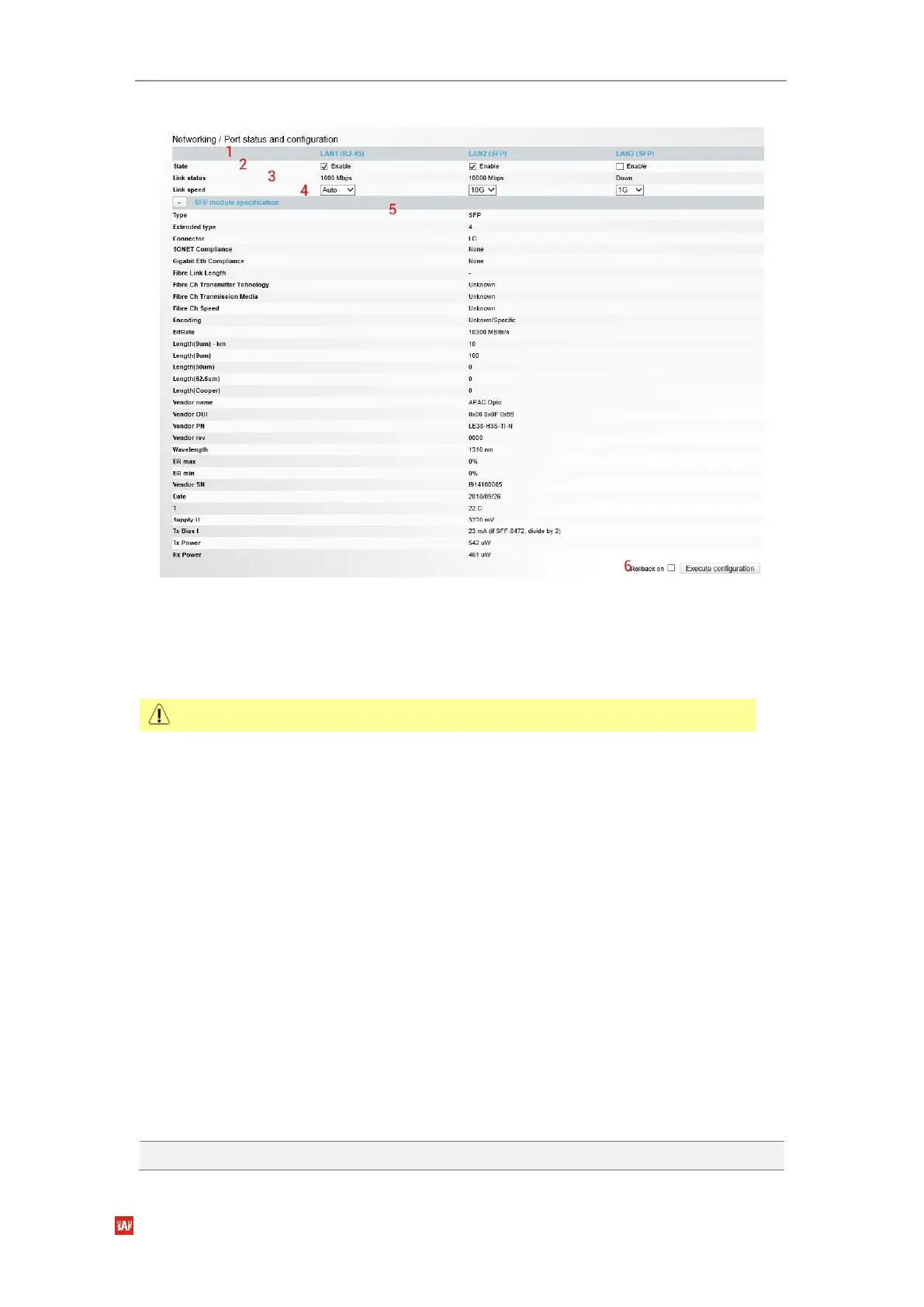
Modify mode
1)
Port
– indicates available switch ports.
2)
State
– Indicates operation status of each LAN port (status mode); allows
enabling/disabling each LAN port (modify mode).
3)
Link status
– Indicates whether a link with the appropriate port is established as well as its
link speed.
4)
Link speed
– Indicates the link speed in Status mode. In Modify mode connection speeds
for the port could be changed:
a. for RJ-45 port: Auto for 1000 Mbps (default setting which is also used for
Gigabit Ethernet connection setup), 100fdx for 100 Mbps or 10fdx for 10
Mbps;
b. SFP/SFP+ ports: 1G for 1 Gbps (default setting), 2G5 for 2.5 Gbps, 10G for
10 Gbps (available only for SFP+ modules) or Auto which is reserved for
future use. Note that Integra-X supports only 1000BASE-T type Gigabit
Ethernet SFP modules when using electrical copper twisted pair SFP
modules. For SFP port location in Integra-X device see chapter
SFP ports
.
5)
SFP module specification
– shows the SFP module information below the corresponding
port if SFP module in the port supports SFF-8472 diagnostic memory mapping (only for
LAN2 and LAN3 ports). This information becomes visible by pressing “+” sign.
6)
By pressing
„Execute configuration”,
changes made to the corresponding section apply only
to the local side Integra-X. If
„Rollback on”
is selected, the configuration will be reverted in
case erroneous configuration changes are applied.
CLI commands
See Chapter 4: COMMAND LINE INTERFACE
Use to show the status of all ports.
If you disable port LAN1, management access through LAN1 will be lost.
Figure 3-24 Modifying ports parameters



 To Next Page