INTEGRA-X User Manual COMMAND LINE INTERFACE
SAF Tehnika JSC 98
Connecting to SSH
The SSH connection to the Integra-X FODU is carried out using an Ethernet management
connection. Ethernet management port connection details are described on page
22
“
Ethernet
management connection configuration
”.
You can use any SSH client. Below are connection steps with PuTTY - Windows
freeware software.
1) Open
PuTTY
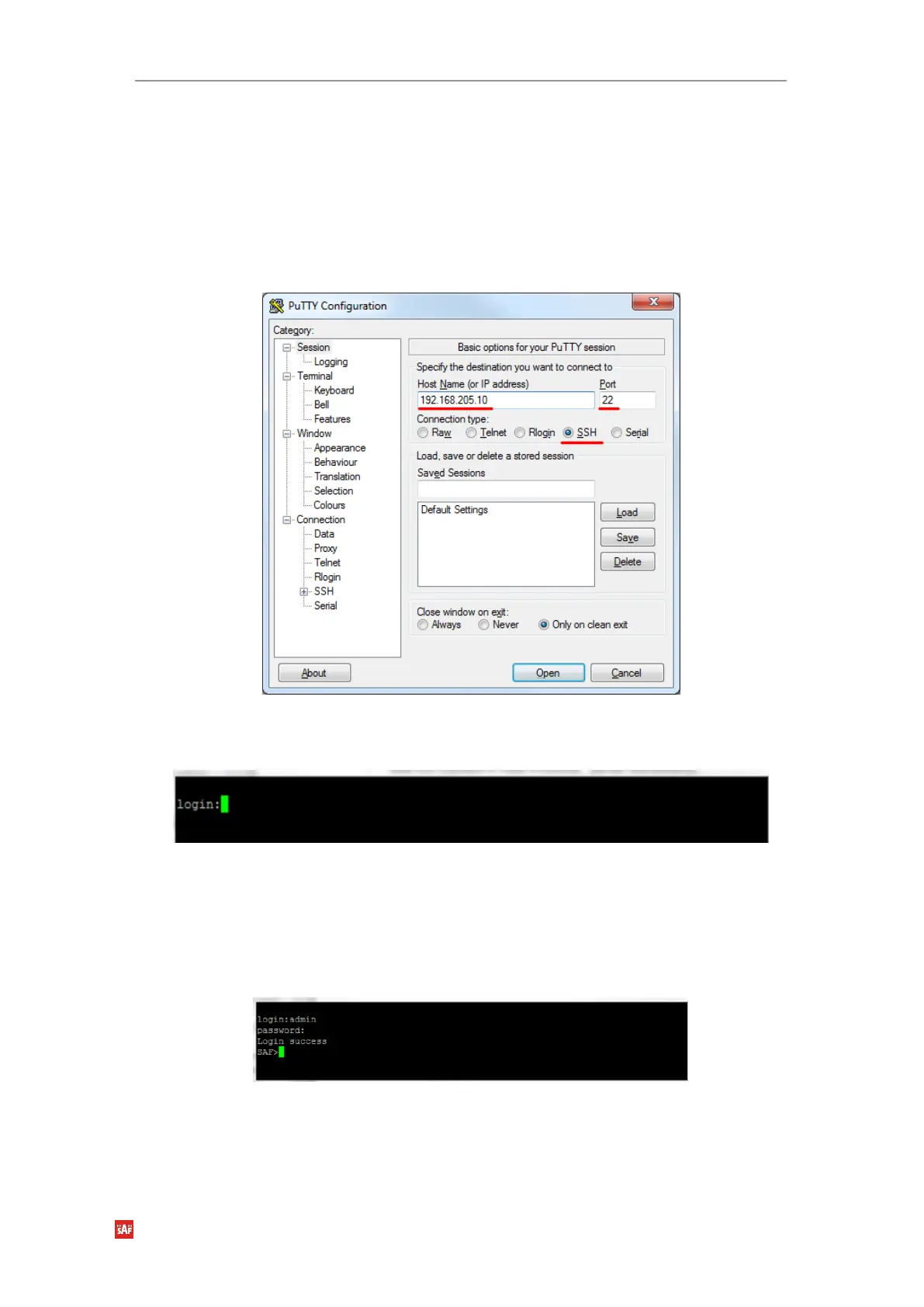
, choose “Connection Type”: “SSH”, enter the IP address and make sure that
the correct port number is used (“22” by default), see
Figure 4-5 PuTTY interface for SSH
connection:
Figure 4-5 PuTTY interface for SSH connection
2) Press “Open. After a successful login, the following prompt, see “
Figure 4-6 Login prompt
”,
should appear:
Figure 4-6 Login prompt
3) Enter the username and password. Default credentials are as follows:
login: admin
password: changeme
4) After successful login “SAF>” prompt should appear (prompt will differ if system name is
not the default one), see
Figure 4-7 System prompt
:
Figure 4-7 System prompt



 To Next Page