- 10 -
1 - Presentation of the machine
Description of the LCD screen
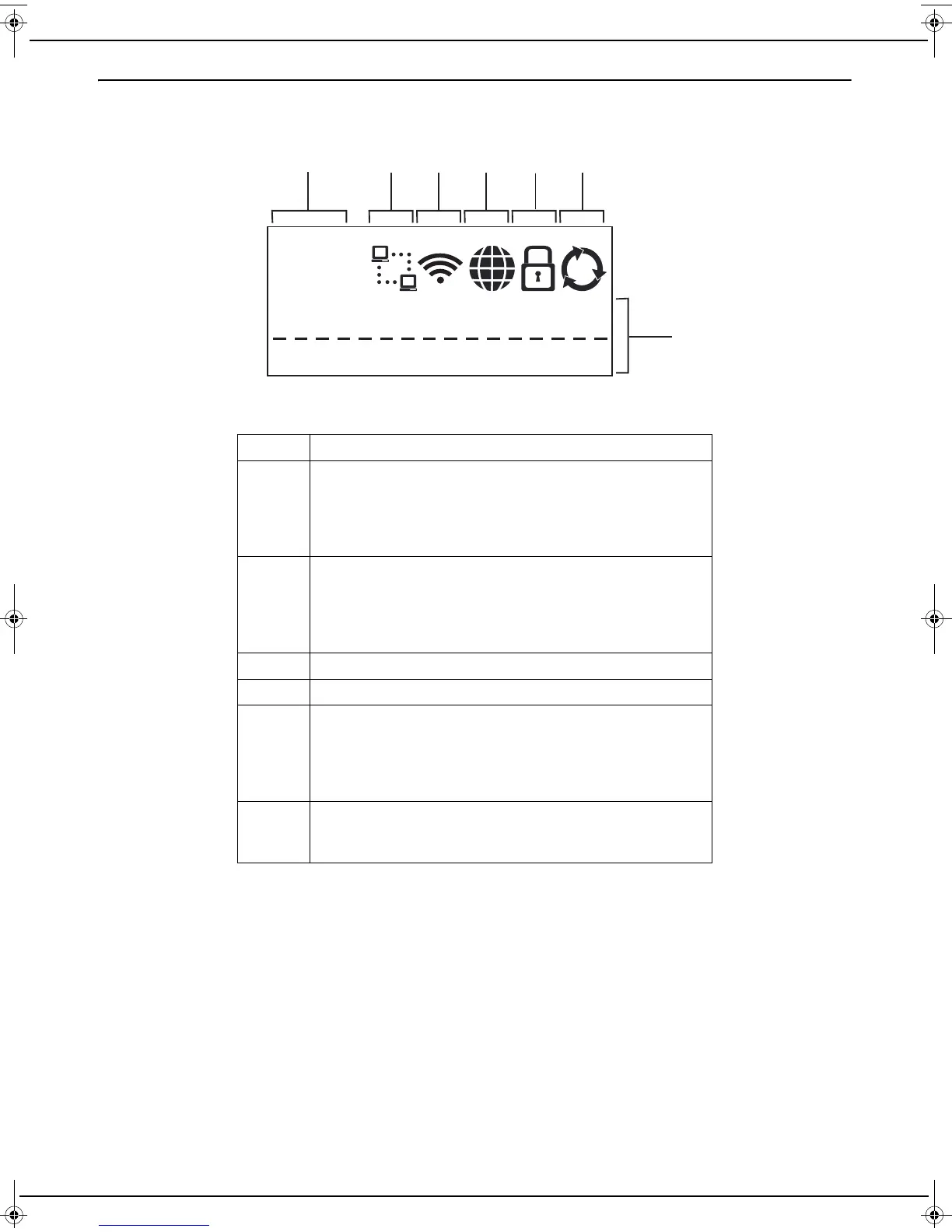
The LCD screen displays the following:
1 Scanned sheet counter
2 Icon indicating the status of the network cable connection
with the Internet box.
Off: no connection
Flashing: connecting
Steady: connection established
3 Icon indicating the status of the Wi-Fi connection with the
Internet box.
Off: no connection
Flashing: connecting
Steady: connection established
4 Icon used during the Internet connection phase.
5 Icon used during the service provider site connection phase.
6 Icon indicating the service provider services status.
Off: no service enabled
Flashing: downloading of the list of services
Steady: services enabled and available to the user
Rotating: documents being sent
7 Line used to display machine messages up to 16 characters
long. When messages are longer than 16 characters, they
are scrolled on the screen.
LU IB1100E_EN.book Page 10 Mercredi, 15. mai 2013 9:01 09


 To Next Page