- 22 -
3 - Using the machine
Scanning to a USB flash drive
Depending on your service provider, scan services to a USB flash drive may be available on your machine. This feature
allows you to carry out additional local scans, for example, if no Internet connection is available.
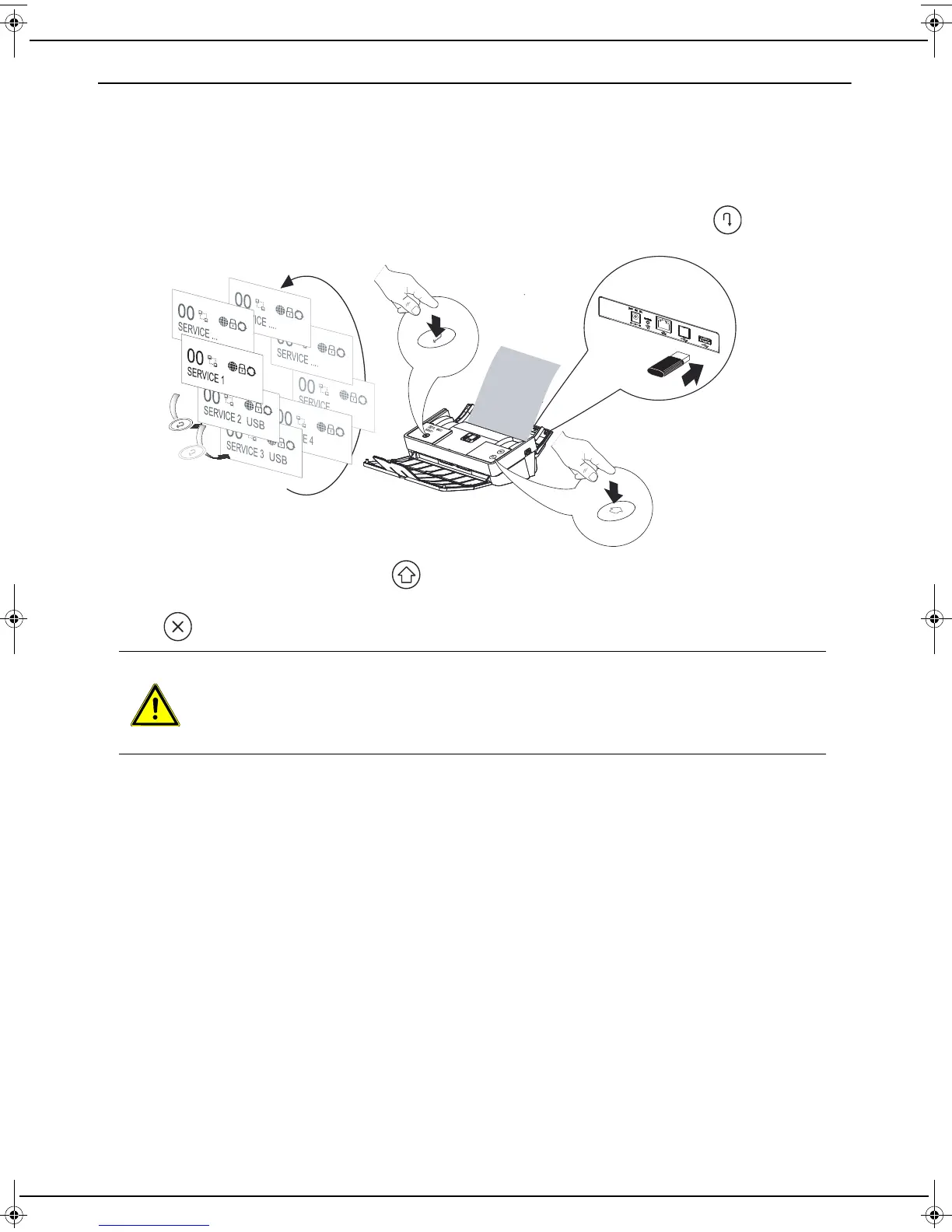
1 Insert a USB flash drive into the back of your machine. The USB flash drive must be formatted for FAT16 or
FAT32.
2 Specific scan services to a USB flash drive have appeared in the list of services. Press the key to select the
desired service.
3 Once the service is selected, press the key to start the operation. If the number of sheets in the document
does not correspond to the number of sheets indicated on the display or if you want to cancel the scan, press
the key.
4 Your locally scanned documents are stored in a "Scan" folder located in the root folder of the USB flash drive.
CAUTION
During the processing of documents, your machine displays "DON'T DISCONNECT MEDIA". During
this phase, do not remove the USB flash drive from the machine otherwise you will not be able to
access its contents later.
LU IB1100E_EN.book Page 22 Mercredi, 15. mai 2013 9:01 09


 To Next Page